ADJUST PIR DETECTION DISTANCE
PIR “Body Detection” is on by default and the default sensitivity is “Mid”, but it is
adjustable. “My Device” - The detecting distance is 6 meters (20 feet).
Note: Higher sensitivity offers longer detecting distance, but it would lead to more
false alarms. You are advised to set up the sensitivity level to “Low” or “Medium”
when you install the camera outdoors.
Sensitivity Detection Distance (For moving and living things)
Up to 4 meters (13 feet)
Up to 6 meters (20 feet)
Up to 8 meters (26 feet)
Low
Medium
High
13 14
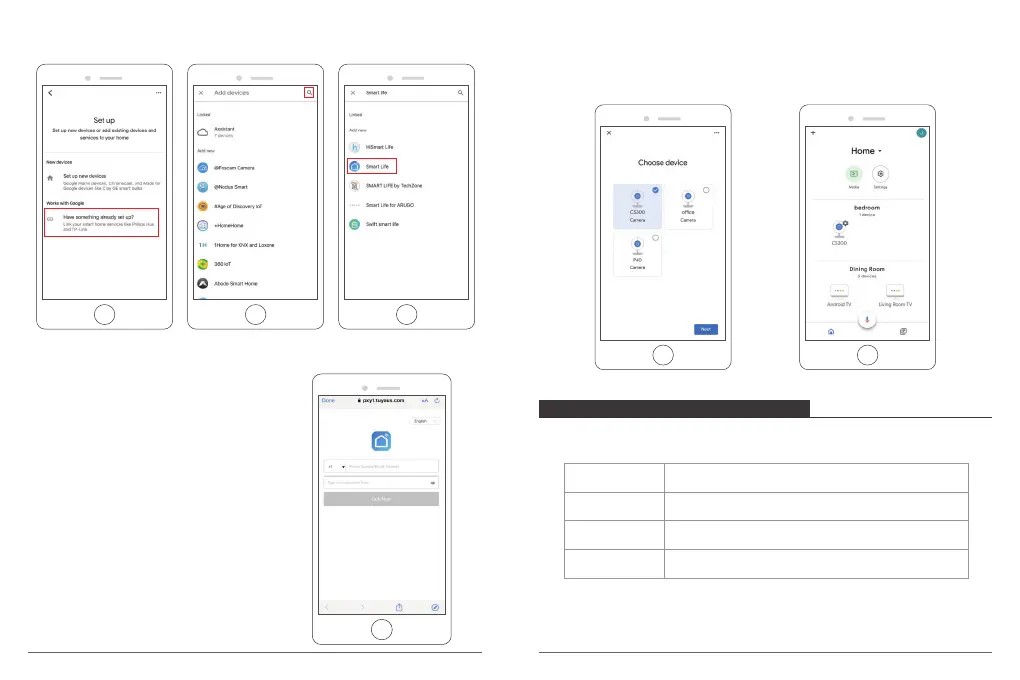
② Then tap the bottom “Have something already set up?” and search for "Smart
Life".
③ Find Smart Life on the list and open it, select the country where your Smart Life
app account is located, enter your Smart Life
app account and password, and tap “Link Now".
④ Enter the Smart Life app account and password, then tap “Link Now” to link your
Smart Life account. Choose the room where your device is located, and then the
skill will appear on the Home Control Devices list. Now you can begin your smart
home journey.



 To Next Page