01:17:34
1080P60
04/28/2019 03:26:52 PM
Video
Loop recording
WDR
WDR
Dual cam Display
1
Front
Resolution
SIZE
2K30
1080P60
1080P DUAL1080P
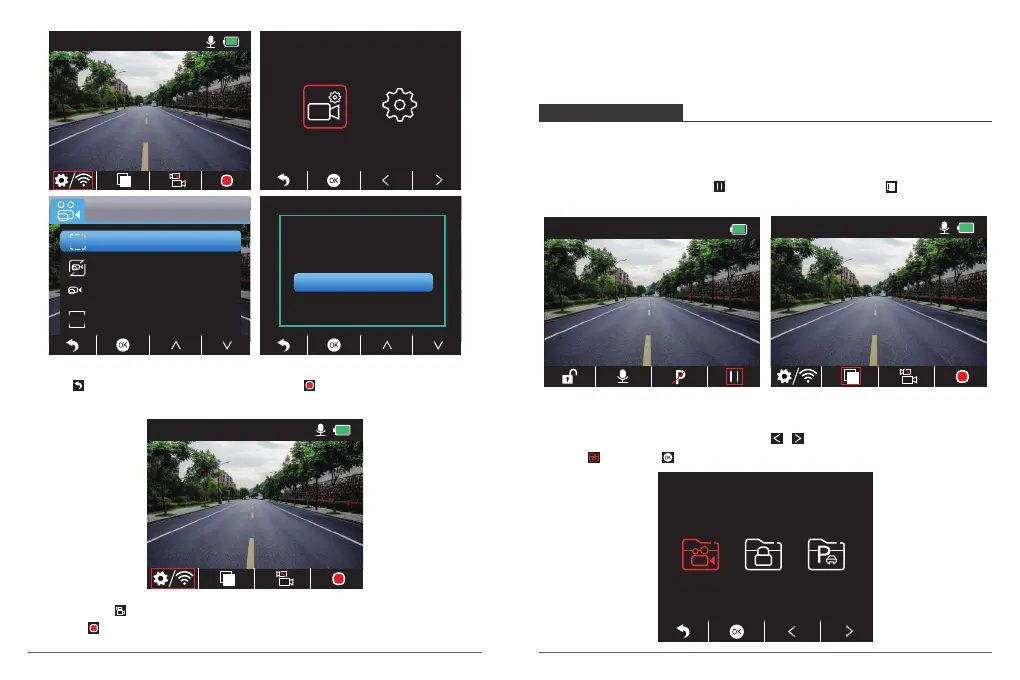
③ Press two times to back the main interface, press to record. The saved video is
1080P DUAL 1080P.
01:17:34
1080P DUAL 1080P
04/28/2019 03:27:52 PM
Quick Set: Press to switch the single recording (front camera) on main interface, press
to record.
Note: The infrared light of inside camera will automatically detect the light brightness of
inside the car and turn on if the light is not sufficient. The recorded video is black and white
after turning on the infrared light.
PLAYBACK VIDEOS
1. Playback Videos on Dash Camera
The unlocked video, locked video and parking monitor’s video for options; the video of
front camera and inside camera for options.
After turning on the camera, press button to stop recording, press to playback the
videos which is stored on the card.
Unlocked videos to playback
① After entering the playback interface, press / to choose the folder of unlocked
videos , then press ;
00:00:23
1080P60
04/28/2019 03:25:52 PM
01:17:34
1080P60
04/28/2019 03:27:52 PM
08 09


 To Next Page