Last update: 2015/03/25 14:02 mycloud_pro http://wiki.myakitio.com/mycloud_pro
http://wiki.myakitio.com/ Printed on 2020/03/09 19:16
To safely turn off the device, press the power switch for about 1 second until the system LED (OS)
starts flashing. The system then shuts down all services and about 20 seconds later, it will power
down.
If for some reason the system is unresponsive, press and hold the power switch for 6 seconds to
forcefully shut down the system and cut off the power.
If the device is not in use for long periods of time, we recommend that you turn off the
device and remove the power supply from the wall socket.
HDD Installation
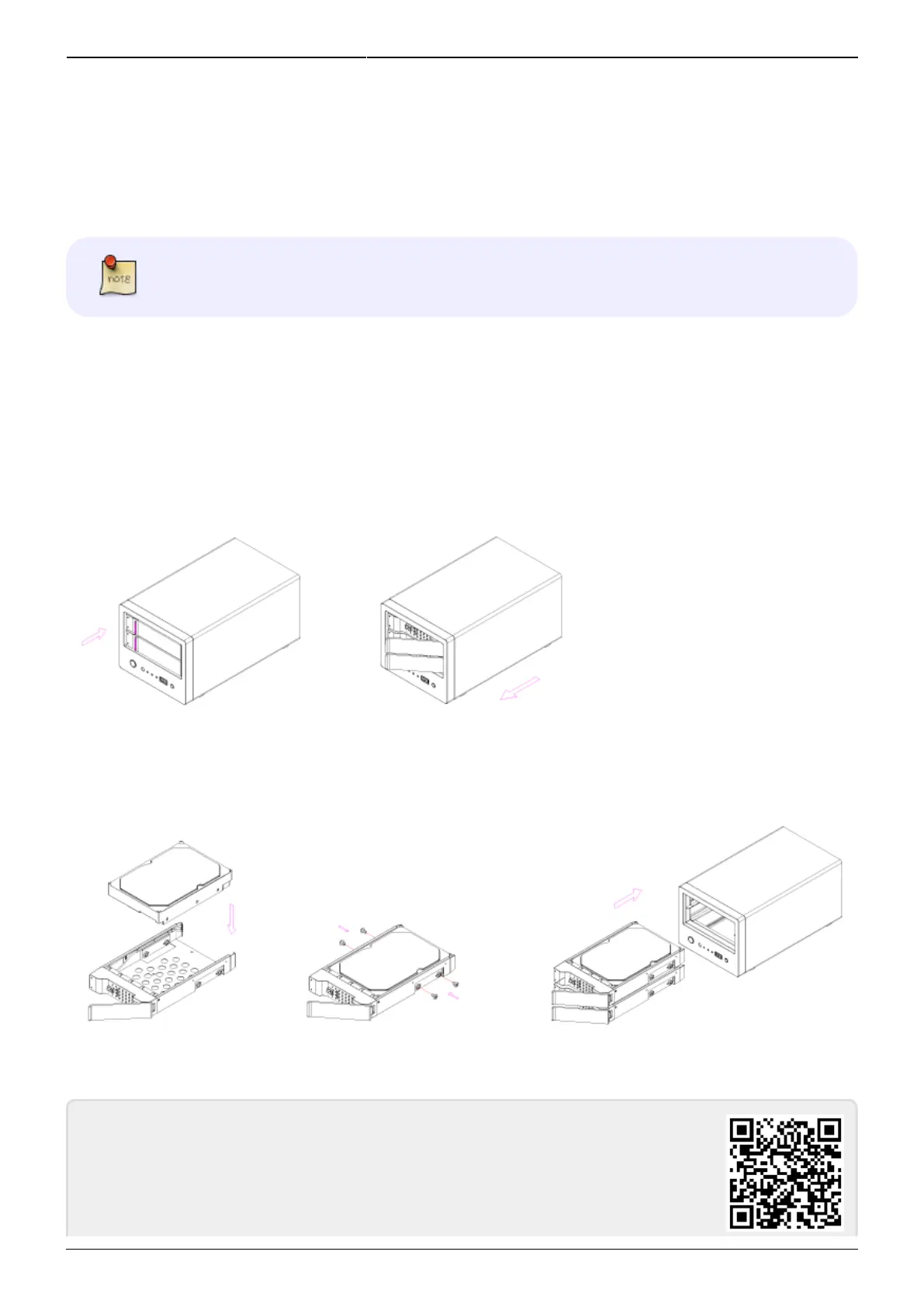
Push the protruding left edge of the tray handle in to release the tray and use the handle to pull out
the tray.
Install the hard drive, making sure the connector is facing the open side of the bracket. Slide the tray
back into the enclosure and push the handle lightly into place.
From:
http://wiki.myakitio.com/ - MyAkitio Wiki
Permanent link:
http://wiki.myakitio.com/mycloud_pro
Last update: 2015/03/25 14:02



 To Next Page