15
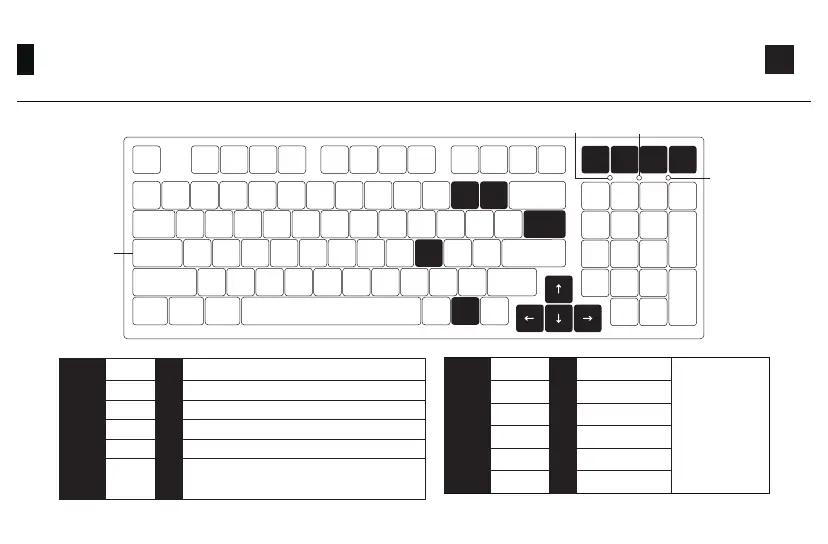
3098B Backlight Settings
Fn
↑
↑
↑
↑
Del\
3
Fn
Del
L
\
_
+
Ins PgUp PgDn
Effect 1、Effect 2、Effect 3、Effect 4、Effect 5
Effect 6、Effect 7、Effect 8、Effect 9、Effect 10
Effect 11、Effect 12、Effect 13、Effect 14、Effect 15
Effect 16、Effect 17、Effect 18、Effect 19、Effect 20
Light On / Off
Del
Ins
PgUp
PgDn
L
Fn+ =
Num Lock Battery Level Indicator
Lock Win
Caps-Lock LED
Indicator (White)
Slower Animation
Faster Animation
Bright
Dim
Set animation
direction to left
Set animation
direction to right
“↑”
“↓”
“←”
“→”
“-”
“+”
Fn+ =
The adjustments on
the left is for generic
lighting effects. Some
lighting effects cannot
be tweaked. For
example, effects with
constant light can
only adjust brightness
as they don’t have
animation speed and
direction.
In all lighting effects with RGB color mode, this
shortcut allows you to set the backlight color to
7 single color with RGB loop effect.
\



 To Next Page