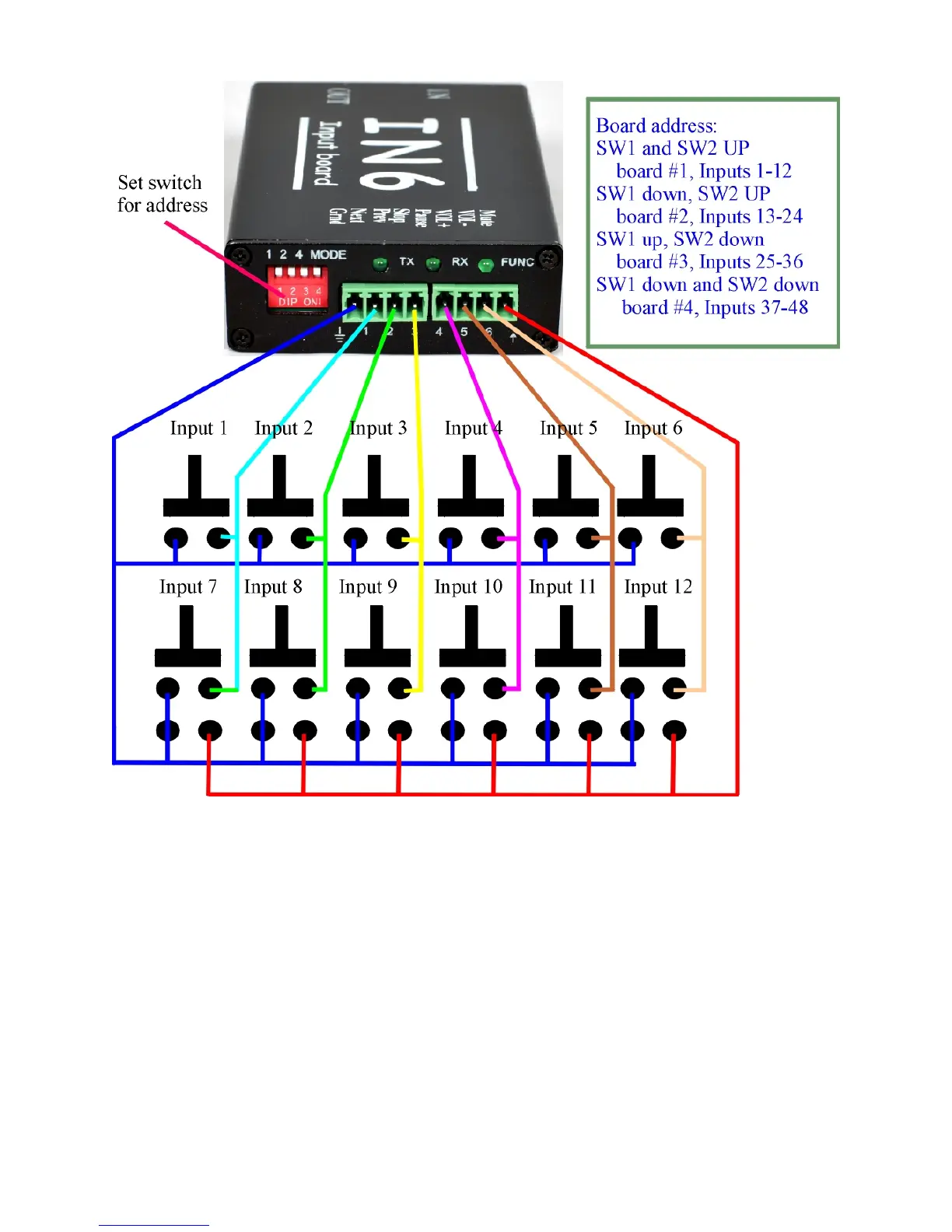
HOW TO CONNECT PUSH BUTTONS INTO THE IN6 BOARD:
The input board has 1 ground terminal, 6 input terminals and 1 UP terminal. There
are a total of 8 terminals. Facing the green terminals from left to right:.
The first terminal is GROUND.
IN1 is the second terminal. To trigger input #1, momentarily short IN1 to ground.
Line 0100xx=xxx.mp3 in the playlist.txt will play.
IN2 is the third terminal. To trigger input #2, momentarily short IN2 to ground.
Line 0200xx=xxx.mp3 in the playlist.txt will play.
IN3 is the fourth terminal. To trigger input #3, momentarily short IN3 to ground.
Line 0300xx=xxx.mp3 in the playlist.txt will play.
IN4 is the fifth terminal. To trigger input #4, momentarily short IN4 to ground.
Line 0400xx=xxx.mp3 in the playlist.txt will play.



 To Next Page