11. Trouble shooting guide.
Should you experience difficulties operating this product please
consult the guide below before calling
the Customer Help Line.
18
If you are still having difficulty please call the Technical help line. Ring 0845 293 7698 (Normal rates apply).
Opening hours Mon-Fri 8 am –
8pm. Sat 9 am –
4pm. Sun 11am –
4pm “Bank holidays as Sun”
Or try our website :-
www.ekey.co.uk
(24Hr) Emails should be responded to within 3 -
4 hours should the
consumer have difficulty getting through.
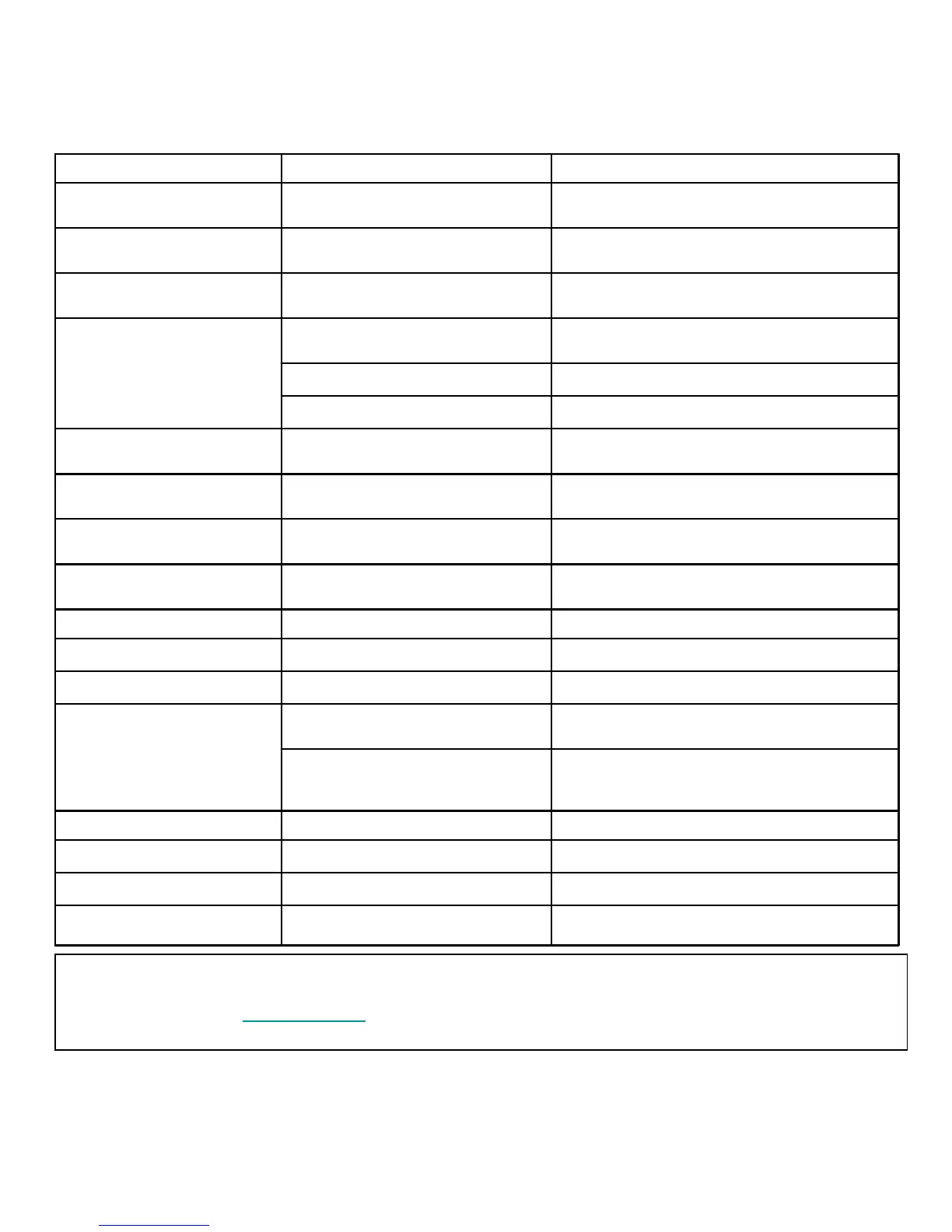
SYMPTOM POSSIBLE CAUSE REMEDY
Dead. No led lit
Power not connected to TV
Check power lead and mains supply connections
and Mains switch at rear of TV is turned ON
No Picture. Led lit Red TV in standby.
Press Power button on TV or Standby button on
remote control.
No picture. Dark screen Led lit
Green
Backlight faulty Call customer help line.
No picture. Blue screen. No
signal displayed
Incorrect input setting Ensure the input selected has an input connected to
it and is turned on.
Aerial not connected Ensure aerial is connected
TV not tuned in Follow instructions on page 12/13
TV Picture noisy and ghosting
(Analog)
Poor aerial signal
Have aerial signal checked. If indoor aerial it may
need an outdoor aerial.
TV Picture freezing and breaking
up (Digital).
Poor aerial signal
Have aerial signal checked. If indoor aerial it may
need an outdoor aerial.
Teletext freezing or breaking up Poor aerial signal
Have aerial signal checked. If indoor aerial it may
need an outdoor aerial.
Digital Signals missing Poor aerial signal
Have aerial signal checked. If indoor aerial it may
need an outdoor aerial.
Bright dots or Dark dots Pixel damage This is not uncommon. It is not covered by warranty
PC OPERATION
No picture. Blue screen. No
signal displayed
No connection from PC to TV.
Check all connections carefully
PC resolution incorrectly set
Enter Display setup of PC and set resolution to
800x600. Increase in steps until the required
resolution is selected
Poor PC Picture TV not matched to PC See page 11 and enter setup menu
REMOTE CONTROL
No or intermittent operation Exhausted batteries Replace batteries every six months or when required



 To Next Page