15
8. Menu Operation. Digital
FAV.
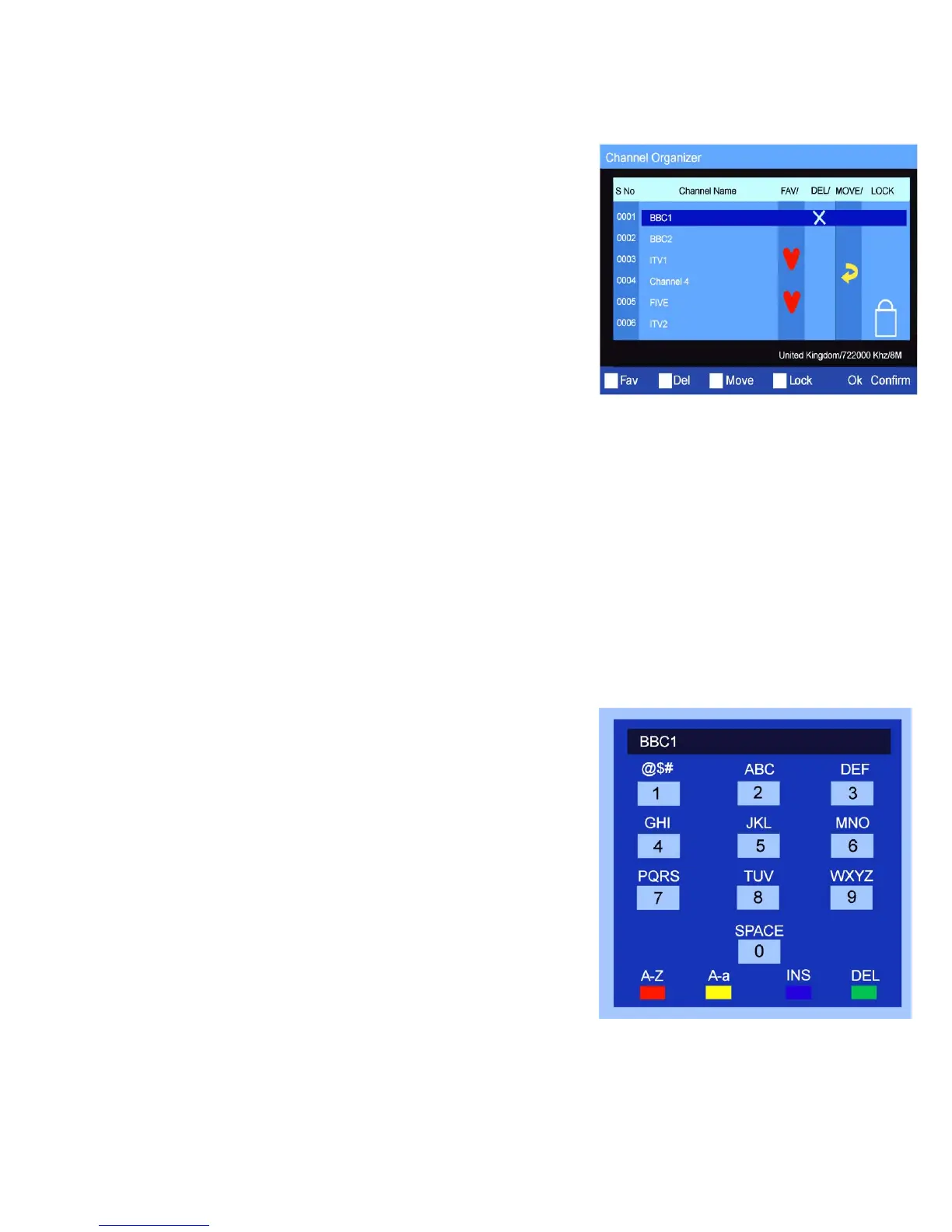
To select Stations that you wish to have as “Favourites” select the
station required by using the ▲/▼ buttons. Press the RED button. This
will place a Red Heart into the FAV column. To de select press the
RED button again.
DEL.
To delete any station, use the ▲/▼ buttons to select the station and
press the GREEN button. This will place a White X in the DEL column.
To delete press OK. You will be asked to confirm the deletion by
selecting YES or NO. If you press YES the station will be deleted
permanently.
To restore the station you must perform a Manual Tuning or Auto
Search as on page 14. To unselect press the GREEN button again.
MOVE.
You may wish to move a station to another more convenient location.
Select the station using the ▲/▼ buttons. Press the YELLOW button. A Yellow arrow will be displayed in the
MOVE column. Using the ▲/▼ buttons, select the destination you wish to move the selected station to and press
OK. The station will now move and all the stations below will move down one location.
LOCK.
To lock a station (Adult Station). Select the station using the ▲/▼ buttons. A box requesting the PASSWORD will
be shown. Enter the password. A Blue Lock symbol will now be shown in the LOCK column.
You may also add the lock feature to any location without further Password insertions.
Each time this “Locked” station is selected you will be requested to enter the Password.
To remove the lock, re enter the Menu and press the Blue button.
Fig 18
Fig 19
RENAMING STATIONS.
It may be necessary to Rename a TV station. Select CHANNEL
ORGANISER and using the ▲/▼ buttons select the station you wish to
rename.
Press either of the ►/◄ buttons. The menu of Fig 19 will be displayed.
To select the letters use the Numeric buttons, to select Upper case or
Lower case use the Yellow button, to Select Letters or Numbers use
the Red button, to move the cursor use the Blue button, and to Delete a
letter use the Green button. When completed press “OK” and the TV
will display the new name in that selected location.
Delete All DTV stations. (Fig 16).
Should you need to Re install the Digital TV stations first you must
Delete all the stored stations. Select DEL TV CH. Press OK and you
will be asked to select YES or NO. If you chose YES all the DTV
channels will be deleted.
You must then see page 14 to re install the DTV stations.


 To Next Page