4. User Controls.
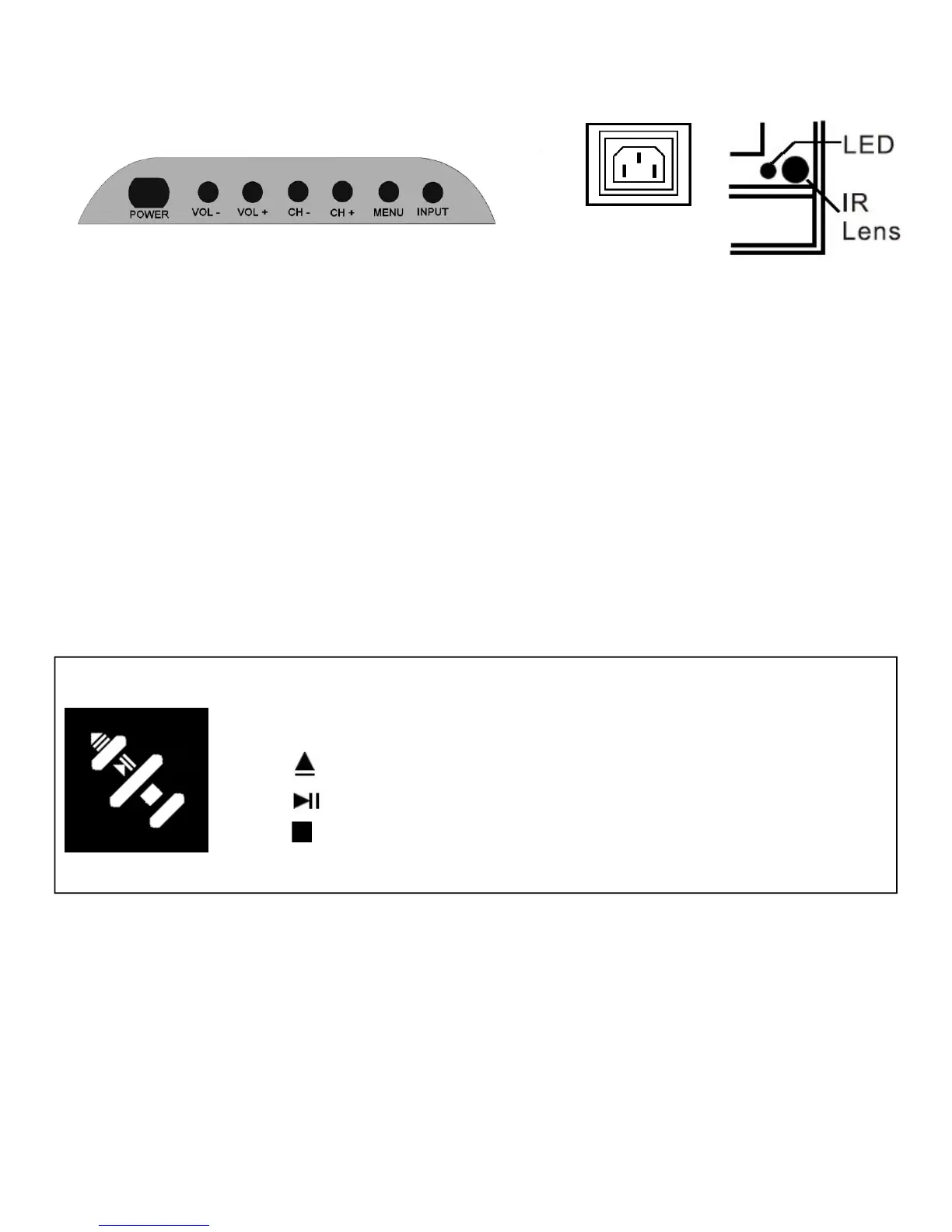
Side view
DVD Controls
1. Press to insert or eject disc from player.
2. Press to play and pause disc. If paused press to restart playing.
3. Press to Stop disc playing.
*For all other functions use the Remote Control*.
5
POWER
INPUT
1. Power. Turns TV On from standby. Also returns TV to standby.
2. Vol – Reduces Volume level. In menu mode will shift the selection to the left, or decreases level being
adjusted.
3. Vol + Increases Volume level. In menu mode, will shift the selection to the right, or increase level being
adjusted.
4. CH - Reduces channel selection by 1 with each press. In menu mode will shift the selection downwards.
5. CH + Increases channel selection by 1 with each press. In menu mode will shift the selection upwards.
6. Menu. Selects the MENU function. If in a sub menu, will revert to previous level of menu.
7. Input. Selects the different input sources, each press will select another input source.
8. POWER INPUT. Mains supply input 100 – 240V AC 50/60 Hz
9. LED. Displays Tv status. In standby illuminates Red, in operation illuminates Green.
10. I R Lens. Remote control receiver lens. Do not obstruct or cover.


 To Next Page