5. Trouble shooting guide.
Should you experience difficulties operating this product please consult the guide below before calling
the Customer Help Line.
7
If you are still having difficulty please call the Technical help line. Ring 0845 293 7698 (Normal rates apply).
Opening hours Mon-Fri 8 am – 8pm. Sat 9 am – 4pm. Sun 11am – 4pm “Bank holidays as Sun”
Or try our website :- www.ekey.co.uk
(24Hr) Emails should be responded to within 3 - 4 hours should the
consumer have difficulty getting through.
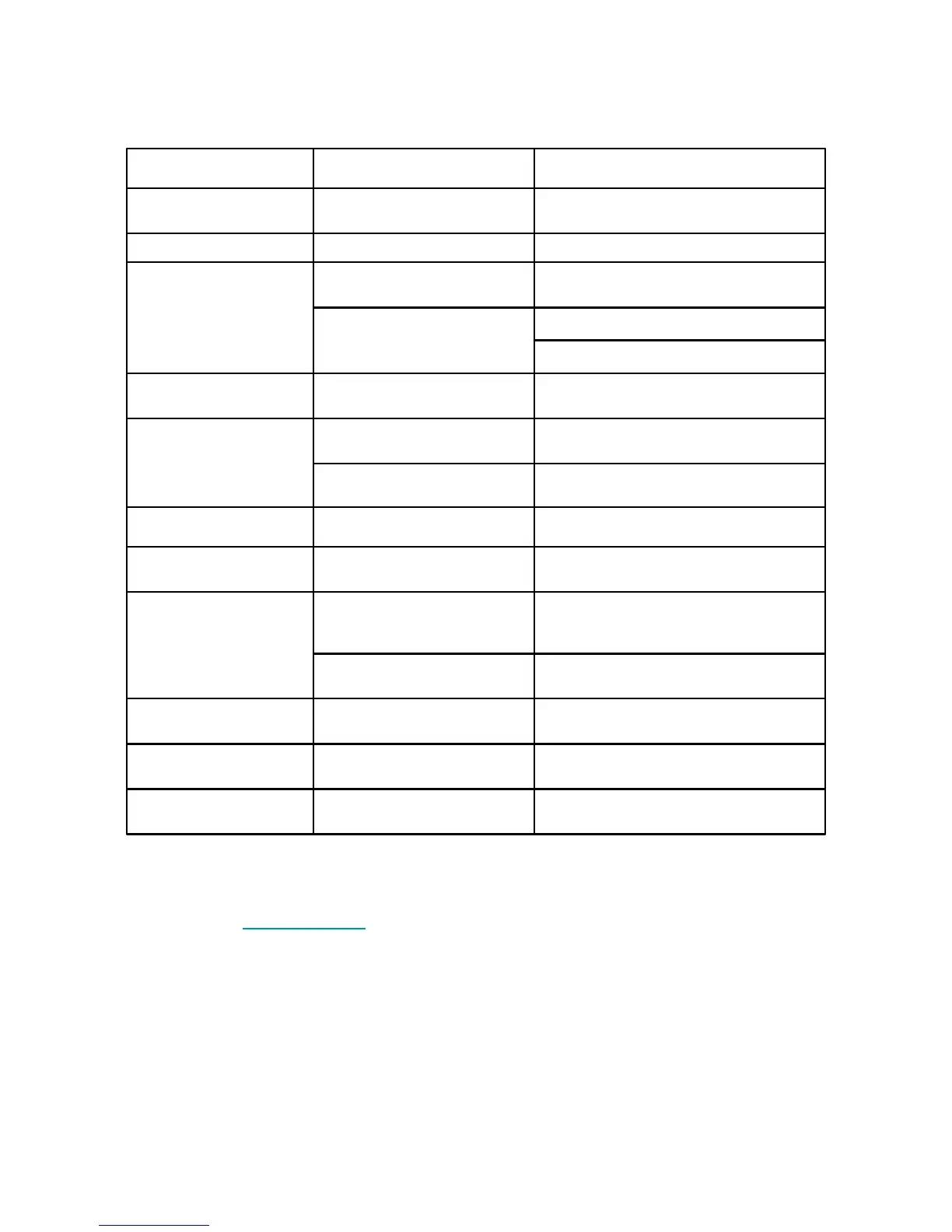
SYMPTOM POSSIBLE CAUSE REMEDY
Dead No led lit Power not connected to player Check power lead connections and mains
switch is turned on
No operation. Led lit Red Player in standby. Press Power button on Player
FM RADIO. Distorted
signal.
Poor signal Extend aerial wire or re position wire
Not tuned in correctly Tune to light Stereo led.
Switch to Mono
AM RADIO. Poor
reception
Poor signal Rotate body of Player to maximize internal
aerial.
CD PLAYER. Not
reading discs
Disc dirty or damaged Clean disc as on page 8. If damaged
discard.
Laser Optic dirty Use special Laser cleaning disc
Not playing discs correctly As above As above.
TAPE PLAYER. Not
playing tapes
TAPE not selected with
Function switch
Select TAPE with function switch
Poor frequency response.
No high notes. Muffled
speech
Tape head dirty Clean tape head with a special tape head
cleaning cassette
Tape head magnetised Demagnetizing may only be done by a
service engineer.
Tapes "Wowing" Tape too tight in cassette Remove tape or Fast Forward entire tape
and re place in player
RECORD PLAYER. Not
playing discs
Phono not selected. Select PHONO with Function switch
Tone arm skids over
record
Stylus damaged or covered Uncover stylus. If damaged replace.


 To Next Page