Getting to know your CD Radio Boombox
You’ll be up and running in no time
Getting to know your CD Radio Boombox 13
section of these instructions, or online at www.argos-support.co.uk
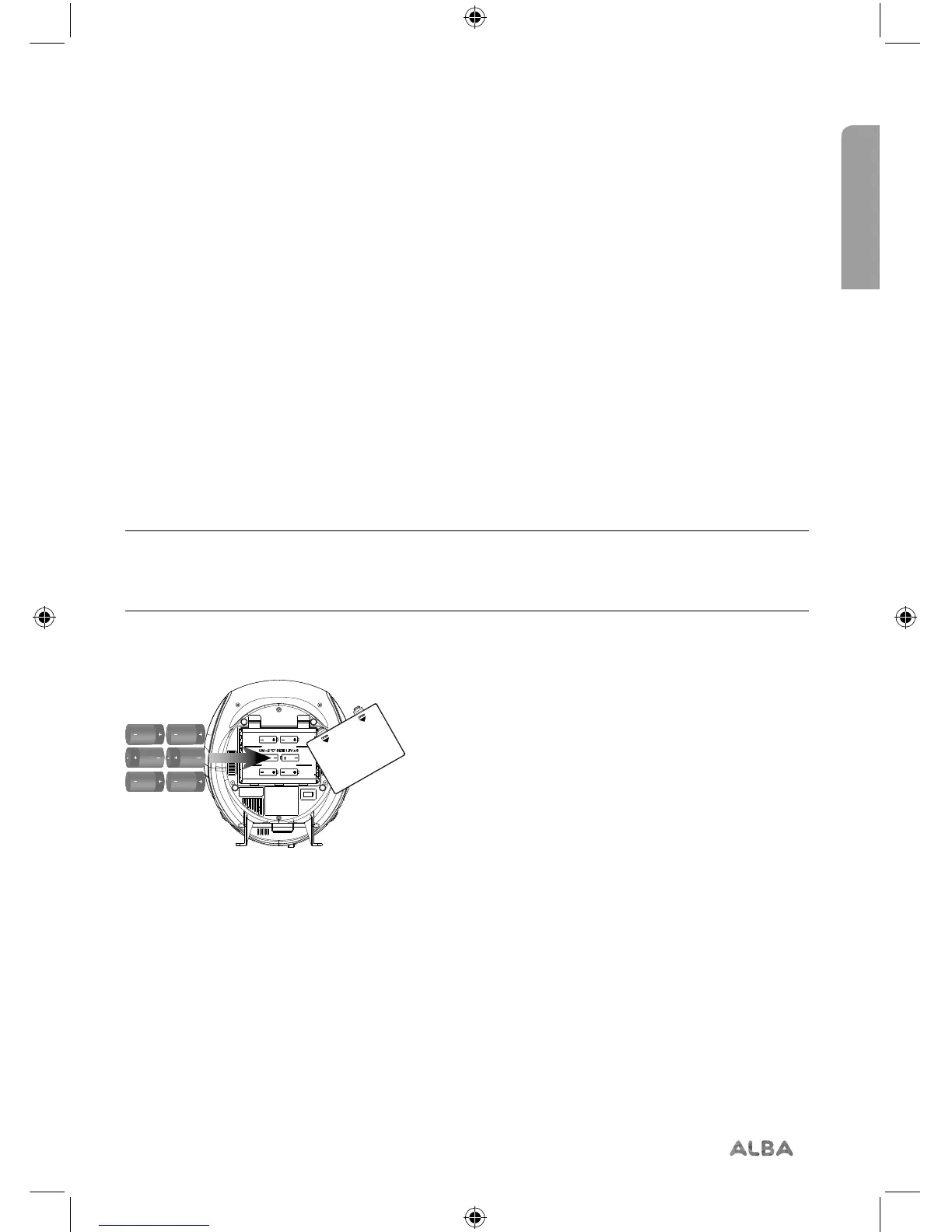
Power connection / Inserting batteries (optional)
Before inserting the batteries (not included), please ensure that the Boombox is switched
off (slide the Power/Mode switch at the back of the Boombox to ‘Off’) and is unplugged
from the mains power supply.
1. Underneath the Boombox, press in the two battery compartment tabs and pull up to
remove the battery compartment cover.
2. Insert 6 x 1.5V C-size (also known as LR-14 and UM-2) batteries (Fig 3), making sure to
note the ‘+’ and ‘-’ markings and position the batteries the correct way around.
3. Replace the battery compartment cover, making sure that it ‘clicks’ home. .
Note: When the battery power is low, you will notice that the audio quality will be a
little distorted and the volume will be quieter. Please switch off the Boombox and
replace the batteries.
Fig 3.


 To Next Page