34
If you require any technical guidance or find that your product is not operating as intended, a simple solution can often be found in the
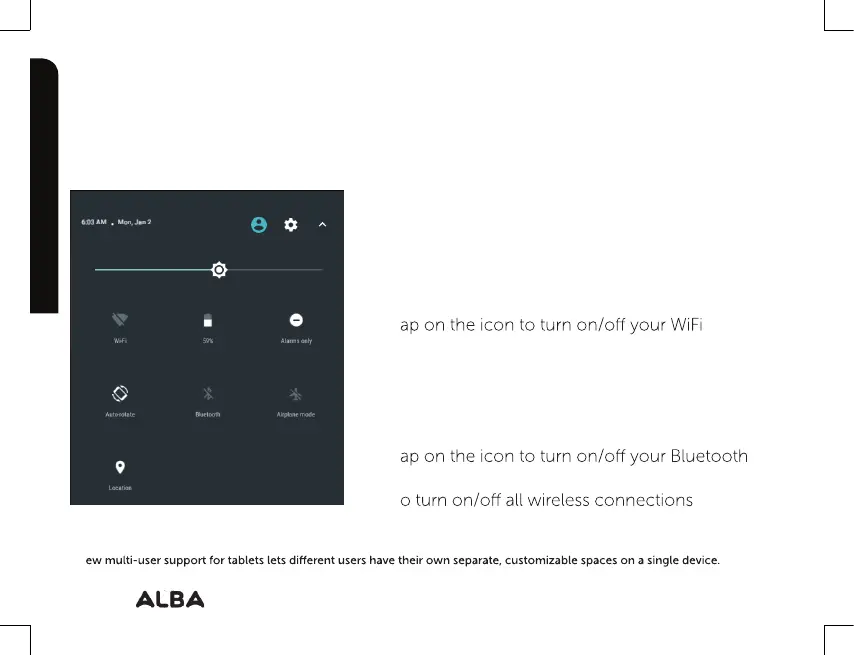
The quick settings
Touch the top of the screen and pull down to open
the notifications. Pull down one more time to open the
quick settings menu.
1.
To access all your settings.
2.
C
urrent user
3. Brightness: To adjust the screen brightness.
4. T
connection.
8. T
connection.
9. T
7. Auto-rotate screen: To activate/deactivate
automatic screen orientation as you turn your tablet.
10. To activate/deactivate your GPS location system.
5. Battery status.
6. Alarms only.
(1)
N
(8)
Getting to know your Alba 8" Tablet
You’ll be up and running in no time.
The Android interface
Getting to know your Alba
(2)
(4) (5) (6)
(7) (8) (9)
(10)
(1)
(3)



 To Next Page