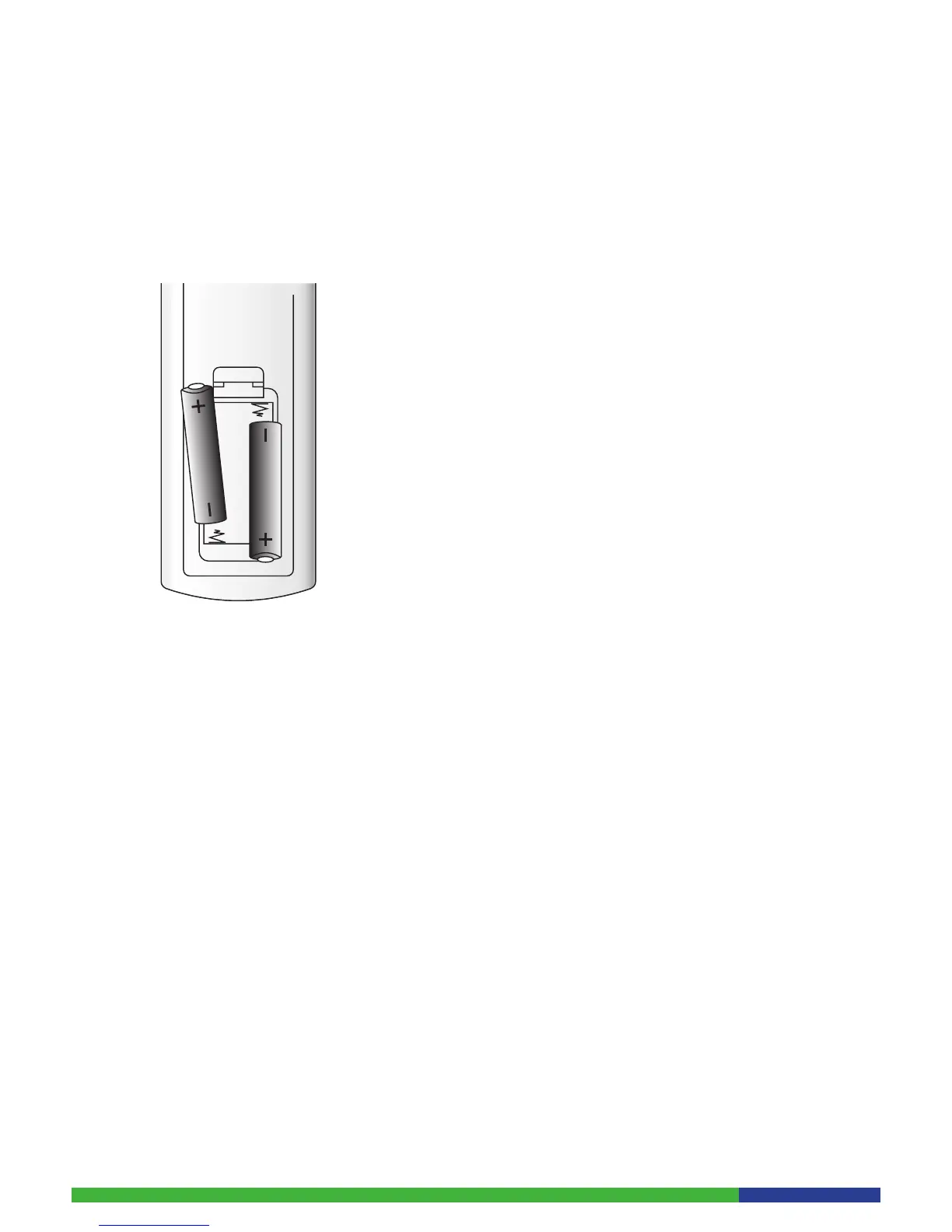
3.3.1 Inserting/Replacing the Batteries
The remote control is powered by 2 batteries (Type AAA). The life time of the
batteries depends on how often you use your remote control. The battery
compartment is on the bottom side of your remote control. Lift off the cover
by pushing the clip.
Insert batteries as shown and replace the cover.
Precautions for battery replacement:
When inserting new batteries, make sure that they are the correct way •
round.
Remove empty batteries immediately.•
When disposing used batteries, please comply with governmental regulati-•
ons or environmental public institution’s rules that apply in your country.
Never attempt to recharge the batteries.•
Always replace both batteries at the same time. Do not use old and new-•
batteries together, and do not use batteries of different types.
If the remote control is not going to be used for a long time, remove the •
batteries.
3.3.2 Using the Remote Control
Navigating through the main menu:
Press the ‘Menu’ button on the remote control. The main menu appears 1.
on the left side of the TV-Screen.
Use the ‘Arrow’ buttons to navigate through the menu.2.
Press the ‘OK’ button to activate the selected function.3.


 To Next Page