65 66
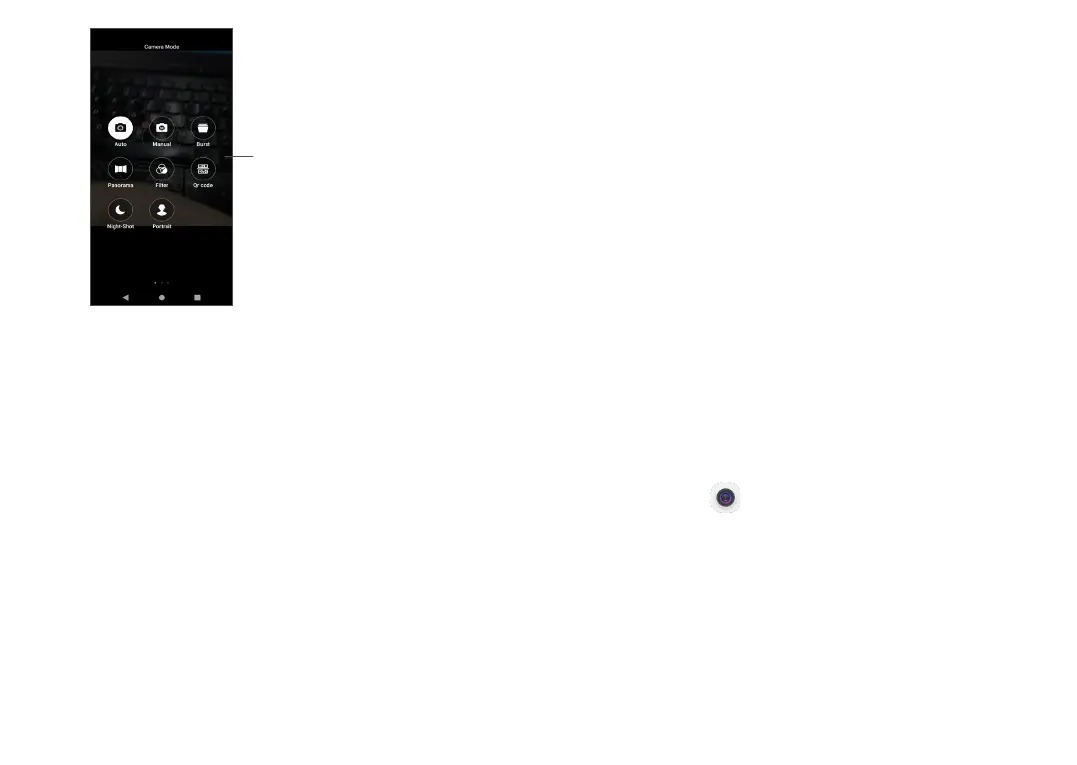
Slide right to access
the Camera Mode
• Auto
Auto is the default mode for Camera.
• Manual
Lets you to take full control of the camera settings,
allows you to adjust ISO, WB, Contrast and more.
• Burst
Long press the shutter for continuous shooting, lift
your finger to stop continuous shooting.
• Panorama
Touch to turn on the panorama function. Touch the
shutter button to start taking a panoramic photo
and move the phone steadily along in the direction
indicated by the onscreen line. Once the slots are
filled, the photo will be automatically saved. If the
slots are not fully filled, touch the shutter button
again to save the photo.
• Filter
Touch to preview the viewfinder with live filter
applied. Touch any filter to apply it and return to the
previous screen.
• Qr code
Align QR Code within frame to scan.
• Night-Shot
This mode helps to capture wonderful pictures at
night in low light.
• Portrait
Touch to create a depth of field effect. You can
create an image that highlights your subject while
producing a gorgeously blurred background.
Camera settings
Touch Camera , slide left to access the camera
settings.
Camera settings:
• Storage path
The default is phone storage.
• Volume key function
Enable the Volume up/down key shortcut function,
to take photos/videos or zoom in/out.



 To Next Page