17 18
5 Entering Text
This section describes how to choose your preferred text input mode when enter-
ing characters.
5.1 Keypad Input
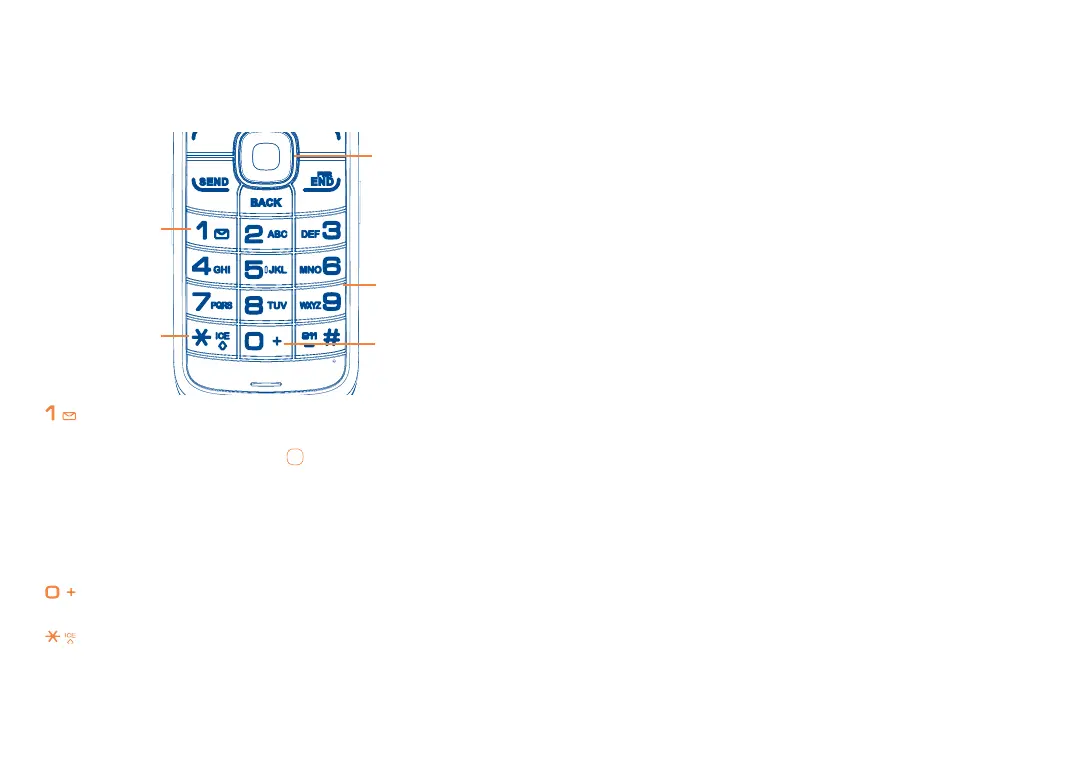
key:
Press: Insert smart punctuation.
Press and hold: Insert 1. Navigation keys
:
Left/Right: Previous/next letter/word.
Up/Down: Page up/down.
Keypad:
Press: Alphabetic input (a, b, c).
Press and hold: Numeric input (1, 2, 3).
key:
Input “0” in numeric mode.
key:
Change input methods.
5.2 Text Input Mode
Text mode allows you to choose between T9Word, Abc, or Numeric modes.
• T9Word: Enter text using a predictive text system that reduces the number of
key presses required while entering a word
• Abc: Allows you to enter alphabetic characters by pressing the key labeled with
the corresponding letter.
• 123: Allows you to enter numbers.
5.3 Changing Text Mode
a When you are in a text entry eld, press OPTIONS > Text Mode to change
text input mode.
b Choose from the following options: T9Word, Abc, 123, Symbols, Smileys, Text
Settings.


 To Next Page