7 8
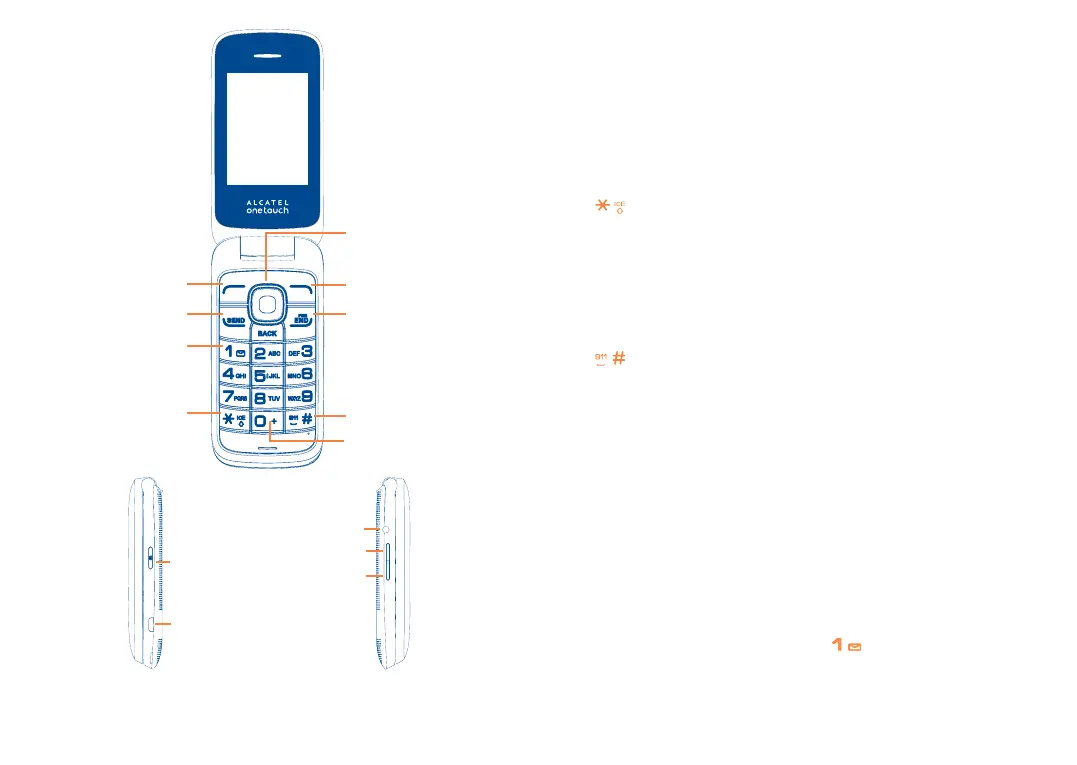
Right softkeyLeft softkey
micro-USB connector
Headset connector
Send key: Answer/Send a call
Enter Recent calls
1 key:
Press: Dial "1"
Press and hold: Access your voicemail
In Edit mode
Press: Input frequently-used symbols
Press and hold: Input "1"
key: Press: Dial "
*
"
In Edit mode
Press: Switch between input methods
0 key: Press: Dial "0"
Press and hold: Switch between "+/0"
In Edit mode
Press and hold: Input "0"
key: Press: Dial "#"
Insert a space in Edit mode
Press and hold: Emergency call
Navigation key
(1)
: Press to go left/right/up/down to access different
functions
OK key: Press to conrm an option
End key: Press: End a call
Return to the Home screen
Press and hold: Power on/off
Back key: Press: Delete content, go back to the previous menu or option.
1.5 Setting Up Voicemail
a From the Home screen, press and hold the key.
b When connected, you’re prompted to set up your voicemail.
Camera key
Volume up
Volume down
(1)
You can personalize navigation keys in Settings.


 To Next Page