9 10
General information .......................................
• Internet address: www.alcatel-mobile.com
• Hot Line Number: see "TCL Communication" leaflet or go to our Internet site.
• Manufacturer: TCL Communication Ltd.
• Address: 5/F, Building 22E, 22 Science Park East Avenue, Hong Kong Science Park, Shatin, NT, Hong Kong.
On our Internet site, you will find our FAQ (Frequently Asked Questions) section. You can also contact
us by e-mail to ask any questions you may have.
This radio equipment operates with the following frequency bands and maximum radio-frequency
power:
GSM900: 33.5dBm
GSM1800: 30.5dBm
UMTS900/850/2100: 23.5dBm
Bluetooth: <2dBm
Hereby, TCL Communication Ltd. declares that the radio equipment type Alcatel 2038M is in
compliance with Directive 2014/53/EU.
The full text of the EU declaration of conformity is available at the following internet address: http://
www.alcatel-mobile.com/EU_doc.
The description of accessories and components, including software, which allow the radio equipment
to operate as intended, can be obtained in the full text of the EU declaration of conformity at the
following internet address: http://www.alcatel-mobile.com/EU_doc.
Protection against theft
(1)
Your telephone is identified by an IMEI (phone serial number) shown on the packaging label and in the product's
memory. We recommend that you note the number the first time you use your telephone by entering *#06# and
keep it in a safe place. It may be requested by the police or your operator if your telephone is stolen. This number
allows your mobile telephone to be blocked preventing a third person from using it, even with a different SIM card.
Disclaimer
There may be certain differences between the user manual description and the phone's operation,
depending on the software release of your telephone or specific operator services.
TCL Communication shall not be held legally responsible for such differences, if any, nor for their
potential consequences, which responsibility shall be borne by the operator exclusively.
(1)
Contact your network operator to check service availability.
1
Getting started ........................................
1.1 Set up
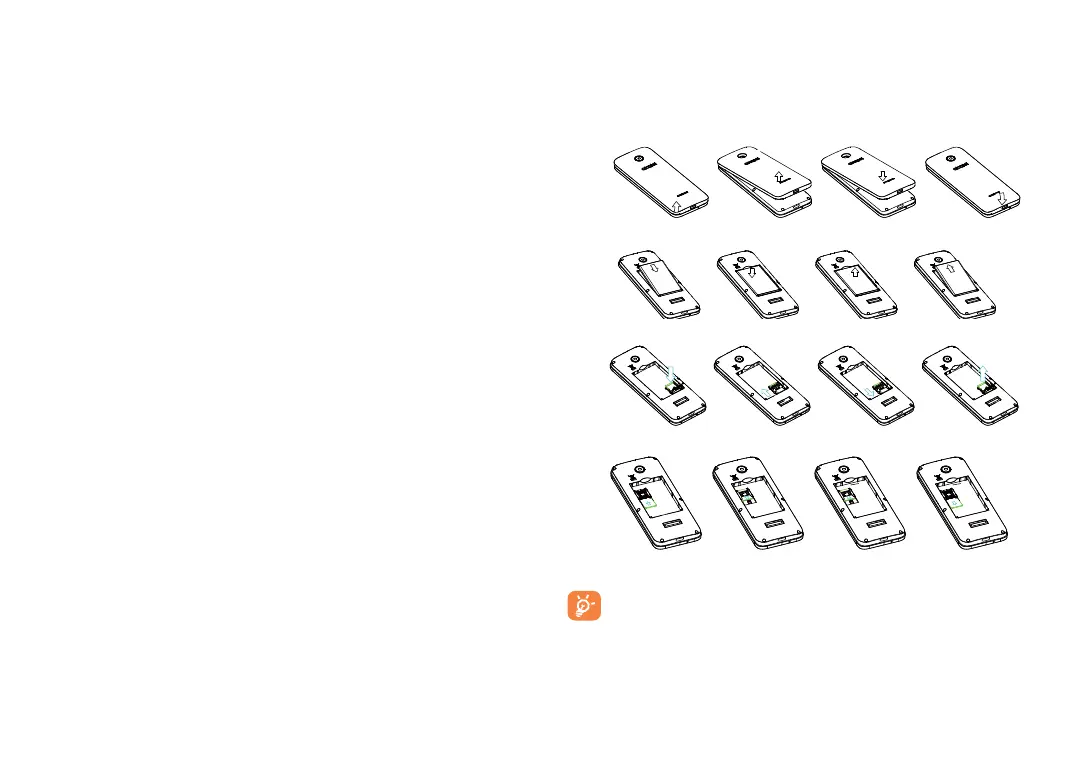
Removing and installing the back cover
Removing and installing the battery
Inserting and removing TF card
Inserting and removing the SIM card
Place the SIM card with the chip facing downwards and slide it into its housing. Make sure that it is
correctly inserted. To remove the card, press it and slide it out.
As to Single SIM model, which only supports mini SIM card. Do not attempt to insert other
SIM types like micro and nano cards, otherwise this may cause damage to your phone.



 To Next Page