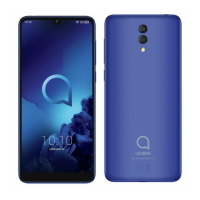
If you can't download new files on your Alcatel Cell Phone, ensure the following:
* There is sufficient phone storage space.
* Select the microSD card as the storage location.
* Check your subscription status with your operator.
N
nrodriguezSep 1, 2025
Why does my Alcatel Cell Phone get so hot?
T
Tara FarmerSep 1, 2025
The heating of your Alcatel Cell Phone is a normal consequence of the CPU handling excessive data. Ending prolonged calls, game playing, internet surfing or running other complex applications will make your phone return to normal temperature.
K
Kevin RiveraAug 31, 2025
What to do if my Alcatel 3C Cell Phone says invalid SIM card?
S
Steven AlvaradoAug 31, 2025
If your Alcatel Cell Phone displays an invalid SIM card message, take these steps:
* Make sure the SIM card has been correctly inserted.
* Ensure the chip on your SIM card is not damaged.
* Make sure the service of your SIM card is available.
G
garciakyleAug 29, 2025
Why can't my Alcatel 3C make calls?
T
Tracy WrightAug 29, 2025
If your Alcatel Cell Phone can't make outgoing calls, please check the following:
* Ensure you've dialed a valid number and touched Call.
* For international calls, verify the country and area codes.
* Make sure your phone is connected to a network that isn't overloaded or unavailable.
* Check your subscription status with your operator (credit, SIM card validity).
* Ensure you haven't barred outgoing calls or forwarded incoming calls.
* Confirm your phone isn't in airplane mode.
J
josephhaynesAug 27, 2025
How to extend battery life on Alcatel 3C?
T
Traci PenaAug 27, 2025
If the battery on your Alcatel Cell Phone drains too fast, consider the following:
* Ensure you follow the complete charge time (minimum 150 minutes).
* After a partial charge, wait at least 20 minutes after removing the charger for an accurate battery level indication.
* Adjust the screen brightness.
* Extend the email auto-check interval.
* Update news and weather information manually or increase their auto-check interval.
* Exit background-running applications when not in use.
* Turn off Bluetooth, Wi-Fi, or GPS when not in use.
R
ricerodneyAug 26, 2025
Why my Alcatel 3C Cell Phone can't connect to network?
J
Joshua GuerraAug 26, 2025
If your Alcatel Cell Phone can't connect to a network or displays "No service", try the following:
* Move to another location to connect to the network.
* Verify network coverage with your operator.
* Check with your operator to ensure your SIM card is valid and that internet access service is available.
* Try connecting later if the network is overloaded.
* Check your phone's internet connection settings.
* Ensure you are in a place with network coverage.
C
Christina DixonAug 25, 2025
What to do if my Alcatel 3C is not responding?
K
Kenneth DickersonAug 25, 2025
If your Alcatel Cell Phone has not responded for several minutes, try these steps:
* Turn off your phone by pressing and holding the Power key until it turns off, then restart it.
* Remove and reinsert the battery, then restart the phone.
* Reset the phone.
N
Nathaniel KellyAug 22, 2025
Why does my Alcatel 3C keep turning off?
S
Suzanne CarterAug 22, 2025
If your Alcatel Cell Phone is turning off by itself, consider these steps:
* Ensure the screen locks when not in use and the Power key isn't accidentally pressed.
* Check the battery charge level.
* Reset or update the phone's software.
* Use the Alcatel charger that came with the phone.
* Make sure the battery is properly inserted and clean the battery contacts if needed.
* If the battery has been empty for a long time, charge it for about 20 minutes to see the charging indicator.
* Charge under normal conditions (0°C (32°F) to 40°C (104°F)).
* Verify the voltage input is compatible.
Multimedia Messaging Service (MMS) is a standard way to send messages that include multimedia content to and from a mobile phone over a cellular network



 To Next Page
 General
 Weight and Dimensions