65 66
1
6
9
8
3
4
5
2
7
10
11
12
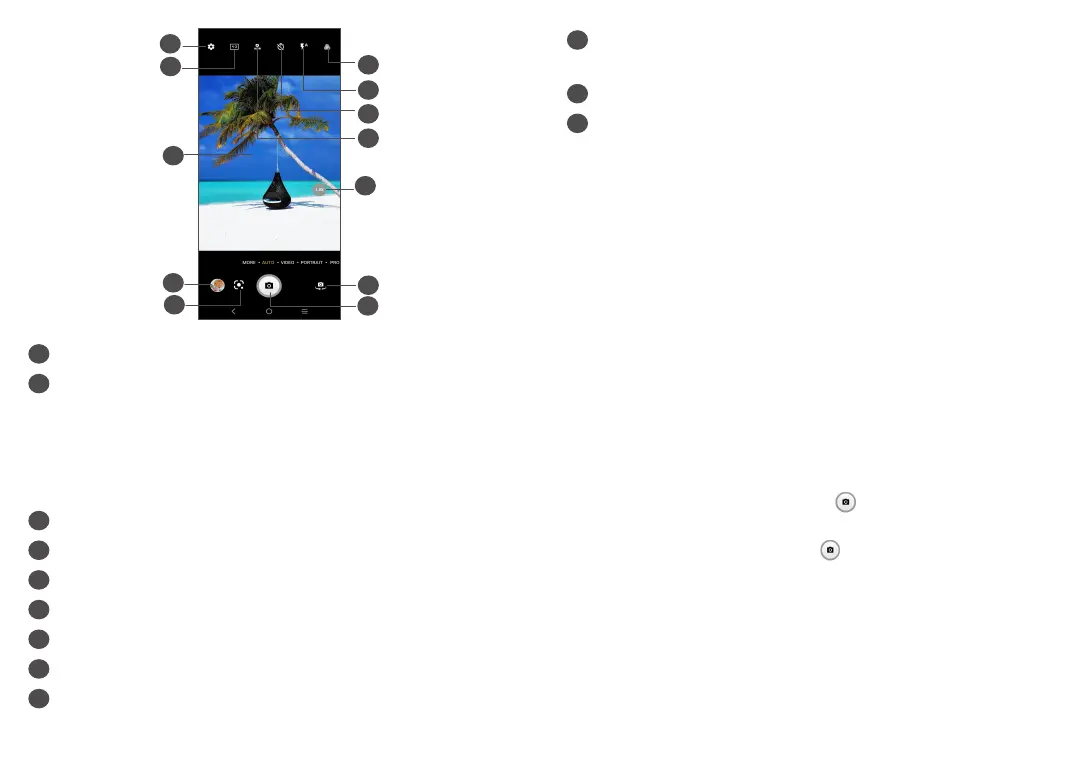
1
Select filter
2
Flash mode
Touch to turn on/off the camera flash
WARNING: Keep a safe distance when using the
flash. Do not point the flash toward people’s or
animals’ eyes.
3
Take a timed photo
4
Take HDR photos
5
Zoom in/out
6
Switch between front and rear camera
7
Take a photo
8
Touch to access settings
9
Picture size
10
Pinch fingers together to zoom out, or spread
fingers apart to zoom in
11
View the photos or videos you have taken
12
Google Lens
(1)
Google Lens:
Google Lens is a free tool that can help you to:
• Copy text
• Search for similar products
• Identity plants and animals
• Discover books & media
• Scan codes
…and more.
To take a photo
The screen acts as the viewfinder. First, position the
object or landscape in the viewfinder, touch the screen
to focus if necessary. Touch or press the Volume
key to capture. The photo will be automatically saved.
You can also touch and hold to take burst shots, the
maximum number is 20.
(1)
Note that Google Lens only works when you are logged
in to your Google account. Your phone must also be
connected to a network.



 To Next Page