69 70
ŎVideo
stabilization
Switch the toggle to enable/disable video
stabilization.
General
ŎManage modes
Touch to manage favorite camera modes.
ŎGrid
Turn on
to enable grid view. It divides the
screen into equal parts and helps you take better
photos by making it simple to align compositional
elements to the grid, such as the horizon or
buildings to the lines in the grid.
ŎVolume button
function
Touch to set volume button function in camera
mode.
ŎMedia storage
Touch to set up default storage location of
pictures and videos captured.
ŎSave location
information
Turn on
to activate the function of tagging
photos and videos with your location. This option
is available when GPS location services and
wireless network are switched on.
ŎShutter sound
Turn on
to enable shutter sound when
taking a photo.
ŎZoom button
Switch the toggle to enable display zoom button
on camera screen..
ŎReset settings
Touch and confirm to reset the camera settings.
7.2 Gallery .................................................................
Gallery acts as a media player for you to view photos and play videos.
In addition, a set of further operations to pictures and videos are
available for your choice.
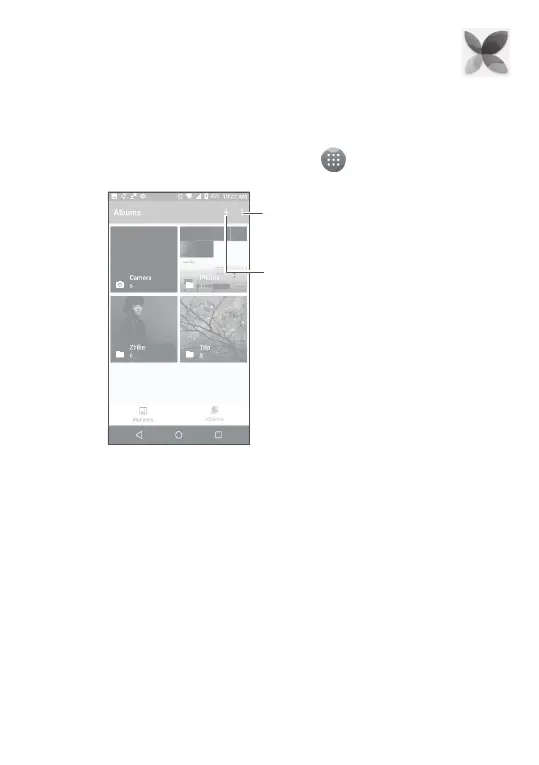
To view the photos you have taken, touch
from the Home screen,
then touch Gallery.
Touch to setup display
of albums.
Access your albums.
To view a picture/play a video
Pictures and videos are displayed by moments and albums in Gallery.
ŎAll pictures and videos are divided by moments, and by albums.
Touch an album to view pictures and videos spread on the screen.
ŎTouch the picture/video directly to view or play.
ŎSlide up/down to view previous or next pictures/videos.
Working with pictures
You can work with pictures by rotating or cropping them, sharing them
with friends, setting them as a contact photo or wallpaper, etc.



 To Next Page