SER 3679 Electronic Meter
Revision (5-10) 4 Alemite, LLC
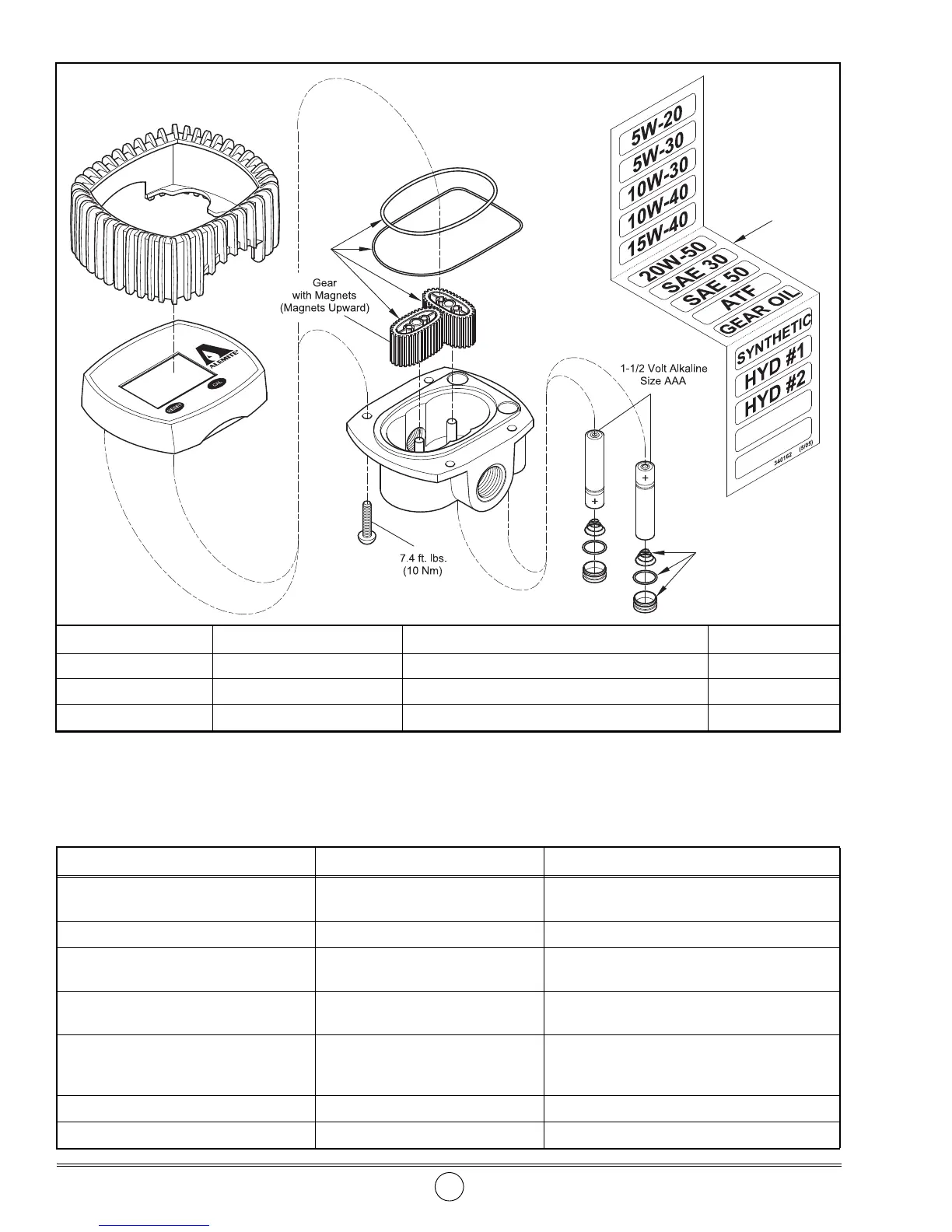
Item No. Part No. Description Quantity
1 393772-9 Kit, Oval Gear 1
2 340162
Labels, Fluid 1
3
393772-12 Kit, Battery Cap 2
Figure 2 Electronic Meter Model 3679 - Exploded View
Troubleshooting Chart
Meter Indications Possible Problems Solution
Battery icon appears solid or flashes on
display or LCD values are faded
1. Weak batteries
2. Dirty contacts
1. Replace batteries
2. Clean batteries and terminals
Meter does not measure accurately Incorrect calibration factor Recalibrate the meter
Display blank Batteries installed incorrectly Install the batteries as indicated on the bottom of
the meter
Reduced or zero flow 1. Gears jammed
2. Clogged system
1. Overhaul metering gear cavity
2. Clean system filter
Meter does not count and the flow rate
is normal
1. Gears installed incorrectly
2. Register defective
1. Install the magnet gear (magnets upward) onto
the left post of the body. See Figure 2.
2. Replace meter
Err 1 flashing Damaged register Replace meter
Err 2 displays Temporary lapse in data calculation Wait until the register updates automatically



 To Next Page