Description of Controls – Chapter 5
MidiVerb 4 Reference Manual 43
CHAPTER 5
DESCRIPTION OF CONTROLS
Front Panel
LCD Display
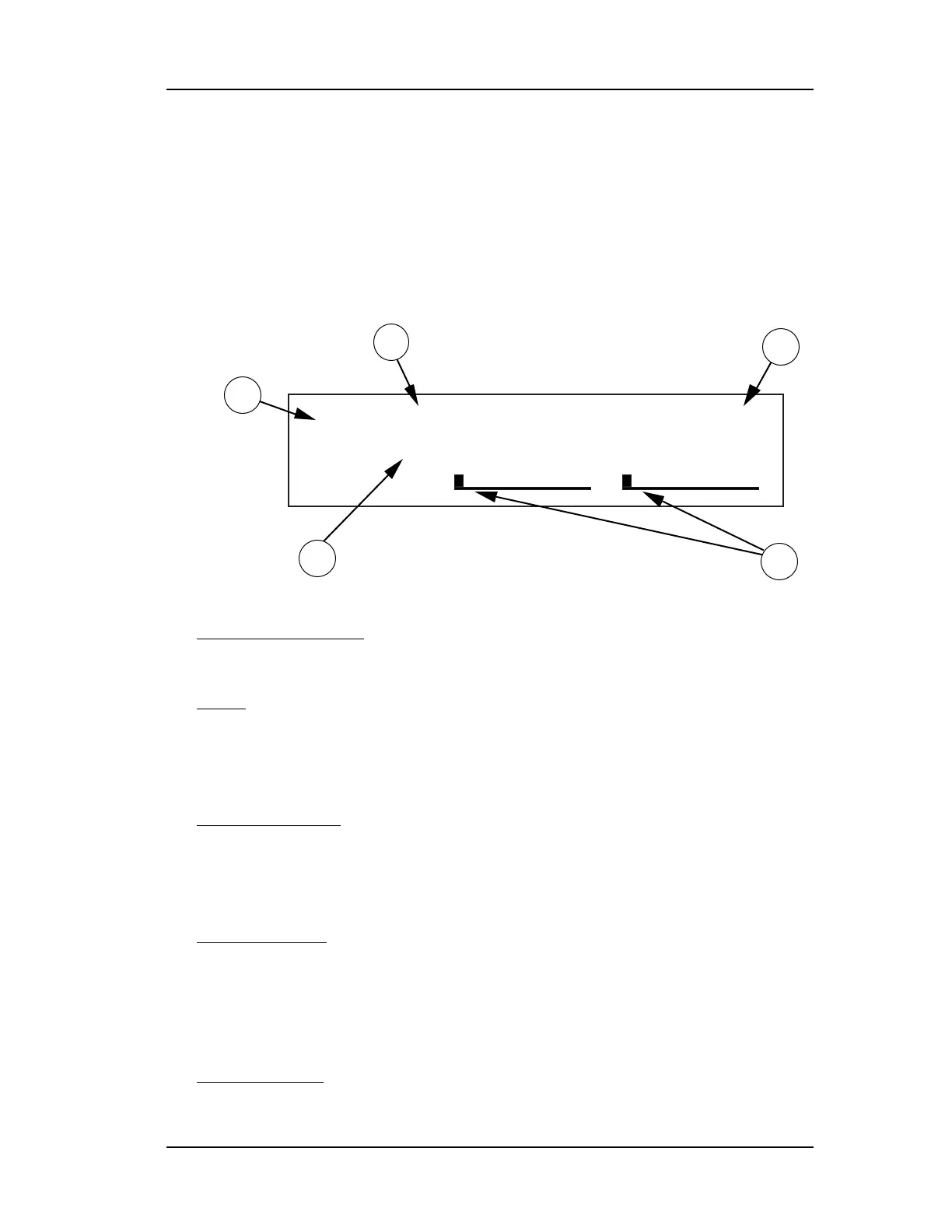
When the MidiVerb 4 is first turned on, the display will look something like this:
L R
PRESET
L r g Ha l l CONCERT HAL
4
5
1
3
2
The MidiVerb 4’s display is divided into 5 sections:
➀
Program Number
. MidiVerb 4 Programs are numbered from 00
to 127. In this example the Program selected is number 01.
➁
Bank
. The MidiVerb 4 has two Banks of 128 Programs: the
Preset Bank and User Bank. The display will either say “PRESET” or
“USER”, depending on the current Bank. In this example we are in
the Preset Bank.
➂
Program Name
. Each Program has its own eight character
name. This one is called Lrg Hall. The 128 User Programs can be
renamed; the 128 Preset Programs are pre-programmed at the
factory and cannot be renamed.
➃
Configuration
. This tells us which effects are used by this
Program, the order in which our input signal(s) will pass through
them, and whether this is a Stereo or Dual Configuration (more about
Configurations in Chapter 3). The Configuration for this Program is
called CONCERT HALL.
➄
Level Meters
. These peak style meters monitor the signal
strength of the unprocessed inputs, and are used in much the same













 To Next Page