2
User Guide (English)
Introduction
Box Contents
• Elevate 4
• 1/8” (3.5 mm) Interconnection Cable
• Stereo RCA to 1/8” (3.5 mm) Cable
• Power Cable
• User Guide
• Safety & Warranty Manual
Support
For the latest information about this product (system requirements, compatibility information, etc.) and product
registration, visit alesis.com.
For additional product support, visit alesis.com/support.
Quick Start
Items not listed in Introduction > Box Contents are sold separately.
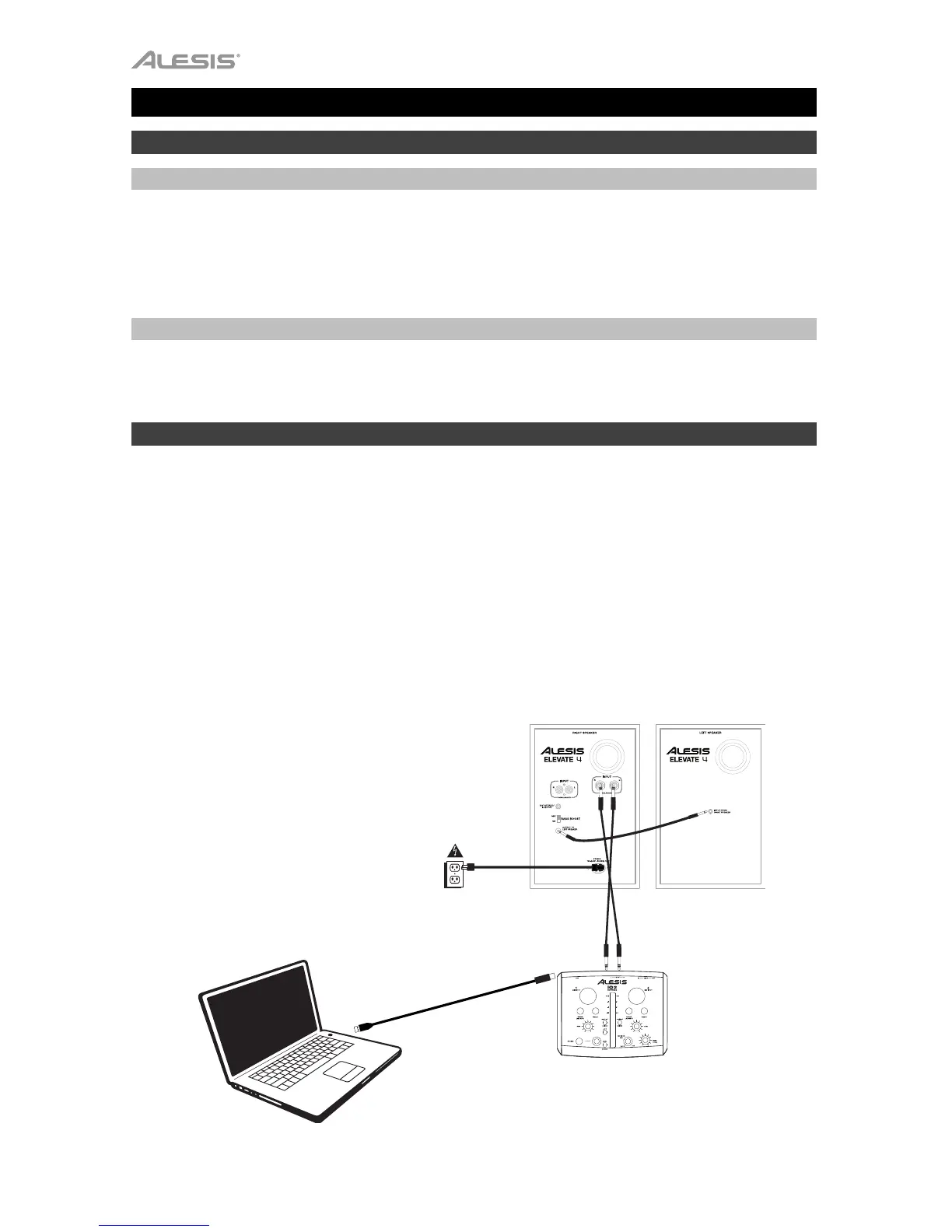
Before turning on the right speaker of Elevate 4's power, do the following:
1. Ensure the volume control on Elevate 4’s right speaker is turned down.
2. Connect Elevate 4's left and right speakers with the included 1/8" (3.5 mm) interconnection cable.
3. Connect any audio sources (such as an audio interface, mixer, etc.) to the inputs on Elevate 4's right speaker.
Power on the audio sources.
4. Connect the included power cable to the power input on Elevate 4's right speaker, and then plug the other
end of the power cable into an outlet.
5. Flip the power switch on Elevate 4's right speaker to the "on" position.
6. Adjust the volume control on the front panel of Elevate 4's right speaker.
Power
Com











 To Next Page