EasyManua.ls Logo

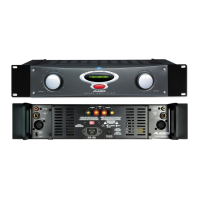
Alesis POWER AMPLIFIER RA150 - User Manual

Alesis POWER AMPLIFIER RA150
38 pages
Print Icon
To Next Page IconTo Next Page
Loading...
REFERENCE SERIES
POWER AMPLIFIERS
REFERENCE MANUAL
©2000 Alesis Corporation

Table of Contents

Questions and Answers

  • A
    Angela GordonJul 25, 2025
    How to troubleshoot no audio from Alesis POWER RA150 outputs?
    • M
      mary13Jul 25, 2025
      If there's no audio coming from your Alesis Amplifier outputs, here's what to check: * **Input Audio:** Ensure your inputs are properly connected. * **Cables:** Try replacing the cables, as they might be faulty. * **Amplifier Level:** Make sure the amplifier levels are set to "12:00" or above. * **Thermal Protection:** If the amplifier is very hot and the PROTECT LEDs are on, it might be in thermal protect mode. Normal operation will resume once it cools down. * **Power Connection:** Verify that the amplifier is properly connected to a power source.
  • M
    Morgan KellyJul 30, 2025
    Why is my Alesis POWER RA150 Amplifier buzzing from the outputs?
    • N
      Natalie ChurchJul 30, 2025
      If you're experiencing a buzz from the outputs of your Alesis Amplifier, consider the following: * **Cable Placement:** Ensure that input cables are not crossing power cables or located near transformers. * **Input Type:** Use balanced inputs instead of unbalanced ones. * **Cable Quality:** Replace the cable with a new, high-quality cable. * **Source Issues:** Plug a known line-level source into the amplifier inputs to see if the problem persists. * **Grounding/Circuit Noise:** Connect to a different electrical circuit, use balanced inputs, or plug the amp and source into the same AC circuit. The issue may be related to a bad AC ground or noisy AC circuit.
  • R
    Renee YangAug 3, 2025
    What to do if the audio cuts in and out on my Alesis POWER RA150 Amplifier?
    • K
      Katelyn BuchananAug 3, 2025
      If the audio from your Alesis Amplifier is cutting in and out, consider these potential causes: * **Input Signal:** Clean the input connectors and check the wiring for any issues, as there might be an intermittent amplifier input signal. * **Overheating:** If the sound cuts out for a minute or two and then returns, the amplifier may be overheating and cycling through thermal protect mode. Check for short circuits in the output wiring or excessive ambient temperature. * **Volume Pot:** The volume pot may be dirty. Try moving the volume pot up and down several times.
  • R
    Robert HolmesAug 7, 2025
    Why does my Alesis POWER RA150 Amplifier sound thin or muffled?
    • A
      Alexis RogersAug 7, 2025
      If you notice a thin or muffled sound from your Alesis Amplifier, here are a few things to investigate: * **Loudspeaker Drivers:** Defective loudspeaker drivers can cause this issue, so consider replacing them. * **Crossover Network (Multi-Amplified System):** If you're using a multi-amplified system with a low-level crossover network, check for bad outputs from the network or improperly connected loudspeakers. Verify the crossover and speaker connections. * **Input Cable Connections:** Ensure that input cables are connected to ground as required, especially if using a balanced connector with one side disconnected or no ground with an unbalanced input.
  • K
    Kristy MillerAug 12, 2025
    What to do if my Alesis POWER RA150 Amplifier shuts down and all lamps are off?
    • S
      Shannon SchmidtAug 12, 2025
      If your Alesis Amplifier shuts down and all the lamps are off, it could be due to: * **Blown Fuse:** The fuse may have blown. Obtain the proper size fuse and replace it. * **Internal Thermal Fuse:** The internal thermal fuse may have activated. Shut off the power and let the amplifier cool down.
  • L
    Latasha OwensAug 15, 2025
    Why does the bass disappear and speakers sound out of phase on my Alesis POWER RA150 Amplifier?
    • S
      Stephen HarrisAug 16, 2025
      If the bass disappears and the speakers sound out of phase with your Alesis Amplifier, the amplifier may have been accidentally set to "Bridge Mono" mode when wired for stereo. Set the switch on the back panel to the "stereo" position.
  • M
    Martha LawsonAug 20, 2025
    Why does my Alesis POWER RA150 Amplifier have low output power?
    • S
      stephaniecarterAug 20, 2025
      If you're experiencing low output power with your Alesis Amplifier, check the line voltage setting. Ensure the switch on the back panel is set to the "120 V" position.

Summary

Important Safety Instructions

Safety Symbols and Precautions

Explains safety symbols and lists essential precautions for product use.

RA150;300;500 Amplifier Overview

Protection Circuitry

Details the amplifier's internal protection mechanisms against faults and overload.

Chapter 2: Connections

Unpacking and Power Considerations

Guides on unpacking, inspecting, and understanding power requirements and grounding.

Connection Details and Power Management

Electrical Service Requirements

Covers AC power capacity, consumption, and circuit needs for optimal performance.

Advanced Connection Techniques

Bridged Mono Operation Setup

Instructions for configuring the amplifier for bridged mono operation for increased power.

Output Connections and Speaker Load

Speaker Cable Connections

Connecting to Binding Posts

Step-by-step guide for connecting speaker cables to the amplifier's binding posts.

Speaker Polarity and Bridged Mode

Output for Bridged Operation

Details how to wire speakers for bridged mono operation for maximum power output.

Chapter 3: Operation

Front Panel Controls Overview

Identifies and explains the function of the amplifier's front panel controls.

Amplifier Controls and Indicators

Protect;Clip Indicators and Meters

Explains the meaning of indicator LEDs and the function of meters on specific models.

AC Voltage and Stereo;Mono Switches

Details the switches for voltage selection and stereo/bridged mono modes.

System Setup and Gain Adjustment

System Setup and Testing Procedures

Steps for setting up and testing the amplifier system before full operation.

Setting the Gain Properly

Guides on adjusting input gain controls for optimal signal-to-noise ratio and avoiding distortion.

Operational Limits and Protection

Chapter 4: Troubleshooting

Maintenance and Servicing Information

Refer Servicing to Alesis

States that only qualified personnel should service the unit.

Repair and Support Information

Obtaining Repair Service

Guides on how to get the product repaired under warranty or otherwise.

Specifications

Model Specifications (RA150;300;500)

Detailed technical specifications for the RA150, RA300, and RA500 amplifier models.

Architects and Engineers Specifications

Alesis Limited Warranty

Alesis POWER AMPLIFIER RA150 Specifications

General IconGeneral
Input Impedance20 kOhms
Signal-to-Noise Ratio> 100 dB
Connectors (Outputs)Binding posts
Damping Factor> 200
Power Requirements120V AC, 60Hz
Power Output (8 ohms)75W per channel
Power Output (4 ohms)150W per channel
Frequency Response20Hz - 20kHz
Input Sensitivity1V for full output
CoolingConvection
Connectors (Inputs)1/4" TRS

Related product manuals