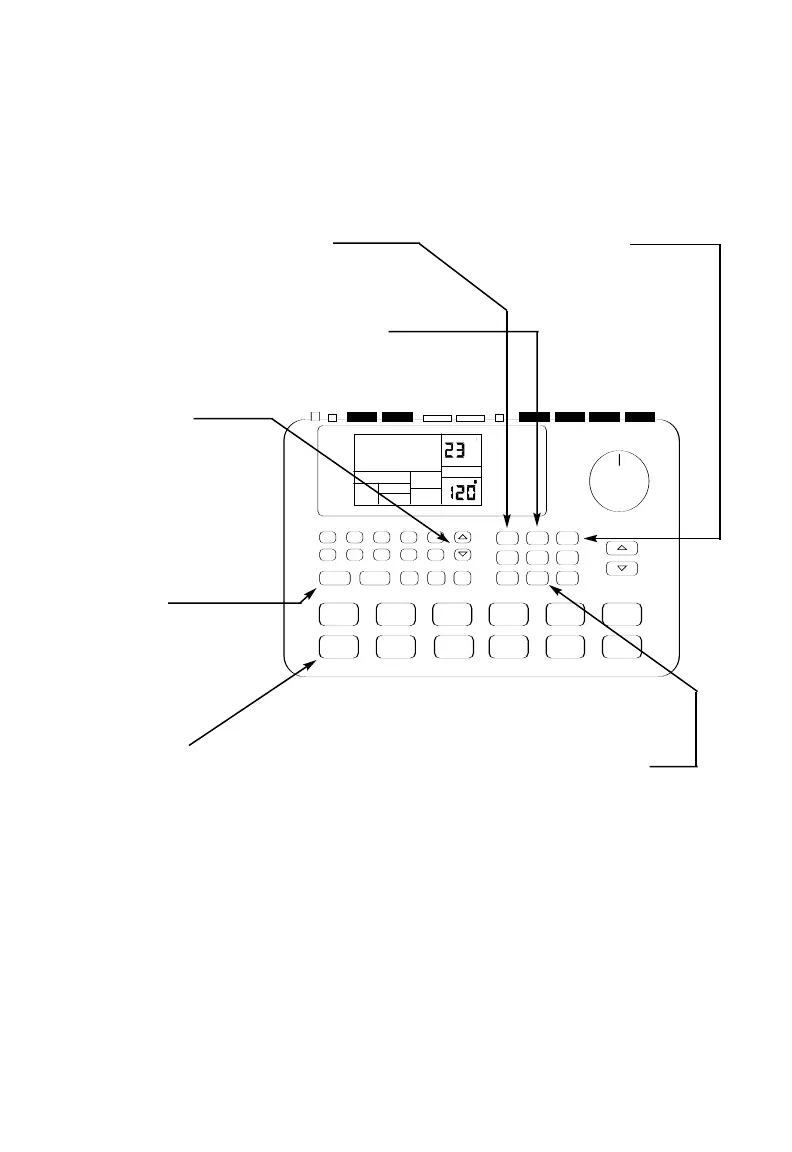
7 If you make a mistake, hold
down the ERASE button,
then hold down the drum pad of
the sound you want to erase.
6 Play the pads.
The SR-16 will shift your playing to the
nearest rhythmic value shown in the
lower-left corner of the quantize
window.
5 Press PLAY to start
recording.
You will probably hear
a metronome click.
When a Pattern reaches
its end, it will loop back
to the beginning so you
can do overdubs.
4 Press the Up/Down
arrow buttons
until you find an EMPTY
PATTern, as shown on
the display.
3 Push the PERFORM/
COMPOSE button
until the display's lower
middle shows COMPOSE.
1 If the display's upper right window shows SONG,
press the PATTERN/SONG button
once to select Pattern mode.
2 If the display's upper right window does not
show USER, press the PRESET/USER button
to select User Patterns.
Recording Your Own Patterns



 To Next Page