EasyManua.ls Logo

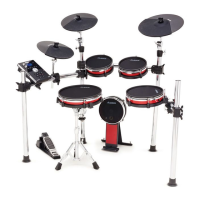
Alesis Surge Mesh Kit - User Manual

Alesis Surge Mesh Kit
2 pages
Print Icon
To Next Page IconTo Next Page
Loading...
alesis.com
Manual Version 1.1
A
ssembly Guide Guía de armado Guide de montage
Guida di montaggio Montageanleitung
1
A
B
C
D
F G
H
E
E
I
I
I I
I
I
J/K
K
J
L/M
2
3 4
D/E
L
L/M
N
5
N
6
O
P
Q
7
E
R
S
S
T
O+P
8
J
J
M
M
N
N
Question and Answer IconNeed help?

Do you have a question about the Alesis Surge Mesh Kit and is the answer not in the manual?

Summary

Assembly Steps

Step 1: Rack Assembly

Initial setup of the main drum rack structure with designated poles and clamps.

Step 2: Tom and Cymbal Mounts

Attaching tom and cymbal mounting arms to the main rack structure.

Step 3: Snare and Hi-Hat Mounts

Mounting the snare drum stand and hi-hat stand components.

Step 4: Cymbal Placement

Positioning and securing cymbal stands and arms.

Step 5: Hi-Hat Configuration

Setting up the hi-hat pedal and attaching cymbals.

Step 6: Kick Drum Pedal

Installing and positioning the kick drum pedal.

Step 7: Module and Pad Setup

Placing the drum sound module and connecting pads.

Step 8: Final Connections

Making all final cable connections for the drum kit.

Box Contents

Component Identification

Visual guide to all included drum kit components, labeled A through X.

Connection Diagram

Module and Pad Wiring

Illustrates how to connect drum pads and cymbals to the sound module.

Summary

Assembly Steps

Step 1: Rack Assembly

Initial setup of the main drum rack structure with designated poles and clamps.

Step 2: Tom and Cymbal Mounts

Attaching tom and cymbal mounting arms to the main rack structure.

Step 3: Snare and Hi-Hat Mounts

Mounting the snare drum stand and hi-hat stand components.

Step 4: Cymbal Placement

Positioning and securing cymbal stands and arms.

Step 5: Hi-Hat Configuration

Setting up the hi-hat pedal and attaching cymbals.

Step 6: Kick Drum Pedal

Installing and positioning the kick drum pedal.

Step 7: Module and Pad Setup

Placing the drum sound module and connecting pads.

Step 8: Final Connections

Making all final cable connections for the drum kit.

Box Contents

Component Identification

Visual guide to all included drum kit components, labeled A through X.

Connection Diagram

Module and Pad Wiring

Illustrates how to connect drum pads and cymbals to the sound module.

Alesis Surge Mesh Kit Specifications

General IconGeneral
TypeElectronic Drum Kit
Hi-Hat PedalIncluded
USBUSB-MIDI
MetronomeYes
SequencerYes
Built-in Coaching FeaturesYes
Kick Pad8-inch mesh
Cymbals10-inch crash, ride, and hi-hat cymbals
Drum ModuleAlesis Surge Drum Module
Kits40 Kits (24 Preset + 16 User)
Outputs1/8-inch Headphones
ConnectivityMIDI, USB
Power Supply9V DC, 500mA, center-positive
EffectsReverb, 3-Band EQ
Module Trigger Inputs10
Module Analog Inputs1/8-inch stereo aux input
Module Analog Outputs1/8-inch headphone output
Headphones1/8-inch headphone output
Module MIDI I/OIn/Out
Snare Pad10-inch dual-zone mesh pad

Related product manuals