EasyManua.ls Logo

Alfa Network 233 - Automatic Embroidery Patterns (333 Series)

Default Icon
40 pages
Print Icon
To Next Page IconTo Next Page
To Previous Page IconTo Previous Page
Loading...
24
AUTOMATIC
EMBROIDERY
(MODELS
333
and
333
BH
ONLY)
These
Models
will
produce
10
Embroidery
Patterns
Automatically
by
inserting
any
of
the
Special
Cams
provided
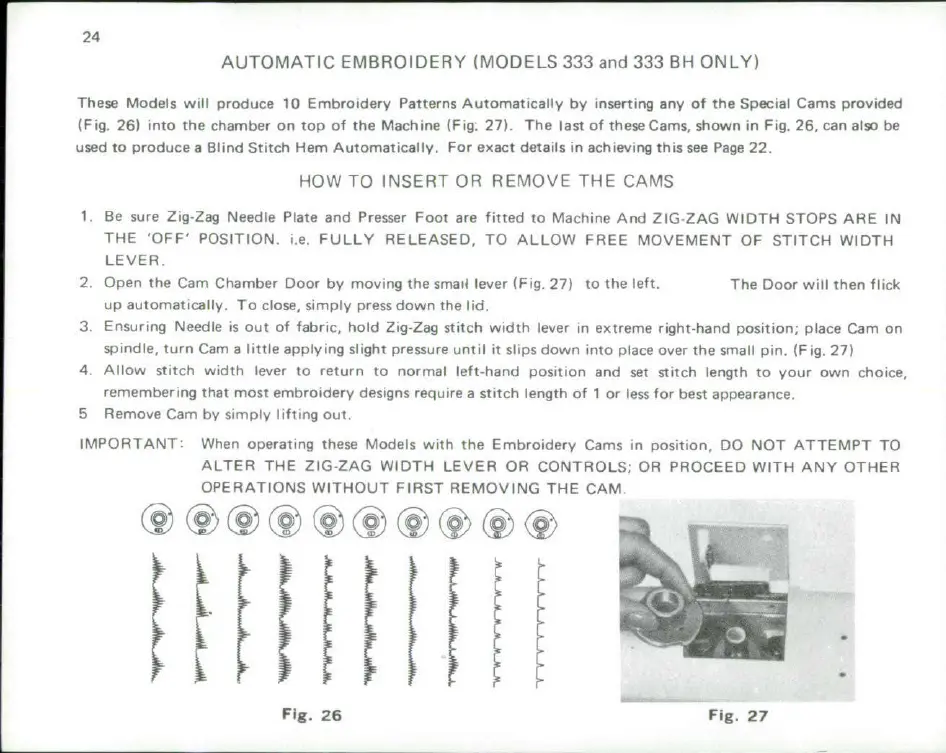
(Fig. 26)
into
the
chamber
on
top
of
the
Machine
(Fig.
27).
The
last
of
theseCams,
shown
in Fig.
26,
can
also
be
used
to
produce
a
Blind
Stitch
Hem
Automatically.
For
exact
details
in
achieving
this
see
Page
22.
HOW
TO
INSERT
OR
REMOVE
THE
CAMS
1
Be
sure
Zig-Zag
Needle
Plate
and
Presser
Foot
are
fitted
to
Machine
And
ZIG-ZAG
WIDTH
STOPS
ARE
IN
THE
'OFF'
POSITION.
i.e.
FULLY
RELEASED,
TO
ALLOW
FREE
MOVEMENT
OF
STITCH
WIDTH
LEVER.
2.
Open
the
Cam
Chamber
Door
by
moving
the
smaic
lever
(Fig.
27)
to the
left.
The
Door
will
then
flick
up
automatically.
To
close,
simply
press
down
the
lid.
3.
Ensuring
Needle
is
out
of
fabric,
hold
Zig-Zag
stitch
width
lever in
extreme
right-hand
position;
place
Cam
on
spindle,
turn
Cam
a
little
applying
slight
pressure
until
it
slips
down
into
place
over
the
small
pin.
(Fig.
27)
4.
Allow
stitch
width
lever
to
return
to
normal
left-hand
position
and
set
stitch
length
to your
own
choice,
remembering
that
most
embroidery
designs
require
a
stitch
length
of
1
or
less
for
best
appearance.
5
Remove
Cam
by
simply
lifting
out.
IMPORTANT:
When
operating
these
Models
with
the
Embroidery
Cams
in
position,
DO
NOT
ATTEMPT
TO
ALTER
THE
ZIG-ZAG
WIDTH
LEVER
OR
CONTROLS;
OR
PROCEED
WITH
ANY
OTHER
OPERATIONS
WITHOUT
FIRST
REMOVING
THE
CAM.
Fig.
26
Fig.
27

Related product manuals