EasyManua.ls Logo

Alfa Network 233 - Page 27

Default Icon
40 pages
Print Icon
To Next Page IconTo Next Page
To Previous Page IconTo Previous Page
Loading...
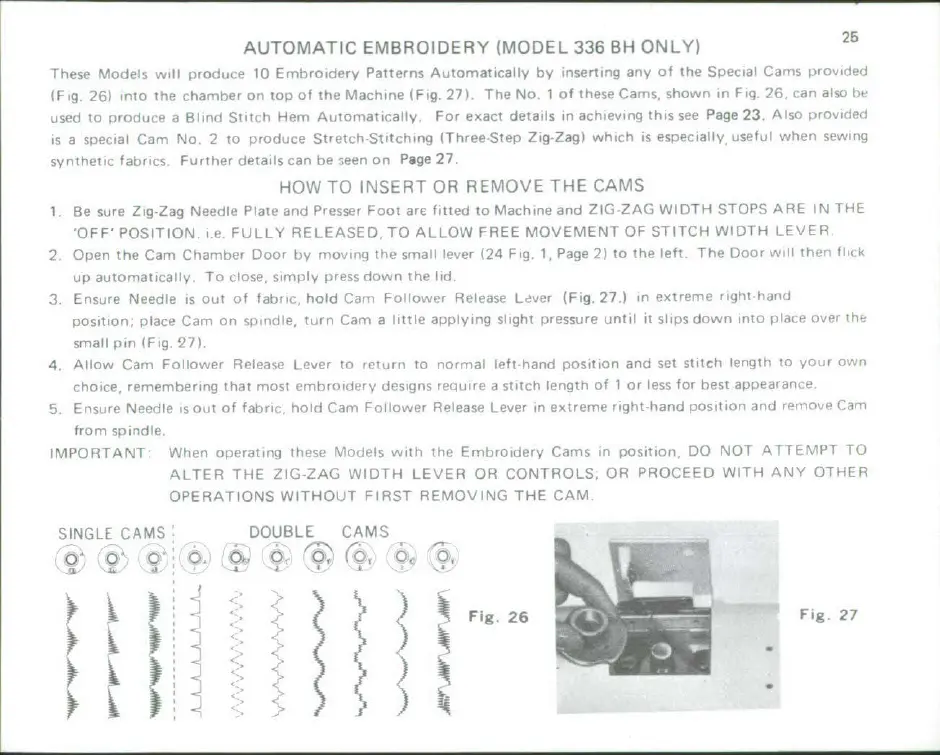
AUTOMATIC
EMBROIDERY
(MODEL
336
BH
ONLY)
25
Them,
Mcdiii,
wil01
d~
10
Emhhttroldy
Palswn..
Automatically
by
lnumliq
all,
of
thes
Stecial1
Camos
urov'dedI
(Fig
Zlril
."t)heý
chrr-het
on
top
of
the
Machine
Fig.
271
ThetNo
1
of
these,
Cam-s,
shirown
In
Fi
26,
cat,
also
uised
To
nrniýioce
a
Hi3i...I
Sti
tch
Hemi
A,,rtomatcally.
F0,ora
eaT
details
in
achievin
this
see
Page
23.
Alsoirvile
is
a
troilclat
Caml
No,
2
to
p>rod,,ce
Stretich
StrchIrrg
lThrea*Sten
Zig-Zag)
which
is
tesutiecally
[sosel
tohen sewingc
syntheisTc
fabrics
Furtherr
details,
Lan
rse- s
en
on
Page
27.
HOW TO
INSERT
OR
REMOVE
THE
CAMS
I
Be
sure
Zig-Zag
N.e~i
lle
Pm
laeadl
Presser
Foot
are
fitted
to
Mach
ine
and
ZIG
ZAG
WIDSTH
STOPS
APF~E
iN
IS4
OFF'
POSIT
ION,
in
F
ULL-Y
RELIEASE
D
TO
ALLOW
FREE
MOVEMENT
OF
STITCH
WVIDTH
L
EVE
i
2
Open
the
Cam
Cha~~emhe
Clorib
h
ovting
the
sijai;
,lever
(24
Fig,
1,
Page
2)
To
rho
left.Ilt
*Vhe
t
Door>
h
1
ii
:I
up
autorniatwiaig,
To
,close,,
si.t
(fly
dei,,lo'
the
I
3.
Ensure
Needle
is 0,I~i
of
fahic
hold
(liini
Li
j110r*r
Release
Livr
(Fig.
27.
inetem
0ilt'ai~
Rositin
placeo
Camh
on
,,)trtLei-l
tu~rn
Car
a
ltl
ppldying
si~ght
prsswre
itnt.l
It
slips
down
ino
;:t1c
oe
i
sm-all
frit,
IFA.
2IT.
4
Alloo
Cam,
Follower
Ri'Ieail~e
Leve
to
roin
To
normal
lOfThand
position
and
set
stitch
l
engtn.
m
In
c hoic
e,
ieretvnLbrirti~
that
rnoostirod
inn , d(einy
h
,~est,,ts
,iitlle
a
stitch
lengt1h
of
1
or
less
for
best
rirsearilrivlŽ.1
5,
Ensu;,re
Needle
fis
no
of
faltiri
holi
Ca,,m
tc
loter
Re.Iease,
Lever
hextremne
oght-hand
nositioýand
i-tohro~nt
iTron
spindle,
IMPO
ETANT
When
orpeoating
115050
%T.Iclelswilath
Ie
E,,mI~hroidey
Cams,
inpsiin
DO
lNOT
AT
f .MNPT
TO
ALTER
THE
ZIG-ZAG
VVIDTH
LEVER
OR
CONIROLS.
OR
PROCEED
WITH
ANY
OTULEi
OPIER
ATIIONS
W
IIITHOUT
F IRST
REMAOVING
THE
CAM.
SINGLE
CAMS
-
DOUBLE
CAMS
0o
0
ato
ra
0,
'0
a,
0,
Fig
26
Fig
27

Related product manuals