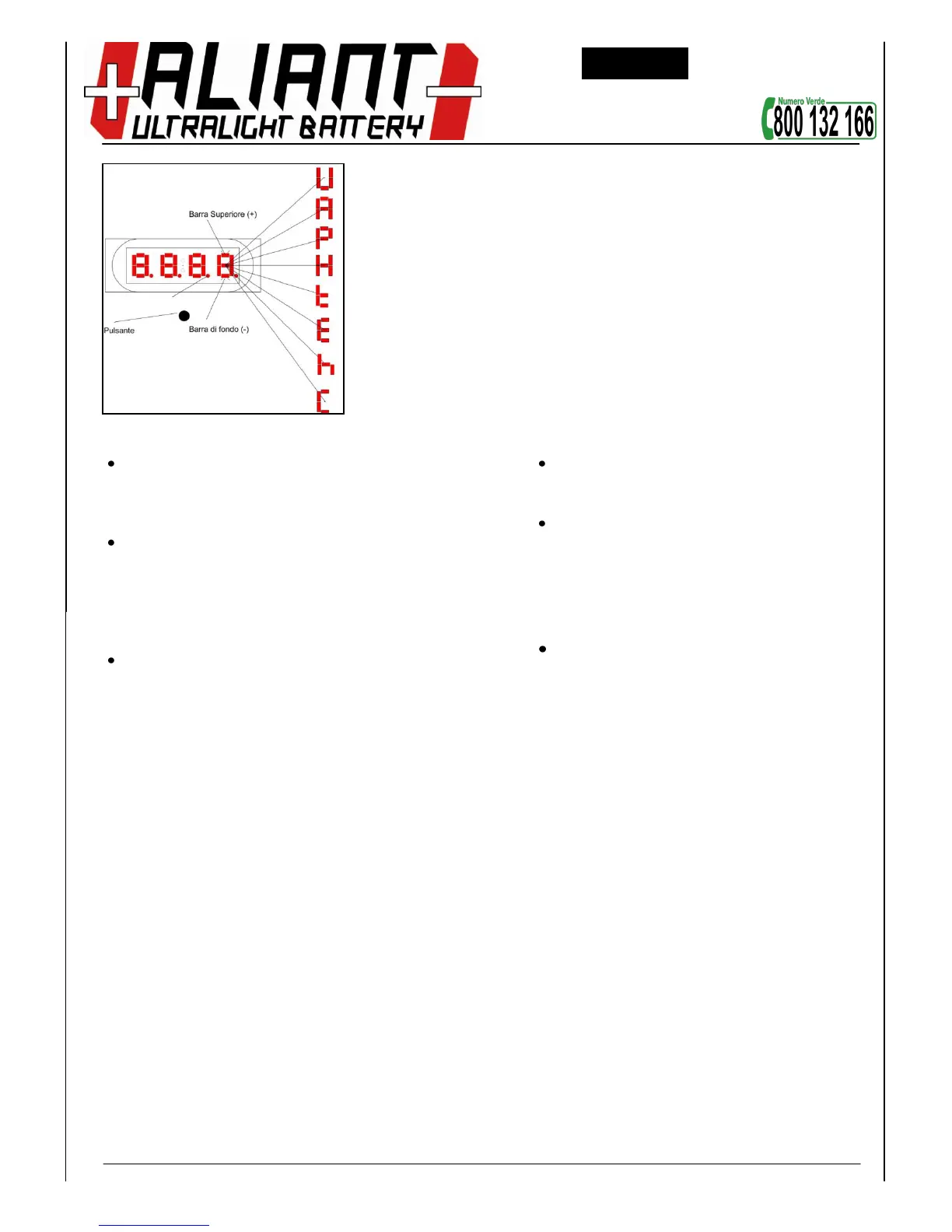
E’ possibile
modificare la
visualizzazione
corrente del
display tramite
la semplice
pressione del
pulsante nero
presente in
basso.
Regole per l’utilizzo del pulsante
Cambiamento visualizzazione: premere il
pulsante con pressione di durata inferiore ad 1
sec al fine di modificare il parametro visualizzato
sul display.
Cambiamento valore parametro visualizzato
o
aumento + / diminuzione - : premere
il pulsante con pressione di durata
pari a ca.2 sec al fine di
aumentare/ridurre il valore del
parametro visualizzato sul display.
Impostazione & Salvataggio: premere il pulsante
con pressione di durata maggiore di 3 secondi
per salvare le modifiche effettuate.
And it is possible to change the current view of the
display by simply pressing the black button in the
lower.
Rules for use of the button
Change view: Press the button with a
pressure of less than 1 sec in order to change the
parameter displayed on the display.
Change parameter value displayed
or increase + / decrease - press
the button with a duration of
pressure approx. 2 sec in order to
increase / decrease the value of the
parameter displayed on the display.
Setting & Saving: press the pressure of
longer than 3 seconds to save your changes.


 To Next Page