9 www.Observint.com
© 2015 Observint Technologies. All rights reserved.
11. Initialize (Init) the HDD when you setup the NVR using Wizard.
HDD Installation - ALI-NVR3108P - HDD 1
The recorder will accommodate one or two internal HDDs. If your recorder doesn’t have an HDD installed, use this procedure to install the rst
HDD. The HDD mounting screws and HDD cables are provided with your recorder.
CAUTION
Follow recommended electrostatic discharge (ESD) guidelines while performing this procedure. Install the HDD in a static-free
environment, wearing a certied ESD wrist strap. If a static free environment and ESD wrist strap is not available, touch the bare
metal of the DVR chassis frequently when installing the drive to dissipate the static charge naturally generated on your skin and
clothing and avoid touching electronic components.
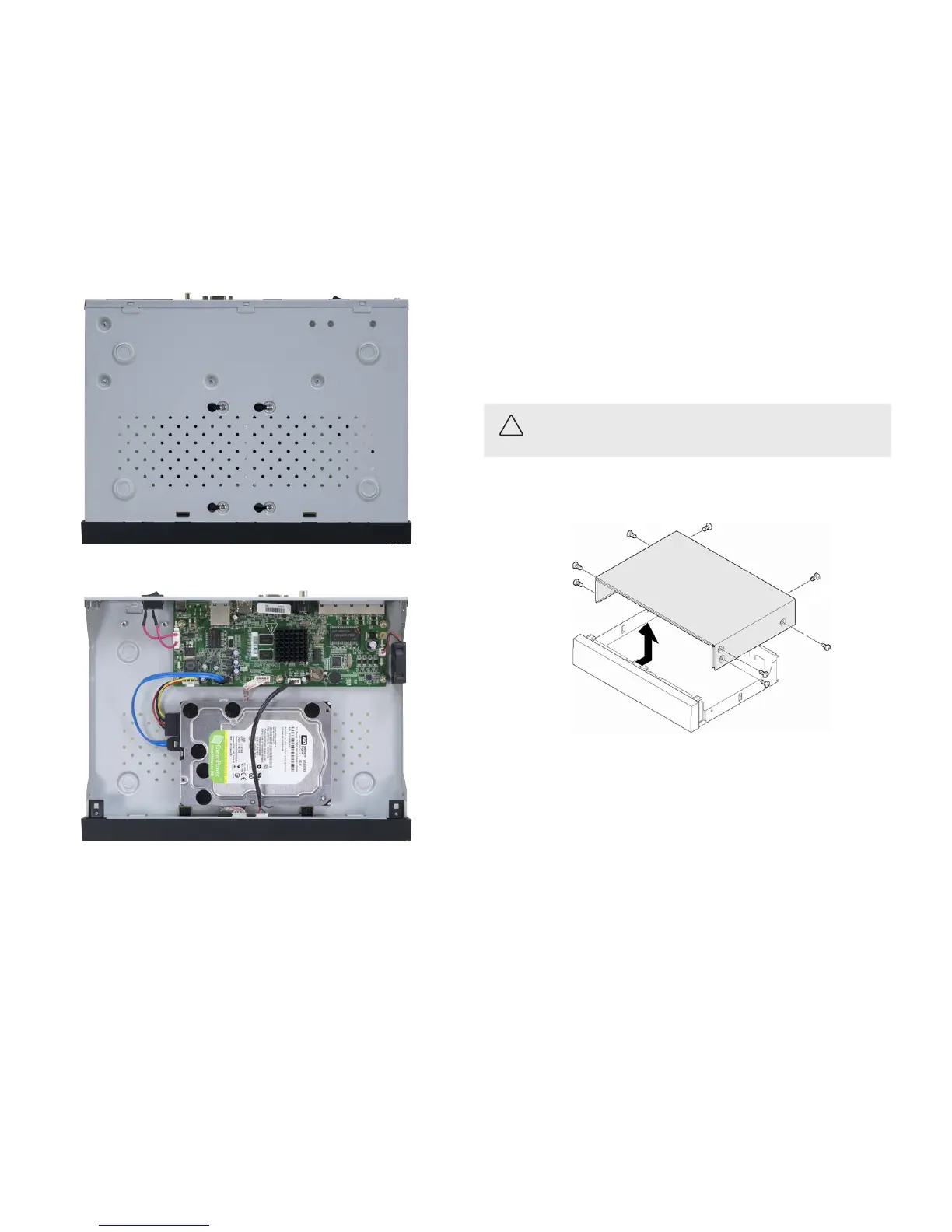
1. Disconnect all cables from the recorder, and then set the recorder on a clean, static free surface, top up.
2. Remove the top cover from the recorder by removing the cover screws on the back of the chassis, and each side.
3. Orient the chassis as shown in the picture below. Become familiar with the locations of the HDD mounting screws for HDD 1 (initial
HDD) and HDD 2 (second HDD), and the location of the HDD 1 SATA connector on the PC board.
8. Turn the chassis over, and then attach the HDD power cable and SATA cable to the mating connectors on the HDD and PC board. These
connectors must be fully seated.
9. Reinstall the DVR cover using the cover using the screws removed earlier.
10. During the DVR initialization, follow the options in the Wizard to initialize/reformat the HDD. You can also initialize the HDD using
the Menu | HDD feature. For more information, refer to the ALIBI Embedded Network Video Recorder Firmware V3.3.4 User
Manual available for download from your vendor.



 To Next Page