Need help?
Do you have a question about the Alienware x15 R2 and is the answer not in the manual?
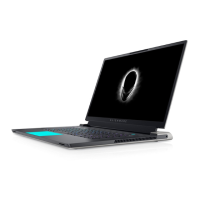
Details microphones, RGB-infrared camera, and status light on the display.
Describes the universal audio jack located on the right side.
Describes the power-adapter port located on the left side.
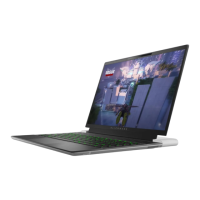
Details touchpad, click buttons, and the power button on the top.
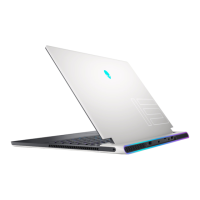
Lists various USB, Thunderbolt, microSD, and HDMI ports on the back.
Describes the left and right speakers and the service tag label on the bottom.
Lists height, width, depth, and weight of the computer.
Details supported processors, wattage, cores, speed, and cache.
Details chipset specifications including DRAM bus width and PCIe bus.
Lists supported operating systems (Windows 11 Home/Pro).
Specifies memory slots, type, speed, and configurations.
Lists network, USB, audio, and video ports on the exterior.
Details the microSD-card slot and supported card types.
Lists internal slots like M.2 for SSDs.
Details the WLAN module, transfer rate, and wireless standards.
Details audio controller, speaker specs, and interfaces.
Lists storage options and M.2 drive specifications.
Details keyboard type, layout, keys, and size.
Lists camera resolution, type, sensor, and viewing angle.
Details touchpad resolution, dimensions, and gestures.
Lists power adapter specifications like type, wattage, and input/output.
Details battery type, voltage, weight, dimensions, and charging.
Lists display panel technology, resolution, brightness, and refresh rates.
Details the integrated graphics controller and memory.
Lists discrete graphics controllers, memory size, and type.
Specifies environmental conditions for operation and storage.
Explains function key usage and multimedia controls.
Describes programmable macro keys for custom actions.
Details keys for mute microphone/speakers and volume control.
Lists online resources like Alienware website and My Dell app.
Provides information on how to contact technical support.
This document provides the setup and specifications for the Alienware x15 R2, a high-performance gaming laptop designed for an immersive user experience. It covers various aspects of the device, from its physical layout and connectivity options to its advanced features and support resources.
The Alienware x15 R2 is a portable computing device primarily designed for gaming and demanding applications. It integrates a powerful processor, advanced graphics processing unit (GPU), and a high-resolution display to deliver a smooth and visually rich experience. The laptop features a comprehensive set of input/output ports for connecting external devices, displays, and networks, ensuring versatility for various user needs. Its audio system is designed to provide clear sound for both gaming and multimedia consumption. The device also incorporates AlienFX lighting, allowing users to customize the aesthetic appeal of their system with a wide array of colors and effects across multiple zones, including the keyboard and power button. This customization extends to performance management, sound management, and thermal controls through the Alienware Command Center (AWCC) software, which serves as a central hub for optimizing the gaming environment.
The Alienware x15 R2 is designed for ease of setup and immediate use. Users can quickly connect the power adapter and press the power button to start the computer. For wired network connectivity, a USB Type-C Ethernet dongle is provided, which connects to the Thunderbolt 4 port. The laptop's display features an RGB-infrared camera for Windows Hello facial recognition and standard RGB imaging, along with dual microphones for audio input during calls and recordings. A camera-status light indicates when the camera is active, ensuring privacy.
The input devices include a responsive touchpad with left-click and right-click buttons, allowing for precise navigation and interaction. The power button, uniquely designed as an Alien head, not only turns the computer on and off but also supports sleep and hibernate states. Its behavior can be customized through Windows settings. The keyboard is a key component of the gaming experience, featuring RGB per-key backlighting for enhanced visibility and aesthetic appeal. It supports various keyboard shortcuts for quick access to functions like adjusting backlight brightness, switching to an external display, launching Bluetooth devices, and controlling display brightness. Additionally, the laptop includes pre-programmable macro keys, enabling users to execute multiple actions with a single key press, which is particularly beneficial for complex gaming commands. Dedicated keys are also available for controlling audio features, such as muting the microphone, muting speakers, and adjusting volume.
Connectivity is a strong suit of the Alienware x15 R2. It includes a USB 3.2 Gen 1 port with PowerShare, allowing users to charge USB devices even when the computer is off or in hibernate state, provided the power adapter is connected and the feature is enabled in the BIOS setup. A Thunderbolt 4.0 port with Power Delivery supports USB4, DisplayPort 1.4, and Thunderbolt 4, offering high data transfer rates and the ability to connect to external displays. It's important to note that for optimal gaming performance with external displays, connecting directly via the HDMI port is recommended, as Thunderbolt ports primarily utilize integrated graphics. A microSD-card slot facilitates reading from and writing to various microSD card types. An additional USB 3.2 Gen 2 Type-C port with DisplayPort 1.4 and Power Delivery provides further connectivity for external devices and displays, supporting faster charging. The HDMI 2.1 port allows for video and audio output to TVs or external displays.
The Alienware Command Center (AWCC) software is integral to the user experience, offering a single interface to customize and enhance gaming. It displays recently played games, provides game-specific information, and allows access to critical settings like themes, profiles, lighting, macros, and audio. AWCC supports AlienFX 2.0, enabling users to create and share game-specific lighting maps and apply individual lighting effects to the computer and attached peripherals. It also includes Fusion features for adjusting power management, sound management, and thermal management, along with Peripheral Management to integrate and control external devices. AWCC provides monitoring capabilities for CPU, GPU, and memory (RAM), helping users keep track of their system's performance.
The manual emphasizes the importance of proper usage and care to maintain the device's performance and longevity. It highlights the low blue light feature, which is enabled by default to minimize eye strain and fatigue, especially during prolonged use. Users are advised to position the display at a comfortable viewing distance, blink frequently, and take regular breaks to look at distant objects to further reduce eye strain.
For optimal power consumption and battery health, Dell recommends regularly charging the battery. If the battery is completely depleted, users should connect the power adapter, turn on the computer, and then restart it to reduce power consumption. The Dell Power Manager application allows users to control charging time, duration, and start/end times, which can help in managing battery health.
The document also provides information on self-help resources, including the Alienware website, My Dell app, and online support for operating systems, diagnostics, drivers, and manuals. Users can leverage their Service Tag or Express Service Code to access relevant support resources tailored to their specific computer. For technical support or customer service issues, users are directed to the Alienware website, with a note that availability of services may vary by country/region. In cases without an active internet connection, contact information can be found on the purchase invoice or Dell product catalog. These resources are designed to help users troubleshoot issues, find solutions, and maintain their device effectively.
 General
| Processor | 12th Gen Intel Core i7-12700H or i9-12900H |
|---|---|
| Graphics | NVIDIA GeForce RTX 3060, 3070 Ti, or 3080 Ti |
| Operating System | Windows 11 Home or Pro |
| Display | 15.6-inch FHD (1920 x 1080) 165Hz or QHD (2560 x 1440) 240Hz |
| RAM | 16GB or 32GB DDR5 |
| Storage | Up to 2TB PCIe NVMe SSD |
| Weight | Starting at 2.36 kg (5.2 lbs) |
| Ports | 1x HDMI 2.1 |
| Wireless | Bluetooth 5.2 |
| Battery | 87Wh Lithium Ion Battery |
| Dimensions | 359.7 x 277.25 x 16.3 mm (14.16 x 10.92 x 0.64 inches) |

 To Next Page