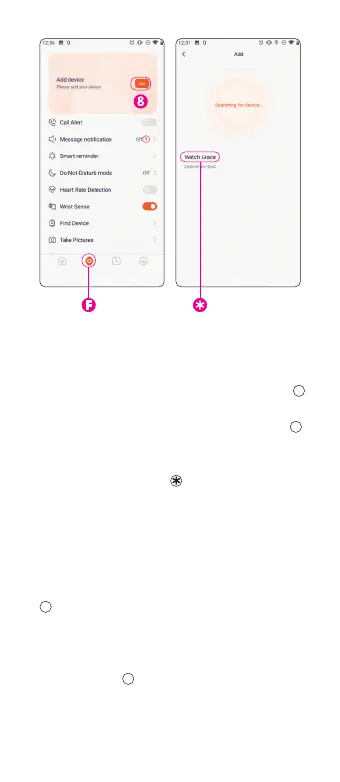
Con n ec t you r wat c h to you r ph on e:
1.
Start the application�
2.
In the app, go to the
watch settings
ta b
F F
�
3.
Bring the switched-on watch close
to your phone and press the
Add button
8 8
at the to p o f t h e sc r e e n�
4.
T h e a p p di s p l ays a lis t of t h e d evice s fo u n d�
5.
Tap
Wa t c h G r a c e
�
6.
The watch is paired� Done!
Display measured data
on your phone
On the home tab of the
Alligator Watch app
G G
, w i l l sh o w y o u th e da t a re c o rd e d
from the watch�
To e d i t the d a t a d i s p l ay e d an d i ts o r d e r,
use the
Ed it Tab
b u t to n at t h e bo t to m
of the screen
9 9
�
70



 To Next Page