Setting notications
on your watch
A n i m p o r ta n t func t i o n of t h e watc h
is notification of incoming calls,
SMS messages, social network messages
and n oti f i c a ti o n s f rom o th e r a p p s�
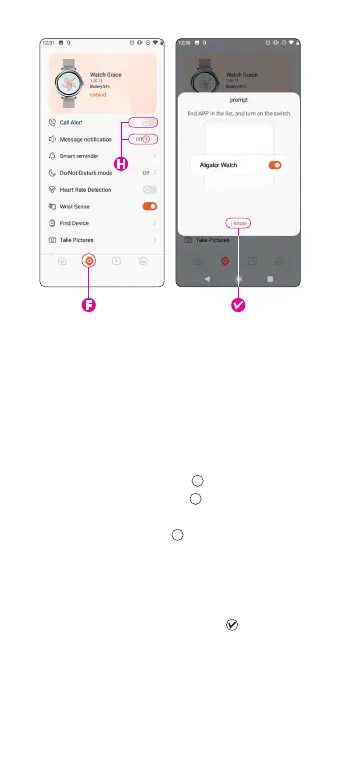
1.
G o to t he s e t t i ngs t a b
F F
�
2.
Select Message alert
H H
�
3.
When you turn on the
Enable
notications toggle
I I
, you’ll see a selection
of notifications that you can activate by
ta p p i n g th e toggl e n ex t to t h e ap p n a m e�
4.
W h e n tur n i n g on n ot i f i c a ti o n s,
th e a p p l i c ati o n m ay a s k fo r di e r e nt ac c e s s
permissions – you must
allow
access
for it to work properly�
The rst ti m e y o u s et it u p, yo u w i l l a l s o s e e a
sc r e e n to a ll o w a c c e s s to not icat i o ns� Tu r n
on the toggle next to
Enable Notications
�
72



 To Next Page