R0368
Cod.R0368‐rev.1.0
(03/2020)
Page 7/14
4.3 ConfigurationofthedefaultSSIDonthefrontWIFIdetectors
AfterconnectingtheservicePCtotheWiFinetworktobeusedasdefault(normallyconnect)presstheAlt+
F3key
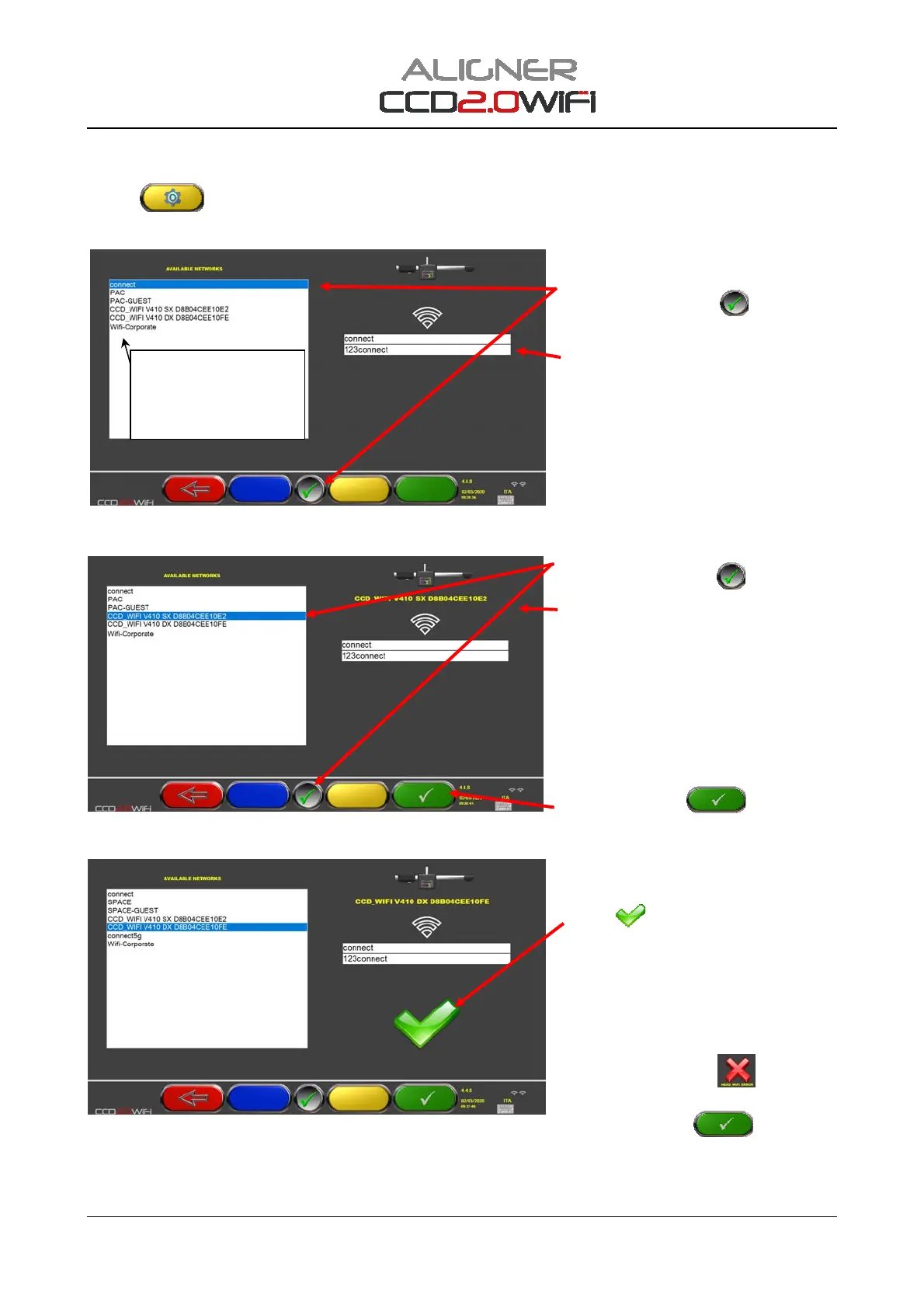
fromtheWiFisearchpage(seeFigure8);accessisgiventotheadvancedconfiguration
page,illustratedinFigure11
Figure11
Figure12
Figure13
ChoosethedefaultSSID(normallyconnect)and
confirmwiththeF5key.
.
TheSSIDisshownontherightside,andbelow
isthepassword.
Checkthatthepasswordiscorrect.
NormallyforSSIDconnectitis"123connect”
Ifnecessarycorrectit.
Selectthedetectorfromthelisteditemsand
confirmwiththeF5key
.
Thechosendetectorisshownintheupper
rightpart.
N.B.thedetectormusthavebeenpreviously
initialised‐seechap.4.2and
itcanberecognisedbyitsname:
CCD_WIFIV410SXXXXXXXXXXXXXo
CCD_WIFIV410DXXXXXXXXXXXXX
SXistheleftdetector;DXistherightdetector
XXXXXXXXXXXXistheMacaddressthatdiffers
foreachdetector.
PresstheF4keyto
confirmthe
configuration.
Waitforthedetectorconfigurationto
completeandcheckthatattheendthetick
symbol
indicatingsuccessoftheoperation
appears.
Repeattheconfiguration(Figure12)alsofor
theotherfrontdetector.
ATTENTION:sometimesitmaybethecasethat
completionofthedetectorconfigurationisnot
successfulandasymbol“
"appearsinplace
ofthetick“
".
TryagaintopressF4
afewtimes,if
necessaryrepeattheprocedurefromthe
beginning(Figure11),
Ifthedesirednetworkdoesnot
appear,waitforthepagetobe
automaticallyrefreshed,possibly
enterandexitthispage.


 To Next Page