
 Need help?
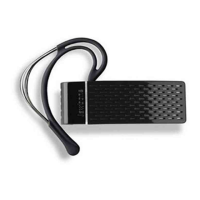
Do you have a question about the Aliph Jawbone and is the answer not in the manual?
Describes Talk Button operations for answering, ending, and volume control.
Describes Noise Shield Button operations for pairing and noise shield control.
Steps to pair Jawbone with a mobile phone, including activating Bluetooth and searching for devices.
Instructions for charging Jawbone using the wall adapter and a 120V outlet.
Instructions for charging Jawbone directly from a PC or MAC via USB.
Step-by-step instructions for pairing Jawbone with Bluetooth-enabled mobile phones.
Instructions on how to answer, end, and manage calls using the Jawbone.
Procedure for powering down the Jawbone headset by pressing and holding the Talk Button.
Using the Noise Shield button to increase volume in six levels.
 General
| Type | Bluetooth Headset |
|---|---|
| Wireless | Yes |
| Noise Shield Technology | Yes |
| Noise Cancelling | Yes |
| Brand | Jawbone |
| Compatibility | Bluetooth-enabled devices |

 To Next Page