OPERATING INSTRUCTIONS
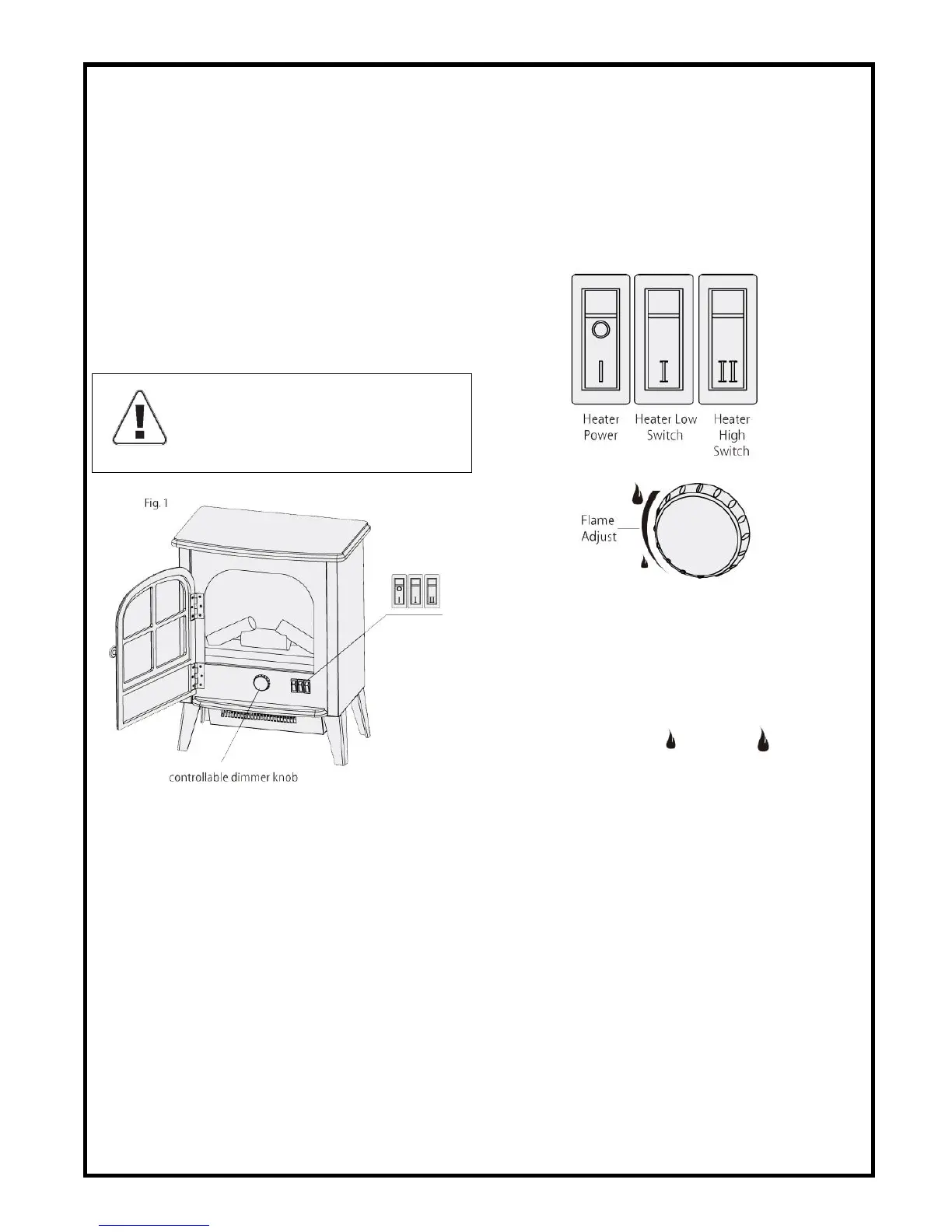
CONTROL PANEL OPERATING PROCEDURES
Once the unit has been properly connected to a
grounded electrical outlet, it is ready to operate.
Note: Ensure the circuit breakers for the power supply
are turned on.
To access the control panel, slowly open the door
located on the front of the heater.(See Fig 1)
HEATER OPERATION (Refer to Fig. 2)
1.Open the door of the unit to locate the control panel.
2.Ensure the power switch is on. You will know that
you have power to the heater when the flame effect is
on.
3.Flip the second rocker switch to the right, marked
“Ⅰ”. This switch gives you 900W of power to your
heater. This switch is for low-level heating. For
high-level heating, make sure that both “Ⅰ” and “Ⅱ”
rocker switches are on.
Fig 2
FLAME OPERATION
1.To switch the flame effect of your heater, flip the
power switch on. You will know that you have power
when the flame effect is on.
2.To adjust the brightness of the flame effect, turn the
left-handed dial, from “Low”, to “High”, until it
reaches the brightness you desire.
CAUTION: TO AVOID INJURY AND/OR
DAMAGE, ALWAYS OPERATE THE
DOOR SLOWLY TO THE OPEN AND
CLOSED POSITION.


 To Next Page