EasyManua.ls Logo

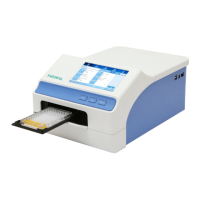
Allsheng AMR-100 - User Manual

Allsheng AMR-100
50 pages
Print Icon
To Next Page IconTo Next Page
Loading...
Operations Manual
Version 2.0
AMR-100
Microplate Reader
Hangzhou Allsheng Instruments Co.,Ltd.

Questions and Answers

Summary

Safety warming and guidelines

Important information for safe use

Critical safety instructions for operating the instrument safely and preventing hazards.

Safety Tips

Practical advice and warnings to ensure safe operation, handling, and environment.

Chapter 2 Features

Chapter 3 Instrument structure

Chapter 4 Installation

Installation

Guidelines for selecting an appropriate working environment and location for the instrument.

Installation steps

Step-by-step instructions for connecting and setting up the instrument.

Chapter 5 Operation guide

Section 2 Program interface

Overview of the main software interface for controlling instrument operations.

File management

Managing program files, including saving, loading, and organizing measurement protocols.

Function button

Control buttons for initiating and managing measurement runs.

Run

Initiates the sample detection and measurement process.

Stop

Stops the ongoing sample detection or measurement.

Plate in;out

Controls the movement of the microplate holder for inserting or removing plates.

Procedure

Guides the user through the steps required for a complete measurement process.

Sample detecting procedure

Detailed steps for preparing and initiating sample detection.

Section 2 Programs setting

Configuration options for creating and customizing measurement programs.

2.1. Mode setting (Measure)

Setting measurement parameters such as wavelength, measurement mode, and layout.

2.2. Layout

Configuration of the microplate layout, defining well types and positions.

2.2.1. Layout

Interface for visually setting up the plate layout and assigning well types.

How to set layout

Instructions on how to select well types and assign them to specific positions on the plate.

Measure

Initiates the measurement after setting the plate layout and parameters.

2.2.2. Standard sample concentration setting

Inputting concentration values for standard samples used in curve fitting.

2.3. Shake setting

Configuration for the plate shaking function to ensure sample homogeneity.

Shake

Enabling or disabling the plate shaking feature.

Speed

Adjusting the speed of the plate shaking function.

2.4. Calculate

Settings for processing and analyzing measurement results.

2.4.1. Kinetic setting

Configuration options for kinetic measurement data processing.

2.6. Quality controls setting

Configuring parameters for quality control checks on measurement runs.

Section 3 Report

Accessing and viewing measurement results and historical data.

2. Kinetics Report interface

Interface for viewing results of kinetic measurements.

Section 4 Settings

Configuration options for instrument settings like language, filters, and time.

2. Filter setting

Configuration of optical filters, including wavelength assignment.

3. Maintenance

Procedures for maintaining the instrument's optimal performance.

Time

Setting the current time on the instrument.

Chapter 6 Maintenance, storage, transportation

Chapter 7 Trouble shooting

Solutions

Recommended steps and actions to resolve identified instrument faults.

Chapter 8 Accessories

Allsheng AMR-100 Specifications

General IconGeneral
BrandAllsheng
ModelAMR-100
CategoryLaboratory Equipment
LanguageEnglish

Related product manuals