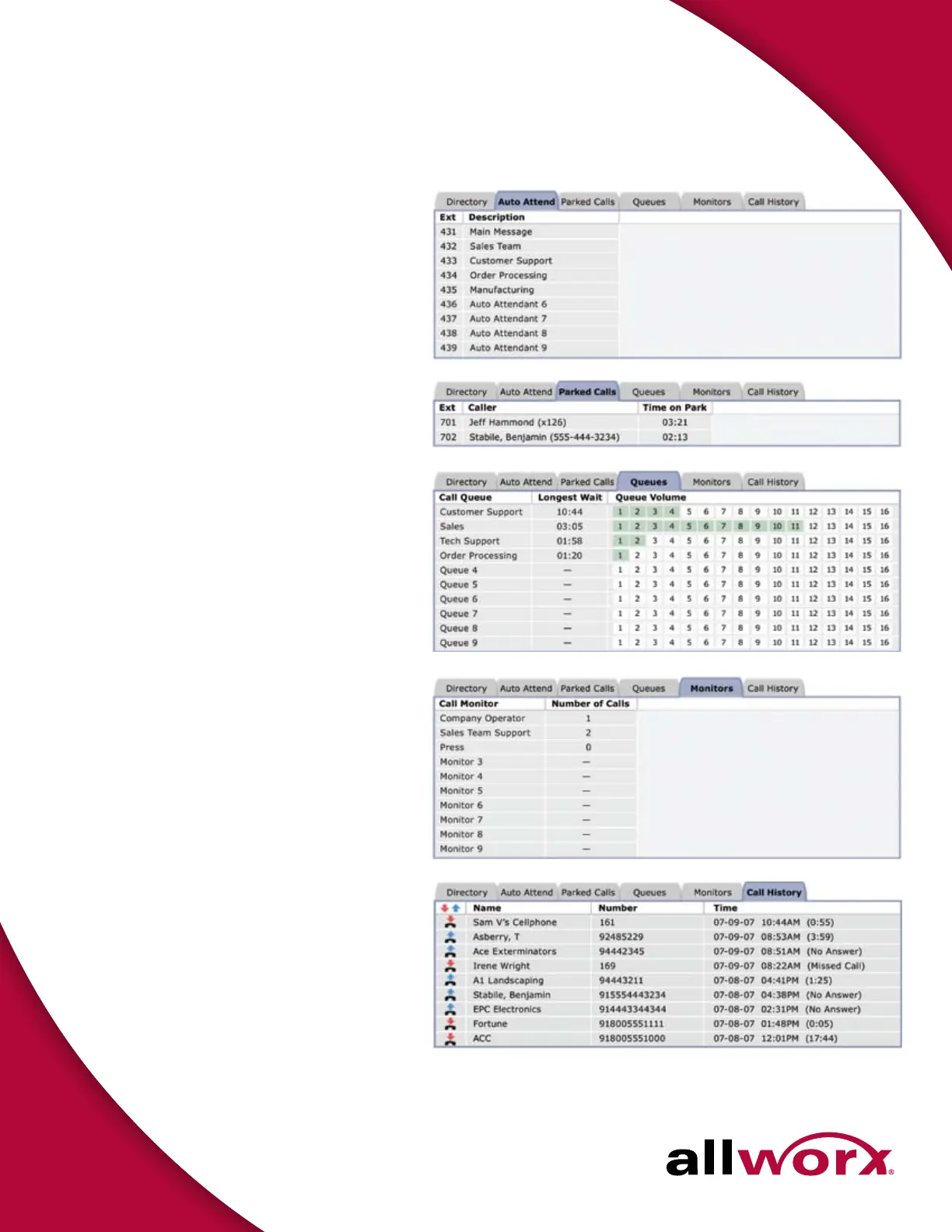
Auto Attendant
Lists all Auto Attendants so that the user can transfer
calls to specific Auto Attendants to assist the caller (e.g.,
transfer a customer who is interested in buying a product
to the sales team; the Auto Attendant “Sales Team” will
have specific options and appropriate call routes in place).
Queues
1
Lists all Call Queues, including Longest Wait Time and
Queue Volume. User can either transfer a call to a specific
queue or answer a queue.
Parked Calls
Lists all Parked Calls currently in the system. User can
pick up any parked call.
Monitors
Lists all Call Monitors including the number of callers
ringing on each Monitor. User can transfer a call to a Call
Monitor or answer a Call Monitor.
Call Monitors offer an easy way to enable an incoming call to directly
ring a group of phones. Multiple calls to the Call Monitor wait to be
answered in the order received. However, these calls benefit from a
“live answer” as an alternative to making the caller wait and listen to
queue announcements (e.g., Call Queues). A business might set up a
Call Monitor to live-answer all incoming calls to the sales team or when
multiple users can answer as the operator.
Call History
Lists all calls that have been dialed and received by user.
Blue up arrow indicates outbound call and red down
arrow indicates incoming call. Shows Caller ID (name and
number, if available), time of call and length of call.
1. Sold as an option.
Designed to work with Allworx systems.
300 Main Street • East Rochester, NY 14445 • Toll Free 1-866-ALLWORX • 585-421-3850 • www.allworx.com
P/ N: 8520083-06 © 2008 Allworx Corp, a wholly owned subsidiary of PAETEC Holding Corp. All rights reserved. All other names may be trademarks or registered trademarks of their respective owners.
Allworx Call Assistant Switchboard Tabs
System Requirements
Allworx Call Assistant requires Windows™ 2000, Windows XP or Windows Vista
operating system, an Allworx phone, and an Allworx system.
1. Sold as an Allworx option.
Footnotes



 To Previous Page