EasyManua.ls Logo

Alnor EBT731 - User Manual

Default Icon
69 pages
Print Icon
To Next Page IconTo Next Page
Loading...
ALNOR
®
ELECTRONIC
BALANCING TOOL
MODELS EBT730/EBT731
OWNER’S MANUAL
P/N 6005725, REV D
OCTOBER 2014
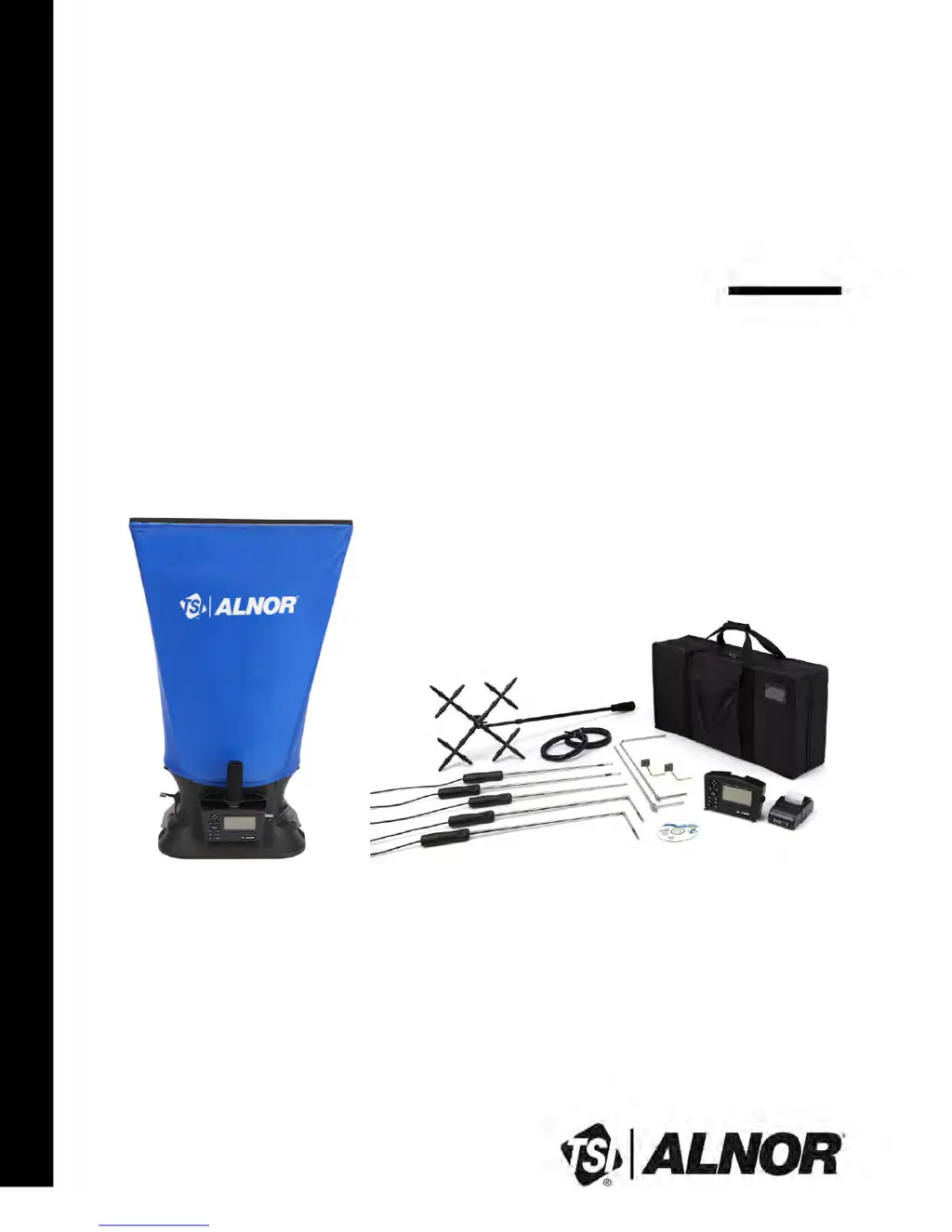
Model EBT731 Balometer
®
Model EBT730 Micromanometer
Air Balancing Instrument (shown with standard and optional accessories)
www.GlobalTestSupply.com
Find Quality Products Online at: sales@GlobalTestSupply.com

Table of Contents

Questions and Answers

  • K
    Kayla GibsonAug 8, 2025
    How to fix no display on Alnor Measuring Instruments?
    • J
      Joshua PetersonAug 8, 2025
      If your Alnor Measuring Instruments display is blank, here are a few things to check: 1. Ensure the unit is turned on by pressing the I/O key. 2. Check the batteries. They might be low, dead, or have dirty contacts. Replace or clean them as needed. 3. If you're using an AC adapter, make sure it's properly connected.
  • K
    kevindicksonAug 19, 2025
    What to do if '------' appears on the display for velocity or volume on Alnor EBT731?
    • A
      Angela WestAug 19, 2025
      If you see "------" on the display for velocity or volume on your Alnor Measuring Instruments, it means a valid temperature reading is required to perform the standard or actual velocity/volume correction. To fix this, ensure a temperature-measuring probe is connected to the meter. Alternatively, you can set “Temp Source” to “Entered” in the Actual/Std menu and manually enter the temperature.
  • J
    Julie MillerAug 28, 2025
    Why is '888888' flashing on the display of my Alnor EBT731 Measuring Instruments?
    • B
      Benjamin HarmonAug 28, 2025
      If your Alnor Measuring Instruments show '888888' flashing on the display, it indicates that the pressure is too high to measure. Check the specifications page for the maximum pressure limit.

Summary

About This Manual

Technical Assistance and Help

Provides contact information for technical support, repair, and recalibration services.

Introduction to Electronic Balancing Tools

Instrument Description and Features

Details the components and features of the EBT730/EBT731 micromanometer and its accessories.

Unpacking and Setting Up the EBT

Preparing the Micromanometer for Use

Guides on powering the micromanometer using AC adapter or batteries and selecting battery type.

Getting Started with the Micromanometer

Understanding Keypad Functions

Explains the function of each key on the micromanometer for operation and navigation.

Menu Setup and Navigation Guide

Setting Up Flow Measurements

Guides for configuring flow measurement parameters like duct type and K-factors.

Data Logging Modes and Configuration

Explains different data logging modes (Manual, Auto-Save, Continuous) and settings.

Instrument Calibration Procedures

Information on field calibration for temperature, velocity, humidity, and pressure.

Changing and Assembling Capture Hoods

Performing Flow Measurements with Capture Hood

Single Reading Flow Measurements

Procedure for taking individual flow measurements using the capture hood.

Backpressure Compensated Flow Measurements

Procedure for accurate flow measurement accounting for hood-induced backpressure.

Maintenance and Troubleshooting Guide

Instrument Calibration Recommendations

Information on annual calibration services and procedures for returning the instrument.

Duct Traversing Techniques for Air Velocity

Traversing Round Ducts with Log-Tchebycheff

Method for measuring air velocity in round ducts using concentric measurement points.

Traversing Square Ducts with Log-Tchebycheff

Method for measuring air velocity in rectangular ducts using grid-based measurement points.

Alnor EBT730;EBT731 Specifications

Alnor EBT731 Specifications

General IconGeneral
BrandAlnor
ModelEBT731
CategoryMeasuring Instruments
LanguageEnglish

Related product manuals