EasyManua.ls Logo

Alpha ESS M4856-P - Error Code Troubleshooting Guide

Alpha ESS M4856-P
29 pages
Print Icon
To Next Page IconTo Next Page
To Previous Page IconTo Previous Page
Loading...
______________________________________________________________________
Alpha ESS Co., Ltd.
Page 20 of 29
Your Smart Energy
Switch On/Off and Display
3. Switch On/Off and Display
Switch On/Off
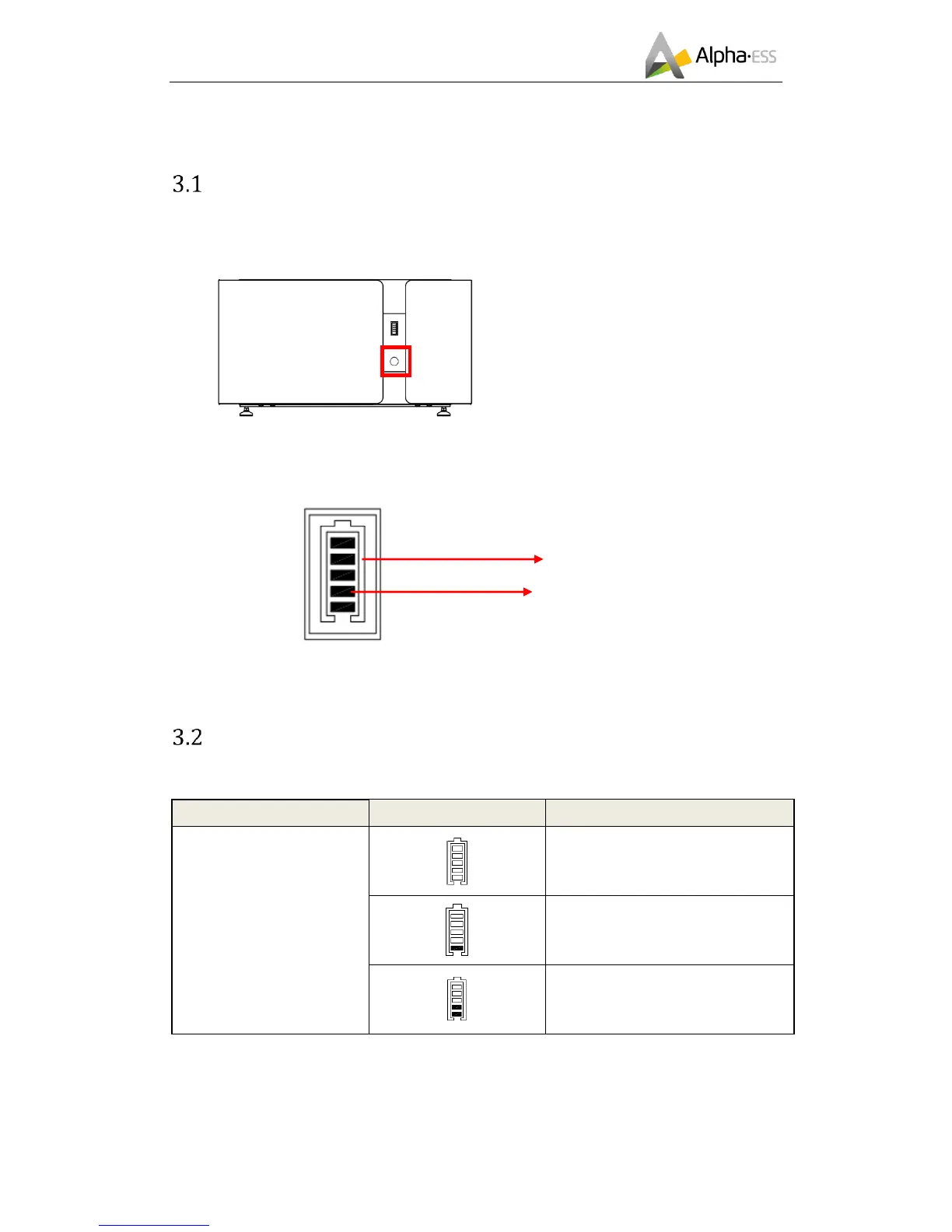
System shall be turned on in the correct sequence to avoid any damage.
Figure 2 M4856-P Switch
Switch on:
Pressing the power button for about 2-4
seconds. The BMS will start up. The LED
display and power button will light up as
well.
Switch off:
Pressing the power button for >5
seconds, Turns off battery modules.
NOTE: when the battery is working
pressing the power button for <5
seconds, LCD display will light up for
30 seconds.

Figure 3 LED Display
LED Display
In normal condition, LED display indicates the SOC as the figure below:
LED Ring
SOC
Description
Standby:
Green light flickering 1 s
Work:
Green light flickering 10s
SOC<5%
5%=<SOC<25%
25%=<SOC<50%
LED Ring
State

Other manuals for Alpha ESS M4856-P

Related product manuals