4
EasyStat
5. User Instructions - see Figs. 5 and 6
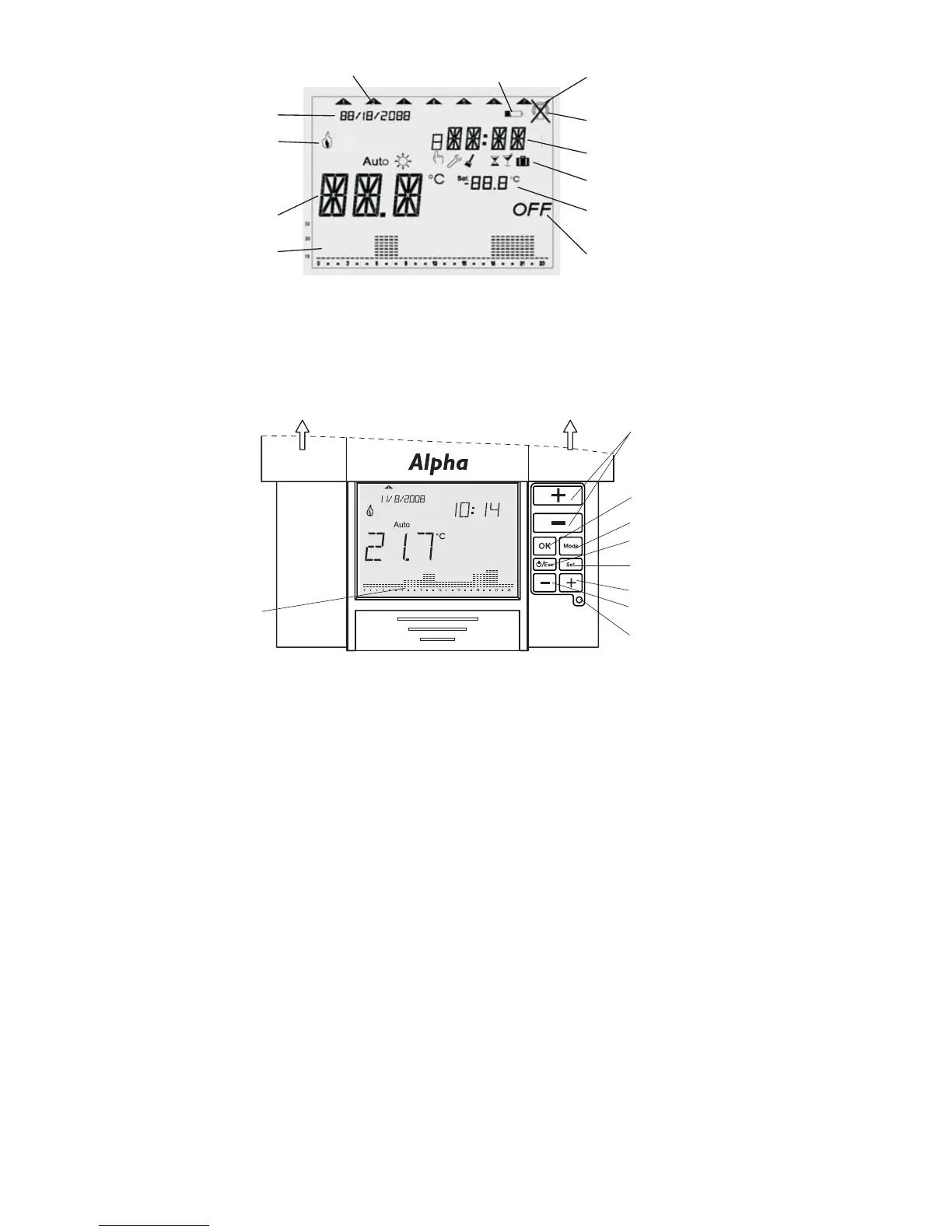
Slide the front cover upwards as shown in Fig. 6 to access the control panel.
a. Set Date
Press the Set button until DATE Menu is displayed. Press the OK button to enter the date
menu.
Press the Increase (+) or Decrease (-) button to set the current year, then press OK.
Press the Increase (+) or Decrease (-) button to set the month, then press OK.
Press the Increase (+) or Decrease (-) button to set the day, then press OK.
b. Set Time
Press the Set button until DATE Menu is displayed. Press the Increase (+) button until TIME
Menu is displayed. Press the OK button to enter the time menu.
Press the Increase (+) or Decrease (-) button to set the current hour, then press OK.
Press the Increase (+) or Decrease (-) button to set the minutes, then press OK.
Fig. 6 - Control panel
Temperature
Increase/Decrease
Modes
Date/Time/Programmes set
Reset
Confirm values
ON/OFF/Escape
Forward (+)
Fig. 5 - Display
Current day of the week
Radio signal
Low battery
Current time
Status/mode indication
Set temperature
Current date
Current temperature
Status (OFF)
Time/temperature
over 24 hours
ON
No radio signal
when battery low
Backward (-)
Slide front cover upwards to access contol panel
Time/Temperature
programme


 To Next Page