ATTENTION
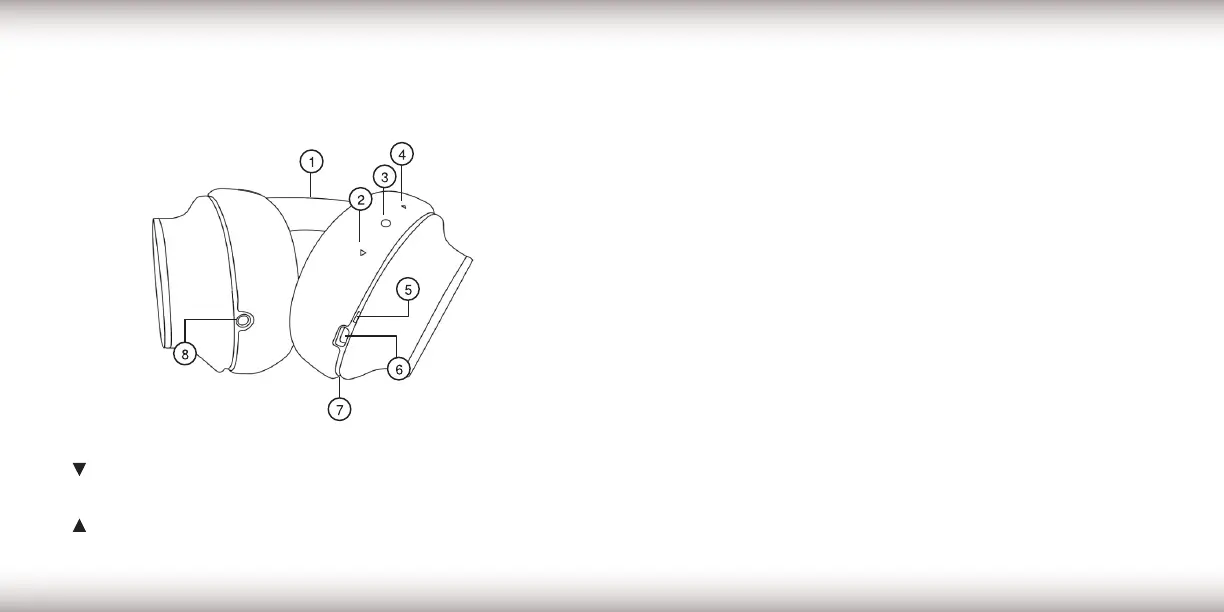
The control buttons are located on the outer-side of the
earpad cushion.
1. Headset
2.
/ - - Button
3. On/Off / Multi Function Button
4.
/+ - Button
5. Status LED Indicator
6. Micro-USB Connector
7. Microphone
8. 3.5mm WIRED Input
HEADPHONE REQUIREMENTS
– Bluetooth source device must be Bluetooth 4.0 or higher.
– Micro USB Charging requirements: 5V / 500mA.
ATTENTION
Fully charge the headset before using for the rst time.
– The headset can be used while charging. The
LED will continue to ash red during charge.
CHARGING
1. Connect the micro USB cable to your headset and a
compatible USB power source.
2. During the charging process, the status LED will
illuminate red.
3. When the headset is fully charged, the status LED will
illuminate green. Disconnect your headset from the
power source.
LOW BATTERY
When the headsets battery becomes low, an audible
warning will be announced to charge the unit soon.
PRODUCT DETAILS CONTINUEDPRODUCT DETAILS
4 5


 To Next Page