ATTENTION
This process only needs to be programmed once. After successfully
programming the headset the unit will automatically connect to the
device when in Bluetooth range and is enabled.
1. Activate the Bluetooth function on your compatible device.
2. Press and hold down the On / Off multi function button for ve
seconds. The status LED will start to ash RED and BLUE
alternately.
3. Search for V50BT in the list of the compatible device and
select connect to device.
4. The statue LED will start to ash BLUE slowly after a
successful connection.
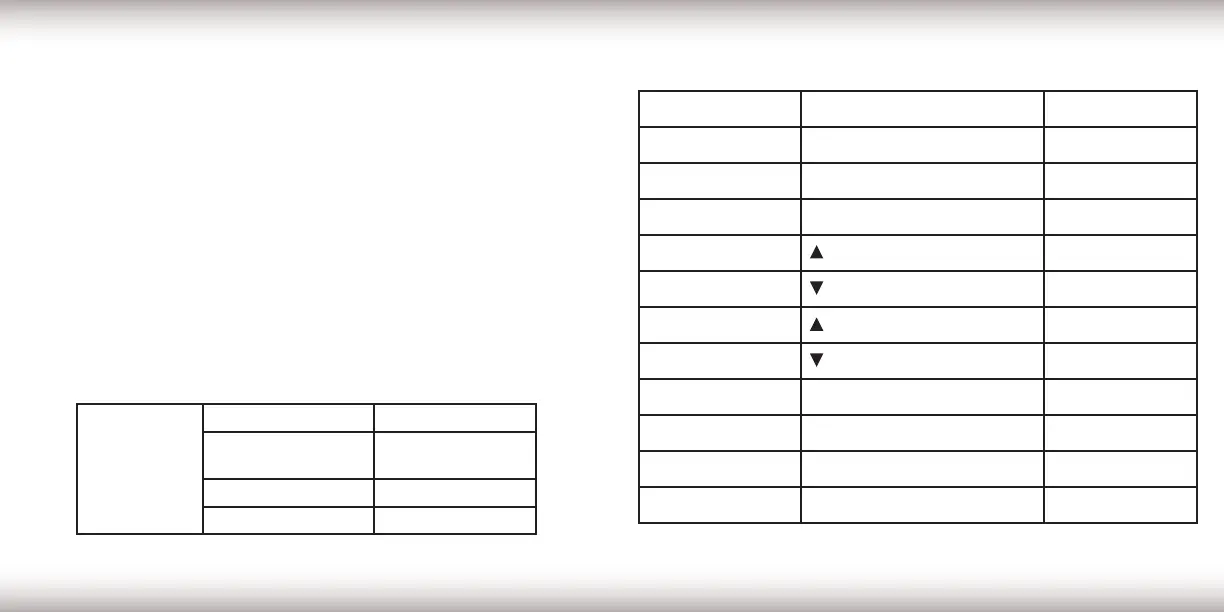
LED INDICATOR
STATUS LED
Flashes Red & Blue In pairing mode
Blinks Blue Slowly
Connected to
compatible device
Illuminates Red Headset Charging
Illuminate Green Headset Charged
CONTROLS BUTTONS ACTION
Turn On On/Off Multi function button Press for 3 secs.
Pairing Mode On/Off Multi function button Press for 5 secs.
Play / Pause On/Off Multi function button Short Press
Volume UP
/+ - Button
Long Press
Volume DOWN
/+ - Button
Long Press
Next Track
/+ - Button
Short Press
Previous Track
/+ - Button
Short Press
Accept a Call On/Off Multi function button Short Press
Reject a Call On/Off Multi function button Press for 2 secs.
End Call
On/Off Multi function button
Short Press
Turn Off On/Off Multi function button Press for 3 secs.
CONTROLSBLUETOOTH CONNECTION
6 7


 To Next Page