22
Temperature compensation setting
Displayed temperature = detected temperature + temperature compensation
Setting Function Setting
range
Factory
default
E6 Temperature compensation for
temperature set ≥7
-10~10 0
E7 Temperature compensation for
temperature set -7 ~-12
-10~10 0
E8 Temperature compensation for
temperature set ≤-13
-10~10 0
Resetting the factory default
Press the SET button until E1 is displayed. Then press the UP and DOWN buttons at the
same time until 888 is displayed. Then all the data return to the factory default.
OPERATION
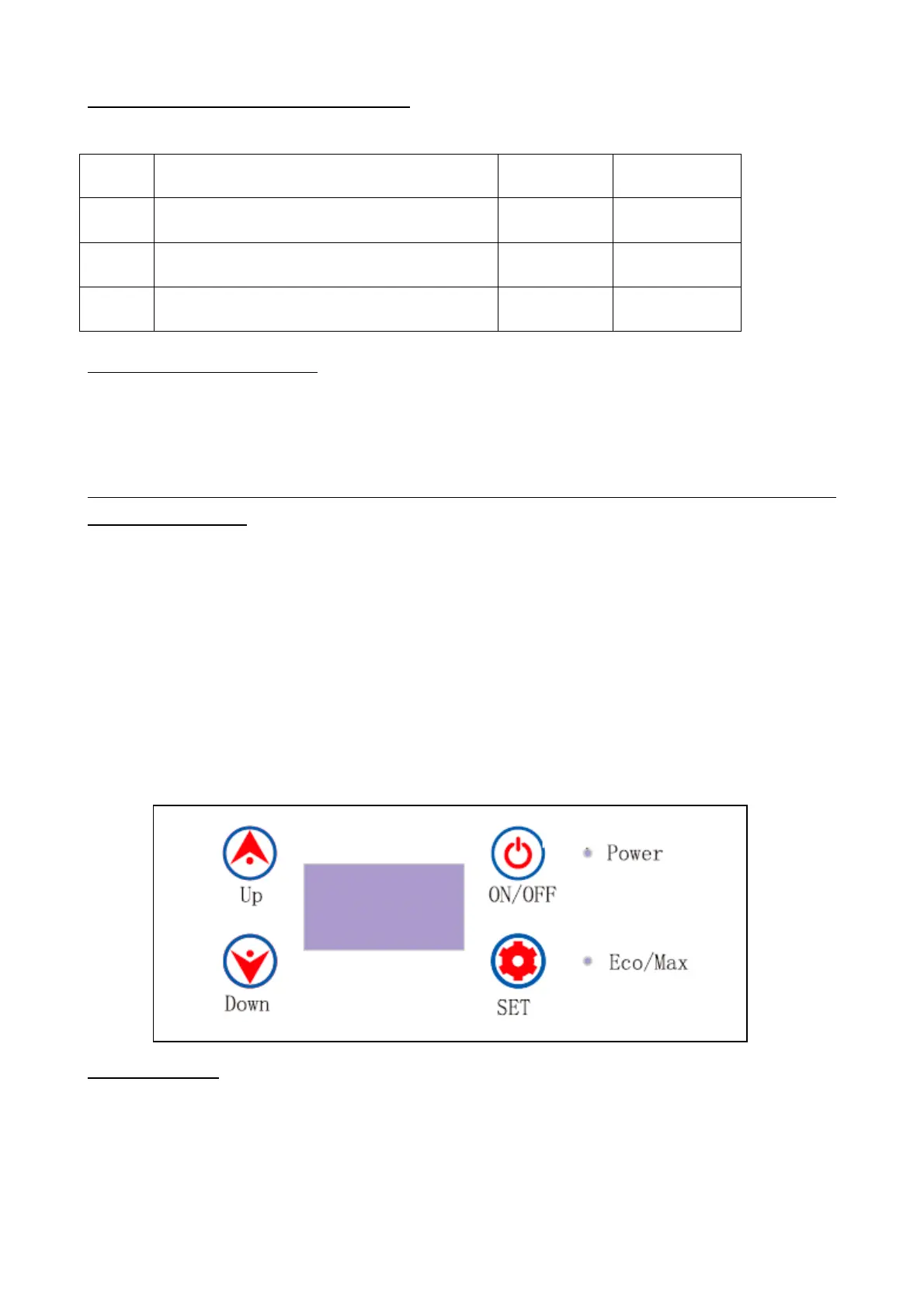
Button functions:
ON/OFF: power on/off
- Press the ON/OFF button for 3 seconds to start the appliance.
- Press the ON/OFF button again for 3 seconds to turn off the appliance.
UP/DOWN: adjust temperature
- Press the UP button to increase temperature or DOWN button to decrease temperature.
SET: energy-saving mode
- Press the SET button to enter the energy-saving mode:
ECO (energy-saving mode)
HH (quick cooling mode)
Indicator light
- Power indicator light in red: the compressor is stopped.
- Power indicator light in green: the compressor is working.
- Eco/Max indicator light in red: quick cooling mode is set.
- Eco/Max indicator light in green: energy-saving cooling is set.



 To Next Page