EasyManua.ls Logo

Alpine 3672 - Configuring CH 1;2 and CH 3;4 Outputs

Alpine 3672
31 pages
Print Icon
To Next Page IconTo Next Page
To Previous Page IconTo Previous Page
Loading...
3672
|
CH
1/2
OUTPUTS:
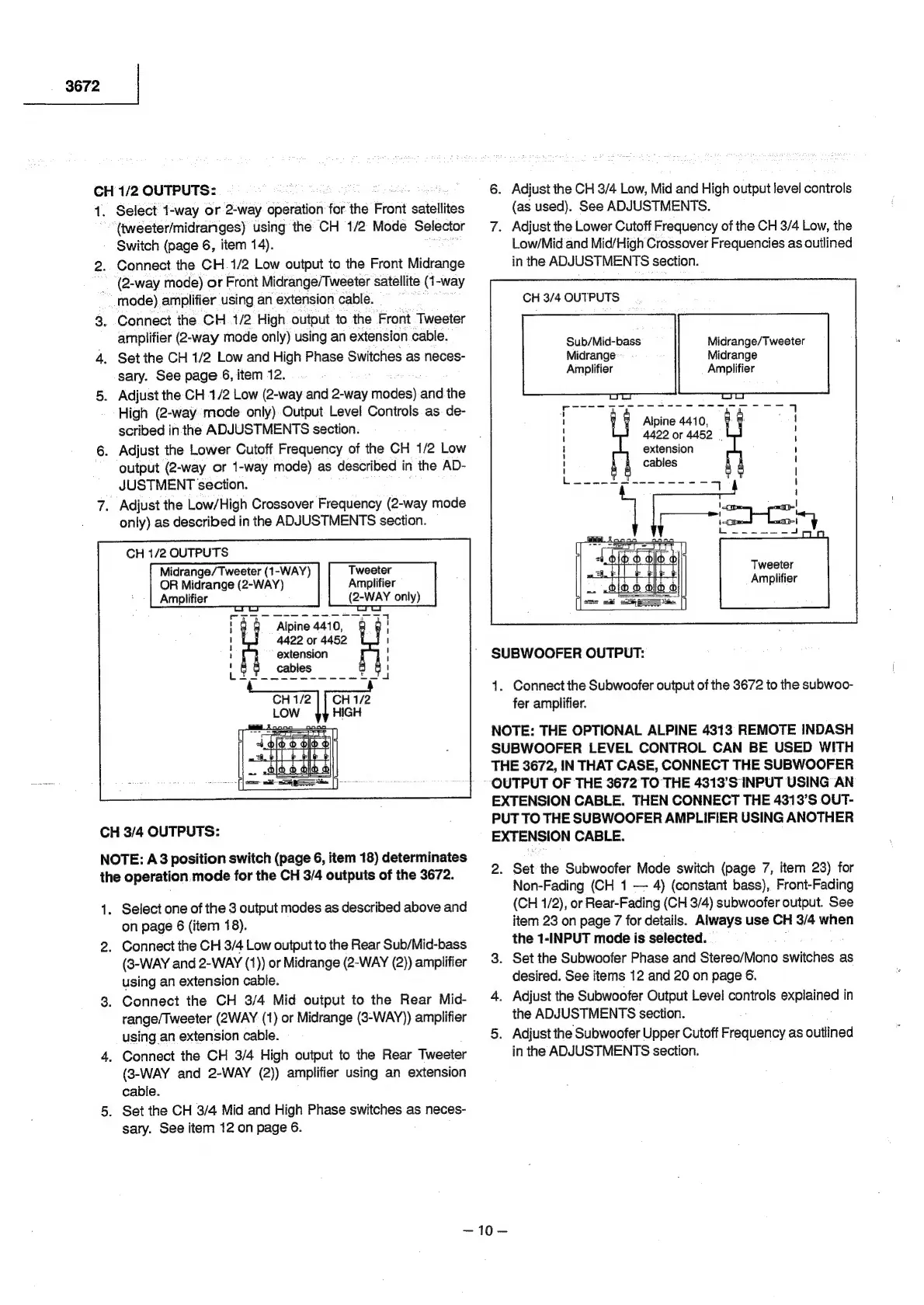
1.
Select
1-way
or
2-way
operation
for
the
Front
satellites
(tweeter/midranges)
using
the
CH
1/2
Mode
Selector
Switch
(page
6,
item
14).
2.
Connect
the
CH.1/2
Low
output
to
the
Front
Midrange
(2-way
mode)
or
Front
Midrange/Tweeter
satellite
(1-way
mode)
amplifier
using
an
extension
cable.
3.
Connect
the
CH
1/2
High
output
to
the
Front
Tweeter
amplifier
(2-way
mode
only)
using
an
extension
cable.
4.
Set
the
CH
1/2
Low
and
High
Phase
Switches
as
neces-
sary.
See
page
6,
item
12.
5.
Adjust
the
CH
1/2
Low
(2-way
and
2-way
modes)
and
the
High
(2-way
mode
only).Output.
Level
Controls
as
de-
scribed
in
the
ADJUSTMENTS
section.
6.
Adjust
the
Lower
Cutoff
Frequency
of
the
CH
1/2
Low
output
(2-way
or
1-way
mode)
as
described
in
the
AD-
JUSTMENT
section.
7.
Adjust
the
Low/High
Crossover
Frequency
(2-way
mode
only)
as
described
in
the
ADJUSTMENTS
section.
CH
1/2
OUTPUTS
Midrange/Tweeter
(1-WAY)
OR
Midrange
(2-WAY)
Amplifier
Tweeter
Amplifier
(2-WAY
only)
Alpine
441
0,
4422
or
4452
extension
=
t
\
I
1
i)
i}
L
CH
3/4
OUTPUTS:
NOTE:
A3
position
switch
(page
6,
item
18)
determinates
the
operation
mode
for
the
CH
3/4
outputs
of
the
3672.
1.
Select
one
of
the
3
output
modes
as
described
above
and
on
page
6
(item
18).
2.
Connect
the
CH
3/4
Low
output
to
the
Rear
Sub/Mid-bass
(8-WAY
and
2-WAY
(1))
or
Midrange
(2-WAY
(2))
amplifier
using
an
extension
cable.
3.
Connect
the
CH
3/4
Mid
output
to
the
Rear
Mid-
range/Tweeter
(2WAY
(1)
or
Midrange
(3-WAY))
amplifier
using
an
extension
cable.
4.
Connect
the
CH
3/4
High
output
to
the
Rear
Tweeter
(8-WAY
and
2-WAY
(2))
amplifier
using
an
extension
cable.
5.
Set
the
CH
3/4
Mid
and
High
Phase
switches
as
neces-
sary.
See
item
12
on
page
6.
6.
Adjust
the
CH
3/4
Low,
Mid
and
High
output
level
controls
(as
used).
See
ADJUSTMENTS.
7.
Adjust
the
Lower
Cutoff
Frequency
of
the
CH
3/4
Low,
the
Low/Mid
and
Mid/High
Crossover
Frequencies
as
outlined
in
the
ADJUSTMENTS
section.
CH
3/4
OUTPUTS
Sub/Mid-bass
Midrange
Amplifier
Midrange/Tweeter
Midrange
Amplifier
Alpine
4410,
4422
or
4452
|
extension
cables
Tweeter
Amplifier
SUBWOOFER
OUTPUT:
1.
Connect
the
Subwoofer
output
of
the
3672
to
the
subwoo-
fer
amplifier.
NOTE:
THE
OPTIONAL
ALPINE
4313
REMOTE
INDASH
SUBWOOFER
LEVEL
CONTROL
CAN
BE
USED
WITH
THE
3672,
IN
THAT
CASE,
CONNECT
THE
SUBWOOFER
~
OUTPUT
OF
THE
3672
TO
THE
4313'S
INPUT
USING
AN
EXTENSION
CABLE.
THEN
CONNECT
THE
4313'S
OUT-
PUT
TO
THE
SUBWOOFER
AMPLIFIER
USING
ANOTHER
EXTENSION
CABLE.
2.
Set
the
Subwoofer
Mode
switch
(page
7,
item
23)
for
Non-Fading
(CH
1
4)
(constant
bass),
Front-Fading
(CH
1/2),
or
Rear-Fading
(CH
3/4)
subwoofer
output.
See
item
23
on
page
7
for
details.
Always
use
CH
3/4
when
the
1-INPUT
mode
is
selected.
3.
Set
the
Subwoofer
Phase
and
Stereo/Mono
switches
as
desired.
See
items
12
and
20
on
page
6.
4.
Adjust
the
Subwoofer
Output
Level
controls
explained
in
the
ADJUSTMENTS
section.
5.
Adjust
the
Subwoofer
Upper
Cutoff
ESAS
as
outlined
in
the
ADJUSTMENTS
section.

Related product manuals