EasyManua.ls Logo

Alpine 3672 - System Adjustments; General Requirements for Adjustment; RTA-Based Adjustment Procedure

Alpine 3672
31 pages
Print Icon
To Next Page IconTo Next Page
To Previous Page IconTo Previous Page
Loading...
3672
|
Adjustments
GENERAL
REQUIREMENTS:
The
Alpine
3672
is
a
very
precise
and
versatile
piece
of
equipment.
It
should
be
adjusted
by
an
autosound
specialist
who
possesses
the
knowledge
and
the
tools
to
accomplish
this
task
accurately.
It
would
be
helpful
to
use
a
Real
Time
Analyzer
(such
as
Alpine
4780),
but
it
is
not
absolutely
nec-
essary.
*
Itis
imperative
to
have easy
access
to
the
3672
while
it
is
being
adjusted.
If
it
is
to
be
mounted
permanently
in
a
location
which
will
not
allow
easy
access,
it
willbe
neces-
sary
to
temporarily
relocated
the
unit
by
using
long
audio
and
power
extension
wires.
*
Before
any
adjustments
can
be
made,
all
stereo
system
components
(except
for
the
3672)
must
be
permanently
mounted
in
their
locations,
and
the
passenger
compart-
ment
should
be
completely
reassembled,
as
removed
door
panels
or
seats
will
affect
the
frequency
response
of
the
vehicle's
interior.
*
The
vehicle’s
doors
should
be
closed
and
windows
rolled
up.
This
may
require
temporary
relocation
of
the
3672
outside
the
vehicle’s
passenger
compartment
(if
it
is
to
be
permanently
mounted
there)
using
long
extension
wires.
*
The
trunk
can
be
left
open
if
the
passenger
compartment,
including
all
the
speakers
and
speaker
enclosures,
are
sealed
off
from
the
trunk.
*
Check
the
component
speakers’
specifications
for
their
rated
frequency
response.
The
active
crossover
frequen-
cies
used
for
each
speaker
must
fall
within
its
frequency
response.
For
example,
a
mid-bass
woofer
rated
from
60Hz
to
300Hz
must
not
be
driven
with
frequencies
lower
than
60Hz
or
higher
than
300Hz.
Otherwise,
the
sound
quality
will
be
severely
degraded
and
speaker
damage
may
also
result.
Therefore,
tentatively
adjust
the
3672
crossover
points.
not
to
exceed
the
frequency
response
of
the
drivers
and
remember
to
stay
with
in
these
boundaries
during
the
adjustment
procedure.
RTA
REQUIREMENTS
AND
SET-UP
*
It
will
be
most
convenient
to
have
the
3672
as
close
as
possible
to
the
RTA
during
adjustments
as
it
is
easier
to
monitor
the
changes
made
by
each
control.
*
This
RTA
should
cover
at
least
20Hz
to
20kHz
in
at
least
one-octave
increments.
It
should
also
possess
the
ability
to
analyze
and
display
frequency
response
at
100dB
or
more
Sound
Pressure
Level
(SPL).
*
As
there
are
many
different
makes
and
models
of
Real
Time
Analyzers,
it
would
be
impractical
to
define
set-up
procedures
for
a
specific
unit.
Therefore,
you
will
need
to
familiarize.
yourself.with
the
particular
model
of
RTA
you
will
be
using
to
adjust
the
3672.
The
RTA’s
owner’s
manual
can
provide
all
the
necessary
information.
Alpine’s
4780
Third
Octave
Analyzer
can
provide
excellent
accuracy,
versatility
and
ease
of
operation.
«x
Ahigh
quality,
calibrated
microphone.
should
be
used
with
the
RTA.
The
RTA
manufacturer
can
recommend
a
suit-
able
model.
This
microphone
should
have
a
very
flat
response
throughout
the
audio
bandwidth
(20Hz
to
20kHz).
The
Alpine
4780
RTA
includes
a
calibrated
mi-
crophone.
NOTE:
RTA
adjustments
must
be
done
in
quiet
surround-
ings.
Noise
from
wind,
traffic,
or
other
car
stereo
systems
will
affect
the
RTA
readings
and
throw
off
the
adjust-
ments.
After
all
the
general
requirements
are
met,
proceed
as
follows:
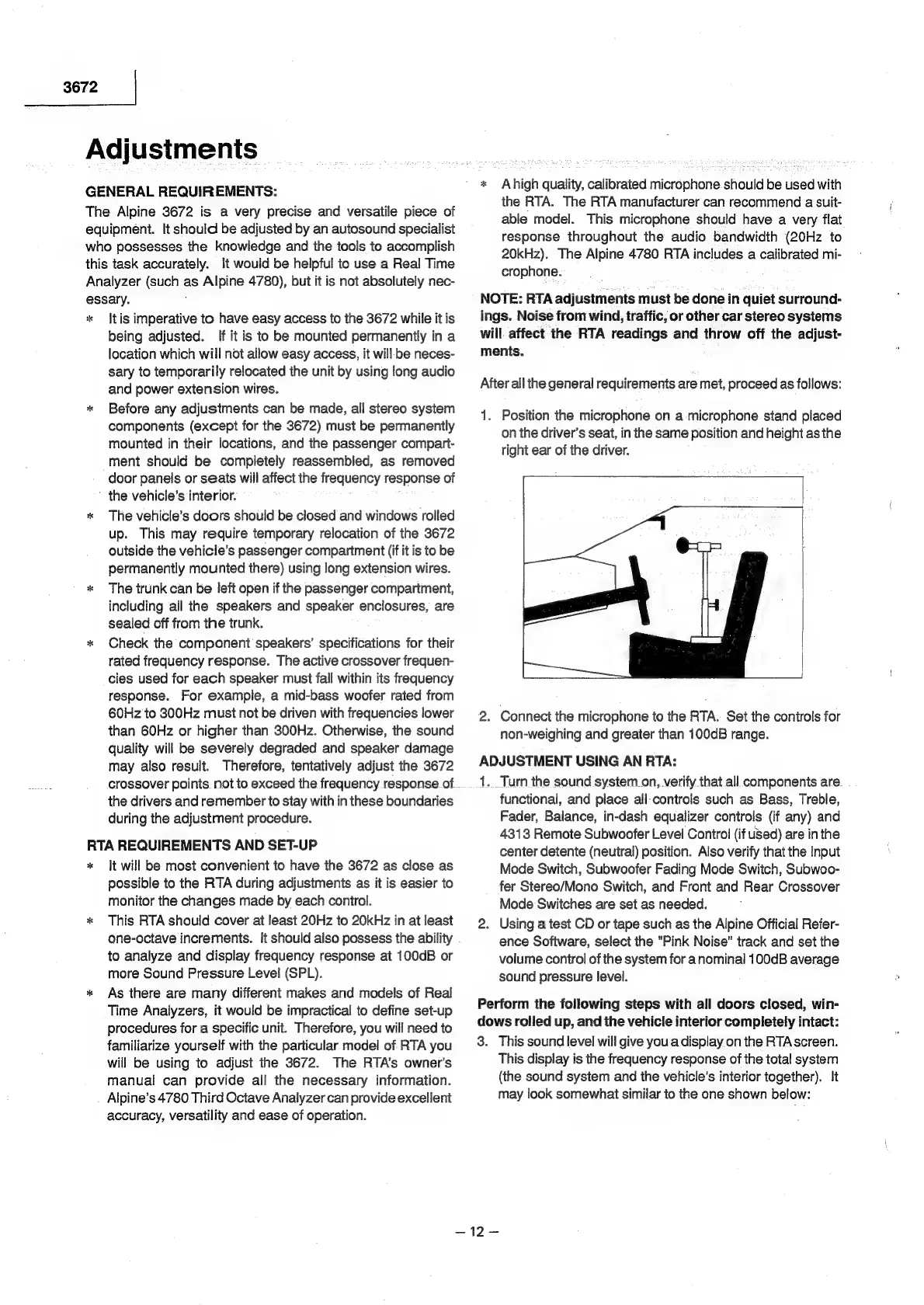
1.
Position
the
microphone
on
a
microphone
stand
placed
on
the
driver’s
seat,
in
the
same
position
and
height
as
the
tight
ear
of
the
driver.
2.
Connect
the
microphone
to
the
RTA.
Set
the
controls
for
non-weighing
and
greater
than
100dB
range.
ADJUSTMENT
USING
AN
RTA:
1...Turn
the
sound
system.on,
verify
that
all
components
are
functional,
and
place
all-controls
such
as
Bass,
Treble,
Fader,
Balance,
in-dash
equalizer
controls
(if
any)
and
4313
Remote
Subwoofer
Level
Control
(if
ued)
are
in
the
center
detente
(neutral)
position.
Also
verify
that
the
Input
Mode
Switch,
Subwoofer
Fading
Mode
Switch,
Subwoo-
fer
Stereo/Mono
Switch,
and
Front
and
Rear
Crossover
Mode
Switches
are
set
as
needed.
2.
Using
a
test
CD
or
tape
such
as
the
Alpine
Official
Refer-
ence
Software,
select
the
"Pink
Noise"
track
and
set
the
volume
control
of
the
system
for
anominal
100dB
average
sound
pressure
level.
Perform
the
following
steps
with
all
doors
closed,
win-
dows
rolled
up,
and
the
vehicle
interior
completely
intact:
3.
This
sound
level
will
give
you
a
display
on
the
RTA
screen.
This
display
is
the
frequency
response
of
the
total
system
(the
sound
system
and
the
vehicle's
interior
together).
It
may
look
somewhat
similar
to
the
one
shown
below:

Related product manuals