EasyManua.ls Logo

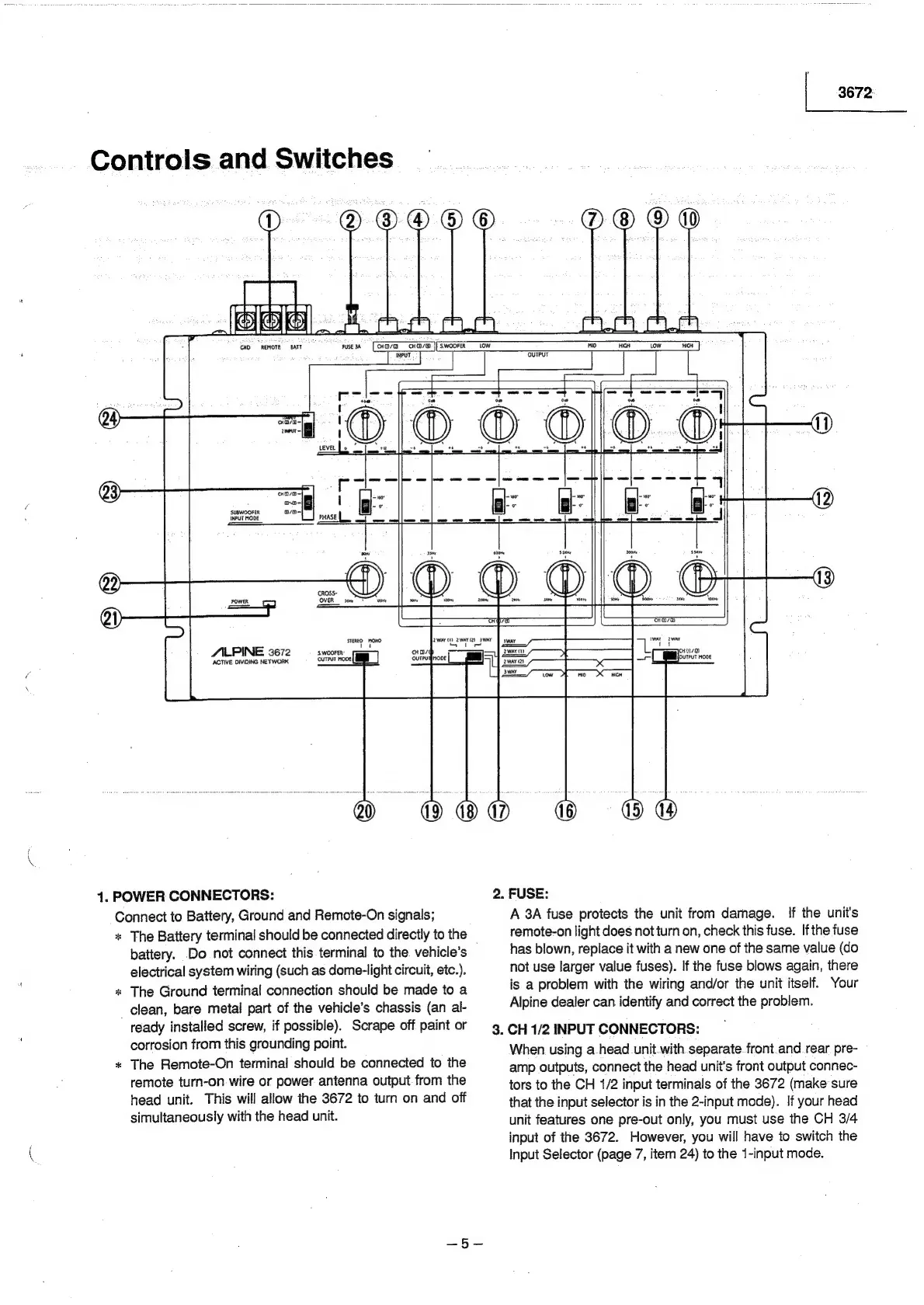
Alpine 3672 - Controls and Switches Identification; Power Connectors and Fuse; Input Connectors

Alpine 3672
31 pages
Print Icon
To Next Page IconTo Next Page
To Previous Page IconTo Previous Page
Loading...
|
3672
Controls
and
Switches
D
@OOO®O
¥
ka
Alsle|
ee
t_]
|.
an
@
FUSE
2A
Hoe
cHa/@
it
S.WOOFER
Low
INPUT
GND
REMOTE
«BATT
r
—_|
oe
noo
1
yore
a
oo-|
hiees
‘SUBWOOFER
avo-
INPUT
MODE
PHASE
———
POWER
my
©
8
SED:
owe
S.WOOFER
oureur
mooe|
a
|
ALPINE
3672
ACTIVE
DIVIDING
NETWORK
0
880
©
0
2.
FUSE:
A
3A
fuse
protects
the
unit
from
damage.
If
the
unit's
remote-on
light
does
notturn
on,
check
this
fuse.
Ifthe
fuse
has
blown,
replace
it
with
a
new
one
of
the
same
value
(do
not
use
larger
value
fuses).
If
the
fuse
blows
again,
there
is
a
problem
with
the
wiring
and/or
the
unit
itself.
Your
Alpine
dealer
can
identify
and
correct
the
problem.
3.
CH
1/2
INPUT
CONNECTORS:
When
using
a-head_unit.with
separate.
front.and
rear.
pre-
amp
outputs,
connect
the
head
unit’s
front
output
connec-
1.
POWER
CONNECTORS:
Connect
to
Battery,
Ground
and
Remote-On
signals;
*
The
Battery
terminal
should
be
connected
directly
to
the
_
battery.
Do
not
connect
this
terminal
to
the.
vehicle’s
electrical
system
wiring
(such
as
dome-light
circuit,
etc.)
The
Ground
terminal
connection
should
be
made
to
a
_
clean,
bare
metal
part
of
the
vehicle’s
chassis
(an
al-
ready
installed
screw,
if
possible).
Scrape
off
paint
or
corrosion
from
this
grounding
point.
The
Remote-On
terminal
should
be
connected
to
the
*
remote
turn-on.
wire
or
power
antenna
output.from
the
head
unit.
This
will
allow
the
3672
to
turn
on
and
off
simultaneously
with
the
head
unit.
tors
to
the
CH
1/2
input
terminals
of
the
3672
(make
sure
that
the
input
selector
is
in
the
2-input
mode).
If
your
head
unit
features
one
pre-out
only,
you
must
use
the
CH
3/4
input
of
the
3672.
However,
you
will
have
to
switch
the
Input
Selector
(page
7,
item
24)
to
the
1-input
mode.

Related product manuals