22
English
Basic Operation
1
LD
MODE
/
LOUD
1
2
MODE
/
LOUD
1
VOL
TREB
BASS
BAL
FAD
2
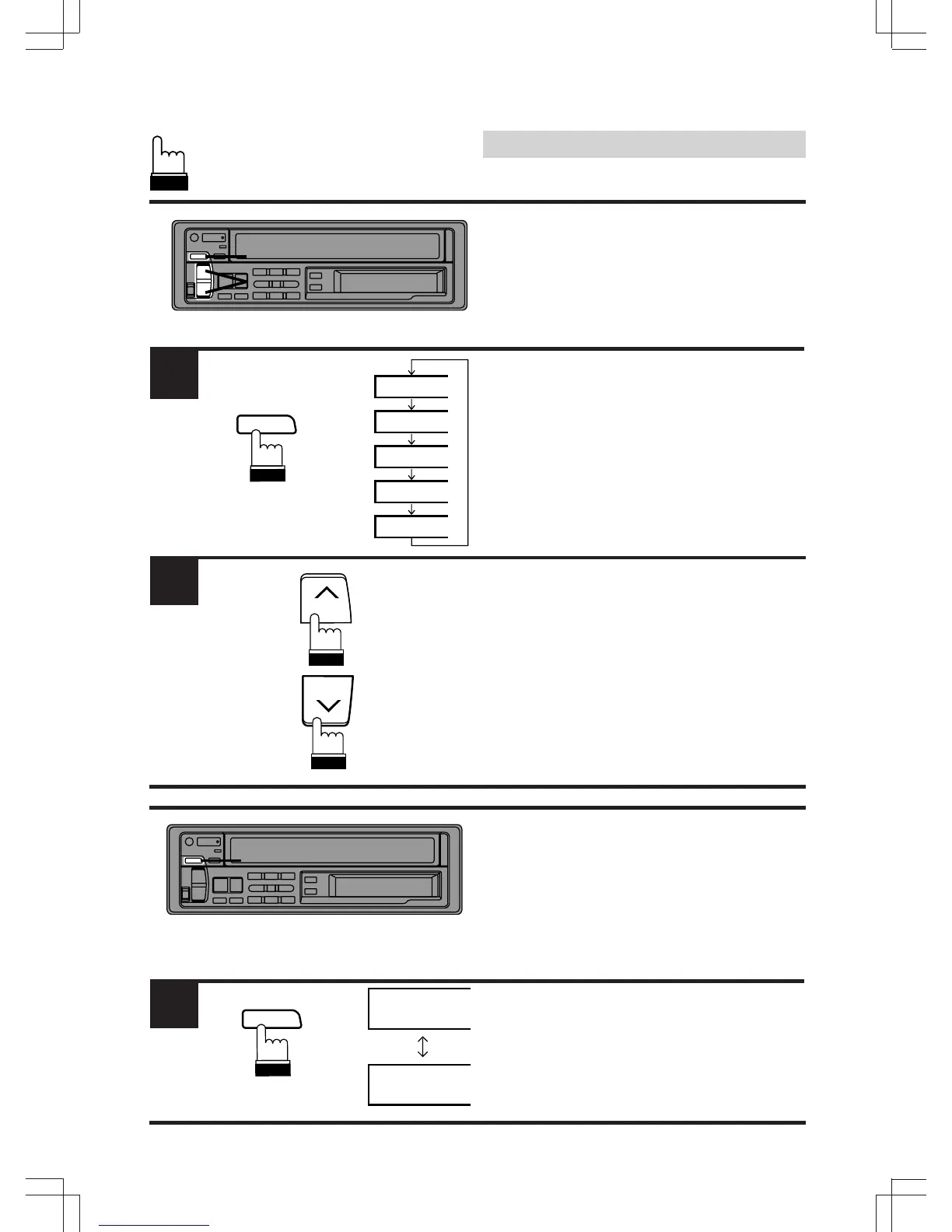
Adjusting Volume/Bass/
Treble/Balance/Fader
Press and release the MODE/LOUD button
repeatedly to choose the desired mode.
Note: If the > or < button is not pressed in 5
seconds after selecting the BASS, TREB,
BAL and FAD modes, the unit automati-
cally returns to the VOL mode.
Press the button > or < until the desired sound
is obtained in each mode.
Notes:
• These buttons have a "Dual Speed"
function. Pressing lightly will change the
level slowly. Pressing the buttons harder will
change the level quickly.
• The BASS and TREBLE settings for each
source (FM, AM and CD) are automatically
memorized. These settings remain until you
manually change them.
Turning Loudness On/Off
Loudness introduces a special low- and high-
frequency emphasis at low listening levels to
compensate for the ear's decreased sensitivity
to bass and treble sound.
Press and hold the MODE/LOUD button for at
least 2 seconds to activate or deactivate the
loudness mode.
LD will appear in the upper, left corner of the
display to indicate the Loudness function is on.
1



 To Next Page