80
English
CD Operation
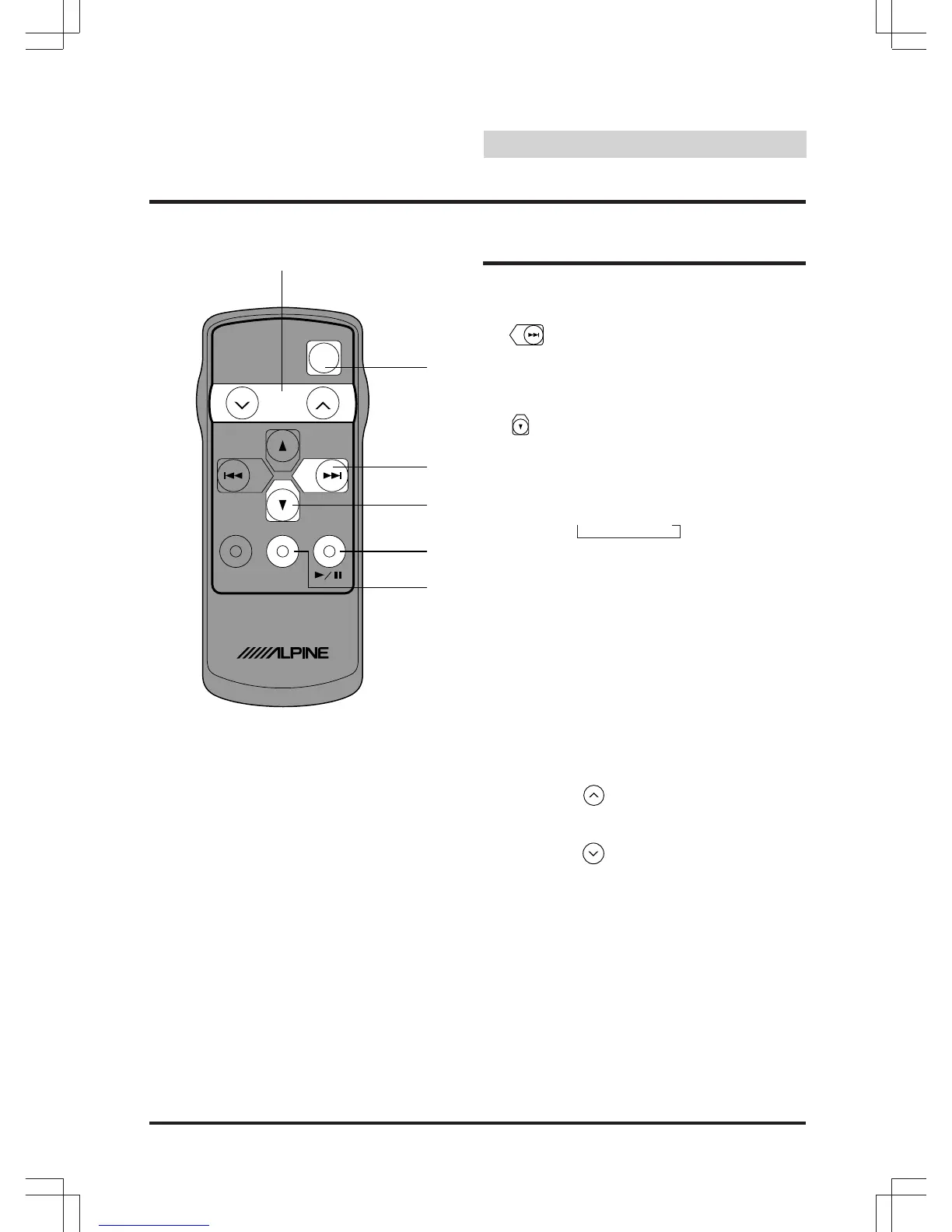
Controls
1 Power Switch
Press the switch to turn the power on/off.
2 Button
Radio mode: SEEK (UP) Button
CD mode: Press the button to advance
to the beginning of the next track.
3 Button
Radio mode: Pressing the button will
select, in descending order, stations
programmed into the radio's presets as
shown below.
CD mode: DISC Select (DN) Button
Press the button to select a disc in
descending order.
4
kk
kk
k Button
Press the button to switch between the
Play and Pause mode.
5 Audio Select Button
Press to select the audio source.
6 Volume Adjustment Buttons
To increase the volume level.....
Press the button
To decrease the volume level.....
Press the button
→6 →5 • • •1
VOL
PWR
REMOTE
CONTROL
UNIT
BAND
PROG
SOURCE
RUE
-
4182
6
1
2
3
4
5
English
Remote Control



 To Next Page