EasyManua.ls Logo

Alpine 7619R - Page 51

Alpine 7619R
80 pages
Print Icon
To Next Page IconTo Next Page
To Previous Page IconTo Previous Page
Loading...
GR/GR-Y
Series
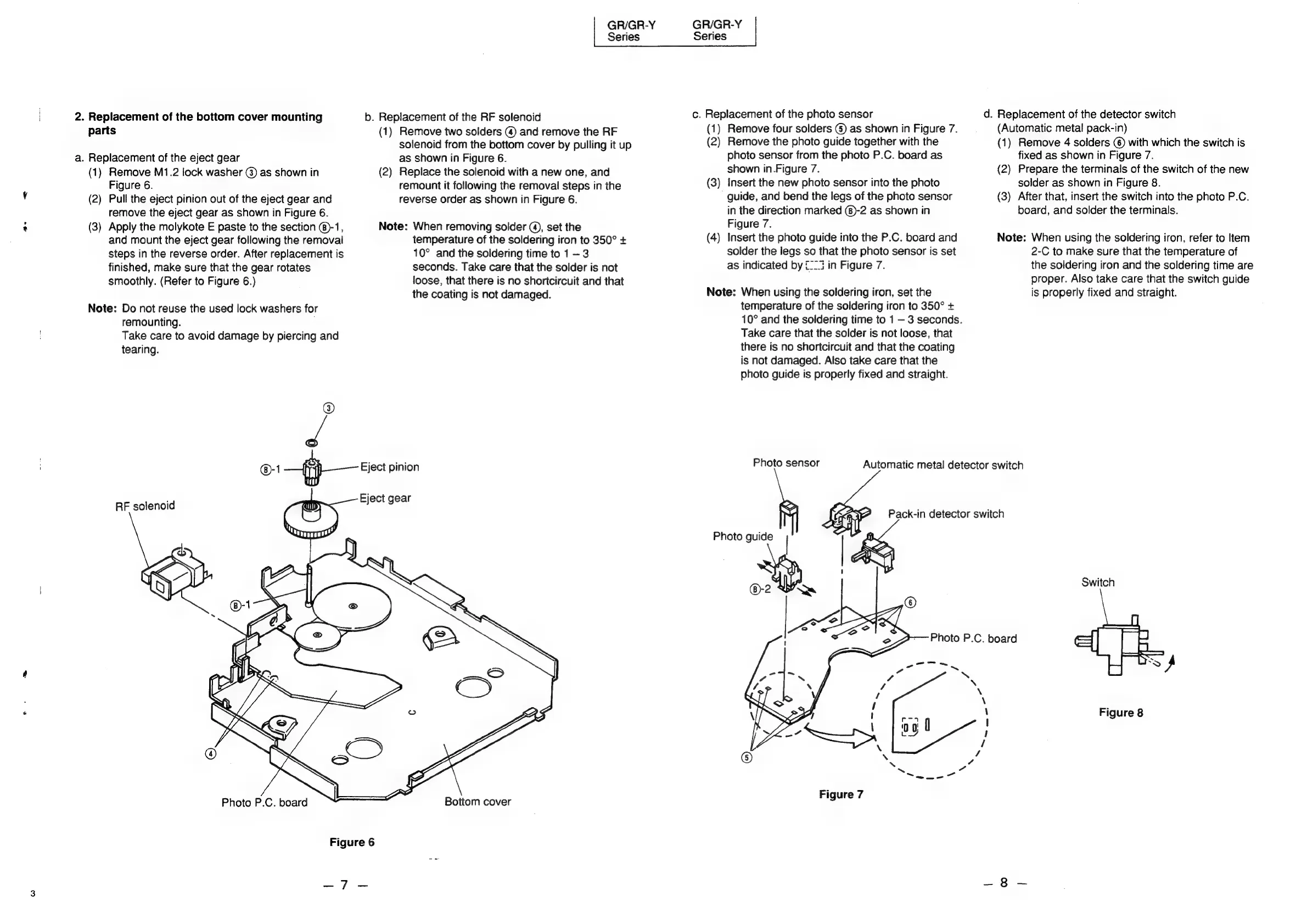
2.
Replacement
of
the
bottom
cover
mounting
b.
Replacement
of
the
RF
solenoid
parts
(1)
Remove
two
solders
@
and
remove
the
RF
solenoid
from
the
bottom
cover
by
pulling
it
up
a.
Replacement
of
the
eject
gear
as
shown
in
Figure
6.
(1)
Remove
M1.2
lock
washer
@)
as
shown
in
(2)
Replace
the
solenoid
with
a
new
one,
and
Figure
6.
remount
it
following
the
removal
steps
in
the
(2)
Pull
the
eject
pinion
out
of
the
eject
gear
and
reverse
order
as
shown
in
Figure
6.
remove
the
eject
gear
as
shown
in
Figure
6.
(3)
Apply
the
molykote
E
paste
to
the
section
@®-1,
Note:
When
removing
solder
@,
set
the
temperature
of
the
soldering
iron
to
350°
+
10°
and
the
soldering
time
to
1
3
seconds.
Take
care
that
the
solder
is
not
loose,
that
there
is
no
shortcircuit
and
that
the
coating
is
not
damaged.
and
mount
the
eject
gear
following
the
removal
steps
in
the
reverse
order.
After
replacement
is
finished,
make
sure
that
the
gear
rotates
smoothly.
(Refer
to
Figure
6.)
Note:
Do
not
reuse
the
used
lock
washers
for
remounting.
Take
care
to
avoid
damage
by
piercing
and
tearing.
Fi
@-1
~"j}—
Eject
pinion
: j
ar
RF
solenoid
Fiect
ge
Photo
P.C.
board
Bottom
cover
Figure
6
ie
Se
GR/GR-Y
c.
Replacement
of
the
photo
sensor
(1)
Remove
four
solders
©
as
shown
in
Figure
7.
(2)
Remove
the
photo
guide
together
with
the
photo
sensor
from
the
photo
P.C.
board
as
shown
in.Figure
7.
Insert
the
new
photo
sensor
into
the
photo
guide,
and
bend
the
legs
of
the
photo
sensor
in
the
direction
marked
(8)-2
as
shown
in
Figure
7.
Insert
the
photo
guide
into
the
P.C.
board
and
solder
the
legs
so
that
the
photo
sensor
is
set
eee)
Note:
When
using
the
soldering
iron,
set
the
temperature
of
the
soldering
iron
to
350°
+
10°
and
the
soldering
time
to
1
3
seconds.
Take
care
that
the
solder
is
not
loose,
that
there
is
no
shortcircuit
and
that
the
coating
is
not
damaged.
Also
take
care
that
the
photo guide
is
properly
fixed
and
straight.
—S
Ne
d.
Replacement
of
the
detector
switch
(Automatic
metal
pack-in)
Remove
4
solders
©)
with
which
the
switch
is
fixed
as
shown
in
Figure
7.
Prepare
the
terminals
of
the
switch
of
the
new
solder
as
shown
in
Figure
8.
After
that,
insert
the
switch
into
the
photo
P.C.
board,
and
solder
the
terminals.
Note:
When
using
the
soldering
iron,
refer
to
Item
2-C
to
make
sure
that
the
temperature
of
the
soldering
iron
and
the
soldering
time
are
proper.
Also
take
care
that
the
switch
guide
is
properly
fixed
and
straight.
Photo
sensor
Automatic
metal
detector
switch
Pack-in
detector
switch
Photo
guide
|
|
'
Figure
7
Switch
Figure
8

Related product manuals