EasyManua.ls Logo

Alpine 7619R - Page 53

Alpine 7619R
80 pages
Print Icon
To Next Page IconTo Next Page
To Previous Page IconTo Previous Page
Loading...
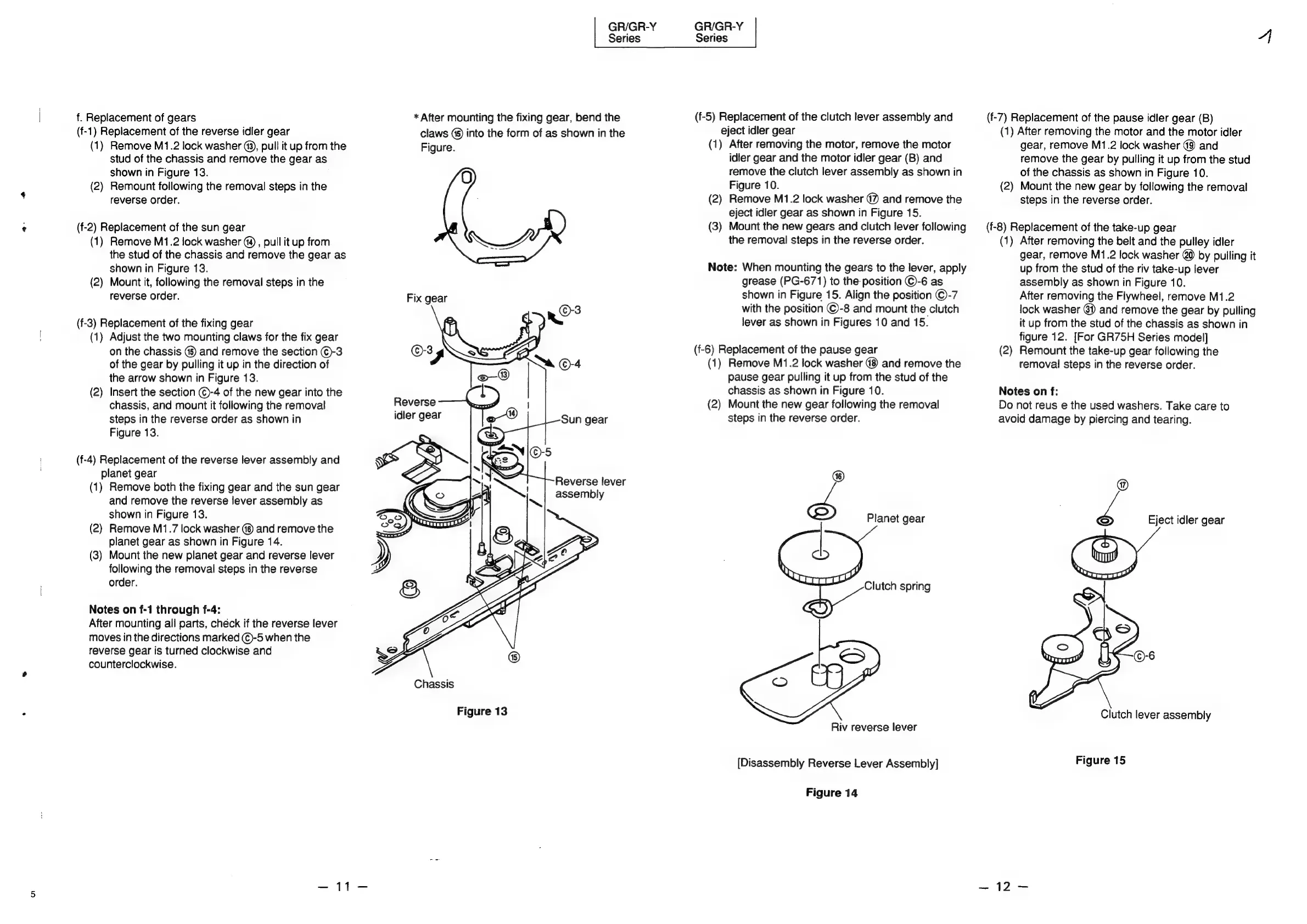
f.
Replacement
of
gears
(f-1)
Replacement
of
the
reverse
idler
gear
(1)
Remove
M1.2
lock
washer
(9),
pull
it
up
from
the
stud
of
the
chassis
and
remove
the
gear
as
shown
in
Figure
13.
(2)
Remount
following
the
removal
steps
in
the
reverse
order.
(f-2)
Replacement
of
the
sun
gear
(1)
Remove
M1.2
lock
washer
(4)
,
pull
it
up
from
the
stud
of
the
chassis
and
remove
the
gear
as
shown
in
Figure
13.
(2)
Mount
it,
following
the
removal
steps
in
the
reverse
order.
(f-3)
Replacement
of
the
fixing
gear
(1)
Adjust
the
two
mounting
claws
for
the
fix
gear
on
the
chassis
(§)
and
remove
the
section
()-3
of
the
gear
by
pulling
it
up
in
the
direction
of
the
arrow
shown
in
Figure
13.
(2)
Insert
the
section
©-4
of
the
new
gear
into
the
chassis,
and
mount
it
following
the
removal
steps
in
the
reverse
order
as
shown
in
Figure
13.
(f-4)
Replacement
of
the
reverse
lever
assembly
and
planet
gear
(1)
Remove
both
the
fixing
gear
and
the
sun
gear
and
remove
the
reverse
lever
assembly
as
shown
in
Figure
13.
(2)
Remove
M1.7
lock
washer
(6)
and
remove
the
planet
gear
as
shown
in
Figure
14.
(3)
Mount
the
new
planet
gear
and
reverse
lever
following
the
removal
steps
in
the
reverse
order.
Notes
on
f-1
through
f-4:
After
mounting
all
parts,
check
if
the
reverse
lever
moves
in
the
directions
marked
€)-5
when
the
reverse
gear
is
turned
clockwise
and
counterclockwise.
11
GR/GR-Y
Series
*
After
mounting
the
fixing
gear,
bend
the
claws
@
into
the
form
of
as
shown
in
the
Figure.
Fix
gear
©
-3
i
th
©-3
:
or.
J
|
a
©-4
Reverse
idler
gear
Sun
gear
Reverse
lever
assembly
Sore?
Figure
13
GR/GR-Y
Series
(f-5)
Replacement
of
the
clutch
lever
assembly
and
eject
idler
gear
(1)
After
removing
the
motor,
remove
the
motor
idler
gear
and
the
motor
idler
gear
(B)
and
remove
the
clutch
lever
assembly
as
shown
in
Figure
10.
(2)
Remove
M1.2
lock
washer
@)
and
remove
the
eject
idler
gear
as
shown
in
Figure
15.
(3)
Mount
the
new
gears
and
clutch
lever
following
the
removal
steps
in
the
reverse
order.
Note:
When
mounting
the
gears
to
the
lever,
apply
grease
(PG-671)
to
the
position
©-6
as
shown
in
Figure
15.
Align
the
position
©-7
with
the
position
©-8
and
mount
the
clutch
lever
as
shown
in
Figures
10
and
15.
(f-6)
Replacement
of
the
pause
gear
(1)
Remove
M1.2
lock
washer
@8
and
remove
the
pause
gear
pulling
it
up
from
the
stud
of
the
chassis
as
shown
in
Figure
10.
(2)
Mount
the
new
gear
following
the
removal
steps
in
the
reverse
order.
J
Planet
gear
t
Clutch
spring
Riv
reverse
lever
[Disassembly
Reverse
Lever
Assembly]
Figure
14
(f-7)
Replacement
of
the
pause
idler
gear
(B)
(1)
After
removing
the
motor
and
the
motor
idler
gear,
remove
M1.2
lock
washer
49
and
remove
the
gear
by
pulling
it
up
from
the
stud
of
the
chassis
as
shown
in
Figure
10.
(2)
Mount
the
new
gear
by
following
the
removal
steps
in
the
reverse
order.
(f-8)
Replacement
of
the
take-up
gear
(1)
After
removing
the
belt
and
the
pulley
idler
gear,
remove
M1.2
lock
washer
@0
by
pulling
it
up
from
the
stud
of
the
riv
take-up
lever
assembly
as
shown
in
Figure
10.
After
removing
the
Flywheel,
remove
M1.2
lock
washer
@i)
and
remove
the
gear
by
pulling
it
up
from
the
stud
of
the
chassis
as
shown
in
figure
12.
[For
GR75H
Series
model]
(2)
Remount
the
take-up
gear
following
the
removal
steps
in
the
reverse
order.
Notes
on
f:
Do
not
reus
e
the
used
washers.
Take
care
to
avoid
damage
by
piercing
and
tearing.
@
Zz
Eject
idler
gear
Clutch
lever
assembly
Figure
15
~
12
—-

Related product manuals